
Best MSI Monitors in 2026: 6 Picks Compared on Specs
The MSI MAG 272UP QD-OLED is our top pick for gamers who want a 27-inch 4K display with a 240Hz refresh rate and quantum dot OLED panel. It combines the highest refresh rate in this list with 4K resolution and OLED contrast. We chose it based on stated specifications from the maker's listings, not on our own testing.
4 picks from 5 monitors that match this guide with a price we can quote today. All prices are live and show when they were read.
Our picks in brief
| # | Pick | Monitor | Price |
|---|---|---|---|
| 1 | Best overall | msi MAG 272UP QD-OLED X24 27-Inch 4K UHD Gaming Monitor | $629.00 (as of 10/24/2026 16:13 PDT - Details) |
| 2 | Best for creative work | MSI PRO MAX 271UPX12G 27-inch 3840x2160(UHD) QD OLED Monitor | $579.99 (as of 10/24/2026 17:06 PDT - Details) |
| 3 | Best 4K office monitor | msi PRO MP273U | $159.99 (as of 10/24/2026 17:06 PDT - Details) |
| 4 | Best ultrawide for esports | msi MAG 346CQDF E20 34-inch 3440 x 1440 | $286.99 (as of 10/24/2026 16:13 PDT - Details) |
Find your match
- For esports on a budget: If you prioritize refresh rate and a wide field of view, the MSI MAG 346CQDF offers 200Hz on a 34-inch screen. See pick 4
- For photo and video editing: The MSI PRO MAX 271UPX brings 4K resolution and QD-OLED contrast to creative work, with DisplayHDR True Black 400 certification. See pick 2
- For office work and spreadsheets: The MSI PRO MP273U offers crisp 4K text on an IPS panel, ideal for long hours of document editing. See pick 3
4 picks, up close
1 Best overall

msi MAG 272UP QD-OLED X24 27-Inch 4K UHD Gaming Monitor
- Size
- 27 in
- Resolution
- 4K UHD
- Refresh
- 240 Hz
- Panel
- OLED
$629.00 (as of 10/24/2026 16:13 PDT - Details)
This 27-inch QD-OLED monitor combines 4K resolution with a 240Hz refresh rate and a 0.03ms Gray-to-Gray response time, making it the most performant pick in our pool. The OLED panel provides per-pixel contrast, and the stated DisplayHDR certification indicates it meets VESA's performance criteria for HDR. If you want the highest refresh rate combined with 4K sharpness, this is the monitor to choose.
Pros
- 240Hz refresh rate, the highest in this list
- 4K UHD resolution
- QD-OLED panel
- 0.03ms Gray-to-Gray response time
Cons
- No VGA port (not relevant for modern setups)
- No stated USB-C connectivity
- Higher refresh rate may require a powerful GPU to fully utilize
Good fit if
- Competitive gamers who want 4K and high refresh
- Enthusiasts who prioritize motion clarity and contrast
Skip if
- Office users who don't need gaming performance
- Users on a tight GPU budget who may not reach 240Hz at 4K
Verdict: The best overall MSI monitor in this list, offering a top combination of resolution, refresh rate, and OLED contrast.
2 Best for creative work
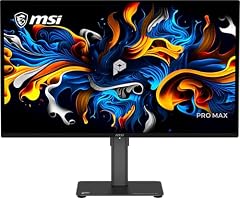
MSI PRO MAX 271UPX12G 27-inch 3840x2160(UHD) QD OLED Monitor
- Size
- 27 in
- Resolution
- 4K UHD
- Refresh
- 120 Hz
- Panel
- OLED
$579.99 (as of 10/24/2026 17:06 PDT - Details)
This 27-inch QD-OLED monitor delivers 4K resolution with a 120Hz refresh rate, making it a strong match for photo editing, video work, and casual gaming. It carries a DisplayHDR True Black 400 certification, which under VESA's DisplayHDR 1.2 standard specifies a 400 cd/m2 peak luminance and a 0.0005 cd/m2 black level for True Black tiers. The FreeSync Premium support helps keep motion smooth on compatible sources.
Pros
- QD-OLED panel for high contrast and wide color gamut
- 4K UHD resolution
- 120Hz refresh rate
- DisplayHDR True Black 400 certified
Cons
- Refresh rate is 120Hz, not 240Hz as on the top gaming model
- No VGA port (if that matters, but not needed)
- No stated USB-C connectivity
Good fit if
- Content creators who want 4K resolution with OLED contrast
- Creative professionals who also play games occasionally
Skip if
- Competitive gamers who want the highest refresh rate
- Users who need a lower-cost 4K display without HDR
Verdict: A strong 4K QD-OLED choice for creative work that balances resolution, refresh, and HDR certification.
3 Best 4K office monitor

msi PRO MP273U
- Size
- 27 in
- Resolution
- 4K UHD
- Refresh
- 60 Hz
- Panel
- IPS
$159.99 (as of 10/24/2026 17:06 PDT - Details)
This 27-inch IPS monitor offers 4K UHD resolution at a 60Hz refresh rate, making it a straightforward choice for office work where sharp text and wide viewing angles matter more than motion smoothness. The IPS panel is stated, and Adaptive-Sync helps reduce screen tearing when the source supports it. It is the only 4K IPS model in this list.
Pros
- 27-inch 4K UHD resolution
- IPS panel type stated
- Adaptive-Sync support
- 4ms Gray-to-Gray response time
Cons
- 60Hz refresh rate is not suited for fast gaming
- No HDR certification is stated
- No USB-C or other modern connectivity is listed
Good fit if
- Office workers who want crisp 4K text
- Users who need accurate colors for general work but not high refresh
Skip if
- Gamers who need high refresh rates
- Users who want an OLED or VA panel for contrast
Verdict: A straightforward 4K IPS monitor for office use that prioritizes resolution and viewing angles over gaming features.
4 Best ultrawide for esports

msi MAG 346CQDF E20 34-inch 3440 x 1440
- Size
- 34 in
- Resolution
- 3440x1440
- Refresh
- 200 Hz
$286.99 (as of 10/24/2026 16:13 PDT - Details)
This 34-inch ultrawide monitor provides a 3440x1440 resolution and a 200Hz refresh rate, making it one of the fastest ultrawide options here. It supports FreeSync Premium for tear-free gaming with compatible GPUs and is 'HDR Ready' meaning it can accept HDR signals, though it does not carry a VESA DisplayHDR certification. The panel type is not stated by the seller, so we cannot confirm whether it is VA, IPS, or OLED.
Pros
- 200Hz refresh rate
- 3440x1440 ultrawide resolution
- FreeSync Premium support
- HDR Ready
Cons
- Panel type is not stated by the seller
- No DisplayHDR certification
- No USB-C or other modern ports are listed beyond HDMI and VGA
Good fit if
- Esports players who want a wide field of view
- Users who need a high refresh ultrawide without paying for OLED
Skip if
- Creative professionals who need accurate panel type information
- Users who prefer a 27-inch or smaller screen
Verdict: A fast ultrawide gaming monitor with a high refresh rate, but its unspecified panel makes it harder to judge color accuracy.
How they compare
| # | Monitor | Size | Resolution | Refresh | Panel |
|---|---|---|---|---|---|
| 1 | msi MAG 272UP QD-OLED X24 27-Inch 4K UHD Gaming Monitor | 27 in | 4K UHD | 240 Hz | OLED |
| 2 | MSI PRO MAX 271UPX12G 27-inch 3840x2160(UHD) QD OLED Monitor | 27 in | 4K UHD | 120 Hz | OLED |
| 3 | msi PRO MP273U | 27 in | 4K UHD | 60 Hz | IPS |
| 4 | msi MAG 346CQDF E20 34-inch 3440 x 1440 | 34 in | 3440x1440 | 200 Hz | not stated |
Our selection method
We started with a pool of six MSI monitors sold by the store, covering panel types from IPS and VA to QD-OLED, sizes from 27 to 34 inches, and refresh rates from 60 to 240 Hz. We shortlisted them based on published specifications: resolution, refresh rate, panel type, adaptive sync support, and connectivity. Prices shown on the page are live listings from the store at the time of reading; we have not used or tested any of these units. All comparisons are based on the specifications the sellers list and on public industry standards such as VESA DisplayHDR and HDMI VRR.
What matters when choosing
Panel type: IPS, VA, or OLED
The panel type determines how the monitor produces colors and handles viewing angles. IPS panels offer wide viewing angles and consistent colors, making them a common choice for office work. VA panels typically provide higher contrast ratios than IPS, which can make dark scenes look deeper, but they may have narrower viewing angles. OLED panels, as seen in the PRO MAX 271UPX and MAG 272UP, control light per pixel, giving true blacks and vibrant colors. For competitive gaming, response times often matter, and OLED panels often have faster pixel response than LCD panels.
Refresh rate and response time
Refresh rate, measured in hertz (Hz), tells you how many times the display updates per second. A 60Hz monitor updates 60 times per second, which is fine for typical office work. Gaming monitors often offer 120Hz, 200Hz, or even 240Hz. Higher rates make motion appear smoother and can reduce input lag. Response time measures how fast a pixel changes color, often listed in milliseconds (ms). The MAG 272UP lists a 0.03ms Gray-to-Gray response time, which is extremely fast. When comparing specs, remember that higher refresh rates and lower response times generally lead to better gaming experiences, but your graphics card must be powerful enough to push those frame rates.
Adaptive sync: FreeSync, G-Sync, and Adaptive-Sync
Adaptive sync technologies reduce screen tearing by synchronizing the monitor's refresh rate with the output of your graphics card. VESA's Adaptive-Sync is an open standard, while AMD FreeSync and NVIDIA G-Sync are vendor-specific implementations. FreeSync Premium, found on several picks here, adds a low framerate compensation and a minimum refresh rate of 120Hz. If you have an AMD graphics card, look for FreeSync support. If you have an NVIDIA GPU, check for G-Sync compatibility. Some monitors are listed as Adaptive-Sync, which indicates they support the base VESA standard. For a smooth experience, pair the monitor with a compatible GPU.
Resolution and screen size
Resolution determines how sharp the image looks. 1080p is common on smaller screens, but 1440p and 4K are increasingly popular. A 4K UHD (3840x2160) monitor gives you a lot of desktop space and crisp text, but it also requires more GPU power for gaming. Ultrawide monitors, like the 3440x1440 models in this list, offer extra horizontal room for multitasking or immersive gaming. Screen size matters too: 27 inches is versatile for both work and play, while 34-inch ultrawide models can be more immersive but may require a deeper desk. Consider your typical viewing distance and the types of apps you run before choosing.
Connectivity and HDR support
Check the ports on the monitor and compare them with your computer's outputs. HDMI and DisplayPort are the most common, but some newer monitors add USB-C, which can carry video, data, and power over one cable. The picks in this list mostly offer HDMI and DisplayPort, with some having VGA for legacy devices. HDR support affects brightness and color depth. VESA's DisplayHDR certification specifies performance criteria; for example, DisplayHDR True Black 400 requires a 400 cd/m2 peak luminance and a 0.0005 cd/m2 black level. The PRO MAX 271UPX carries this certification, while other models are listed as 'HDR Ready,' which often means they can accept HDR signals but lack the certified performance.
Questions
What is the difference between IPS, VA, and OLED panels?
IPS panels have wide viewing angles and good color consistency, making them a common choice for office work. VA panels typically offer higher contrast ratios, which can make blacks look deeper, but they may have slower response times. OLED panels control light per pixel, providing true blacks and vibrant colors, along with fast response times. For gaming, OLED panels like those in the MAG 272UP and PRO MAX 271UPX deliver excellent motion clarity, while IPS and VA panels offer different trade-offs in price and performance.
Is a 240Hz refresh rate necessary?
A 240Hz refresh rate is beneficial for competitive gamers who play fast-paced titles and want the smoothest motion and lowest input lag. To take advantage of it, your graphics card needs to produce frame rates near 240 fps at the monitor's resolution. If you play less demanding games or use the monitor for productivity, a 120Hz or 60Hz display may be sufficient. The MAG 272UP offers 240Hz at 4K, which is very demanding on the GPU, so consider your hardware before choosing that model.
What does DisplayHDR True Black 400 mean?
DisplayHDR True Black 400 is a VESA certification for HDR performance. It specifies a peak luminance of 400 cd/m2, a black level of 0.0005 cd/m2, and support for 10-bit color depth. This certification is designed for OLED and other emissive displays where deep blacks are important. The PRO MAX 271UPX carries this certification, indicating it meets these criteria. Monitors that only say 'HDR Ready' may accept HDR signals but do not have the same certified performance.
How does FreeSync Premium differ from FreeSync?
FreeSync Premium is a higher tier of AMD's adaptive sync technology. It adds low framerate compensation (LFC) and a minimum refresh rate of 120Hz at the monitor's native resolution. This helps keep the image smooth even when the frame rate dips below the refresh rate. Base FreeSync only requires a minimum 60Hz refresh rate and no LFC. If you have an AMD graphics card and play games at varying frame rates, FreeSync Premium offers a more consistent experience.
Do I need a 4K monitor for office work?
A 4K monitor gives you more pixels, which means sharper text and more screen space to arrange windows. It is especially useful for tasks like photo editing or working with large spreadsheets. However, it also requires more GPU power to drive, and some older software may scale poorly. If your computer can handle it, a 4K IPS monitor like the PRO MP273U is a solid choice for office productivity. If you have a lower-end laptop, a 1440p or 1080p monitor may be more practical.
Change log
- : First published.