
Best Gaming Monitors in 2026: 12 Picks Compared on Specs
The Samsung 27 Odyssey OLED G6 (G61SH) is our top pick, pairing a 240Hz refresh rate with OLED contrast and QHD resolution. We chose it and 11 others from a pool of 60 monitors based on published specifications. We prioritized refresh rate, resolution, panel technology, and adaptive sync support. All prices are live and read from the store listing at the time of writing; no units were tested.
11 picks from 124 monitors that match this guide with a price we can quote today. All prices are live and show when they were read.
Our picks in brief
Find your match
- For esports on a budget: If you want high refresh without spending on 4K, a 27-inch 240Hz 1080p monitor like the Dell SE2726HG gives you the speed you need for competitive shooters. See pick 4
- For 4K gaming with an RTX 50 series GPU: Pair a powerful graphics card with a 4K 160Hz IPS monitor like the KTC H27P22S to enjoy sharp details and smooth motion in modern titles. See pick 7
- For immersive ultrawide play: If you want a wide field of view for racing or flight sims, a 34-inch OLED ultrawide like the Alienware AW3425DW delivers a 240Hz refresh rate and deep blacks. See pick 3
- For competitive shooters at 1440p: A 27-inch QHD IPS monitor with a 180Hz refresh rate, like the LG 27GS60QC-B, offers a balance of resolution and speed for fast-paced games. See pick 6
11 picks, up close
1 Best overall

Samsung 27" Odyssey OLED G6
- Size
- 27 in
- Resolution
- QHD 1440p
- Refresh
- 240 Hz
- Panel
- OLED
$424.99 (as of 10/24/2026 18:06 PDT - Details)
This 27-inch OLED pairs a 240Hz refresh rate with QHD resolution, giving you both fast motion and deep contrast. It stands out among the 12 picks for combining a high refresh with OLED's per-pixel lighting.
Pros
- 240Hz refresh rate
- OLED panel for near-infinite contrast
- QHD resolution (2560x1440)
Cons
- No stated HDR certification
- Only 27 inches, which may be small for some ultrawide fans
Good fit if
- Competitive players who want high refresh and OLED response
- Those who value deep blacks and vibrant colors
Skip if
- You need 4K resolution
- You prefer a larger 34-inch or 49-inch screen
Verdict: The best all-around gaming monitor for most players.
2 Best 4K OLED

msi MAG 272UP QD-OLED X24 27-Inch 4K UHD Gaming Monitor
- Size
- 27 in
- Resolution
- 4K UHD
- Refresh
- 240 Hz
- Panel
- OLED
$629.00 (as of 10/24/2026 16:13 PDT - Details)
This 27-inch QD-OLED delivers 4K UHD resolution and a 240Hz refresh rate, a combination found in only a few of these picks. It is a top choice for gamers with powerful GPUs who want the sharpest image.
Pros
- 4K UHD (3840x2160) resolution
- 240Hz refresh rate
- Quantum Dot OLED panel
Cons
- 27-inch size may require scaling in Windows
- No stated HDR certification tier
Good fit if
- Gamers with RTX 50-series or high-end GPUs
- Users who want a single monitor for 4K gaming and media
Skip if
- You prefer a larger screen
- You are on a strict budget
Verdict: The best 4K OLED monitor for those who demand top resolution and speed.
3 Best ultrawide OLED
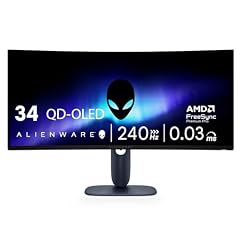
Alienware 34 240Hz QD-OLED Curved Gaming Monitor
- Size
- 34.2 in
- Resolution
- QHD 1440p
- Refresh
- 240 Hz
- Panel
- OLED
$699.99 (as of 10/24/2026 11:30 PDT - Details)
With a 34.2-inch QD-OLED panel, a 240Hz refresh rate, and 3440x1440 resolution, this Alienware offers an immersive ultrawide experience without sacrificing speed.
Pros
- 34-inch ultrawide (3440x1440)
- 240Hz refresh rate
- 1800R curvature
Cons
- No stated HDR certification
- Large footprint may not fit small desks
Good fit if
- Simulation and racing game fans
- Players who want a wide field of view
Skip if
- You prefer a flat 16:9 display
- You need a higher 4K resolution
Verdict: The best ultrawide OLED for an immersive, high-refresh gaming setup.
4 Best 27-inch 240Hz

Dell 27 240Hz Gaming Monitor
- Size
- 27 in
- Resolution
- FHD 1080p
- Refresh
- 240 Hz
- Panel
- IPS
$149.99 (as of 10/24/2026 12:19 PDT - Details)
This Dell offers a 240Hz refresh rate on a 27-inch IPS panel at 1080p, making it a strong choice for esports players who want maximum frame rates without the cost of QHD or 4K.
Pros
- 240Hz refresh rate
- IPS panel for consistent colors
- 1080p resolution reduces GPU load
Cons
- 1080p on 27-inch is less sharp than QHD
- No stated HDR support
Good fit if
- Competitive gamers who prioritize frame rate
- Budget-conscious players with mid-range GPUs
Skip if
- You want a higher resolution for desktop use
- You prefer a curved screen
Verdict: A great 27-inch 240Hz monitor for high-speed gaming at a sensible resolution.
5 Best 1440p IPS

Acer Nitro 27in QHD 2560x1440 IPS 180Hz Gaming Monitor KG271U N3bmiipx
- Size
- 27 in
- Resolution
- QHD 1440p
- Refresh
- 180 Hz
- Panel
- IPS
$159.99 (as of 10/24/2026 11:18 PDT - Details)
The Acer Nitro KG271U offers a 27-inch QHD IPS panel with a 180Hz refresh rate, balancing sharp visuals and smooth motion. It is a versatile pick among the 1440p monitors here.
Pros
- QHD resolution (2560x1440)
- 180Hz refresh rate
- IPS panel for wide viewing angles
Cons
- No stated HDR certification
- Not as fast as 240Hz models
Good fit if
- Gamers with mid-range GPUs that handle QHD
- Users who prefer flat IPS panels
Skip if
- You need 4K
- You are a professional esports player needing 240Hz
Verdict: A solid 1440p IPS monitor for mainstream gaming.
6 Best curved 1440p

LG 27GS60QC-B Ultragear 27-inch Curved Gaming Monitor QHD
- Size
- 27 in
- Resolution
- QHD 1440p
- Refresh
- 180 Hz
$199.97 (as of 10/24/2026 16:07 PDT - Details)
This LG Ultragear brings a 27-inch QHD panel with a 180Hz refresh rate and a 1000R curve, providing an immersive feel without taking up extra desk space.
Pros
- QHD resolution (2560x1440)
- 180Hz refresh rate
- 1000R curvature for immersion
Cons
- VA panel may show slight ghosting in dark scenes
- No stated HDR certification
Good fit if
- Gamers who enjoy immersive single-player titles
- Users who like curved displays
Skip if
- You need IPS color accuracy
- You prefer a flat screen
Verdict: A well-rounded curved 1440p monitor for hybrid gaming.
7 Best 4K IPS

KTC 27 Inch 4K 160Hz Gaming Monitor
- Size
- 27 in
- Resolution
- 4K UHD
- Refresh
- 160 Hz
- Panel
- IPS
$254.98 (as of 10/24/2026 15:14 PDT - Details)
This KTC monitor combines a 27-inch 4K IPS panel with a 160Hz refresh rate, offering high detail and smooth motion for gamers who want 4K without paying for OLED.
Pros
- 4K UHD resolution (3840x2160)
- 160Hz refresh rate
- Fast IPS panel
Cons
- Lower refresh than 240Hz models
- No stated HDR certification
Good fit if
- Gamers who want 4K clarity
- Content creators who also game
Skip if
- You need 240Hz for esports
- You have a GPU that struggles with 4K
Verdict: A great 4K IPS monitor for high-resolution gaming.
8 Best 34-inch 240Hz

AOC 34" Curved Gaming Monitor UWQHD 240Hz VA AMD FreeSync Premium
- Size
- 34 in
- Resolution
- 3440x1440
- Refresh
- 240 Hz
- Panel
- VA
$279.99 (as of 10/24/2026 11:40 PDT - Details)
The AOC CU34G4Z packs a 34-inch ultrawide 3440x1440 VA panel with a 240Hz refresh rate, making it one of the fastest ultrawide picks in this list.
Pros
- Ultrawide 3440x1440 resolution
- 240Hz refresh rate
- VA panel for good contrast
Cons
- VA panel viewing angles
- No stated HDR certification
Good fit if
- Racing and flight simulation games
- Players who want high refresh ultrawide
Skip if
- You prefer IPS color reproduction
- You need a smaller, more compact monitor
Verdict: An excellent ultrawide for high-speed gaming.
9 Best 34-inch 180Hz

ViewSonic VX3418C-2K 34 Inch 1440p Ultrawide Curved Gaming Monitor
- Size
- 34 in
- Resolution
- QHD 1440p
- Refresh
- 180 Hz
- Panel
- VA
$289.99 (as of 10/24/2026 19:08 PDT - Details)
This ViewSonic ultrawide offers a 34-inch 1440p panel with a 180Hz refresh rate, providing a solid balance of resolution and speed for most gaming rigs.
Pros
- 34-inch 1440p ultrawide
- 180Hz refresh rate
- QHD resolution for sharp game detail
Cons
- Panel type not stated by the seller
- No HDR certification stated
Good fit if
- Ultrawide fans who want 180Hz
- Users with mid-range GPUs
Skip if
- You need a specific panel type like IPS or OLED
- You prefer a flat screen
Verdict: A sensible ultrawide option for high refresh gaming.
10 Best 40-inch ultrawide

INNOCN 40C1R Ultrawide Monitor 40" WQHD 3440 x 1440p 144Hz FreeSync
- Size
- 40 in
- Resolution
- QHD 1440p
- Refresh
- 144 Hz
- Panel
- IPS
$479.99 (as of 10/24/2026 15:08 PDT - Details)
The INNOCN 40C1R uses a 40-inch IPS panel with a 144Hz refresh rate, offering one of the largest screens in this list while keeping smooth gameplay.
Pros
- 40-inch ultrawide IPS panel
- 144Hz refresh rate
- 3440x1440 resolution
Cons
- 144Hz is lower than some other picks
- No stated HDR certification
Good fit if
- Productivity users who want a large workspace
- Gamers who enjoy a massive field of view
Skip if
- You need higher refresh for esports
- You have limited desk space
Verdict: A large ultrawide that balances work and play.
11 Best super ultrawide

Z-Edge 5K 49 Inch Curved Gaming Monitor
- Size
- 49 in
- Resolution
- 5120x1440
- Refresh
- 240 Hz
$679.99 (as of 10/24/2026 19:12 PDT - Details)
With a 49-inch DQHD panel (5120x1440) and a 240Hz refresh rate, this Z-Edge delivers a panoramic view and very high speed, ideal for the most immersive setups.
Pros
- 49-inch super ultrawide
- 240Hz refresh rate
- 5K resolution (5120x1440)
Cons
- Very large and may be too big for many desks
- Panel type not stated
Good fit if
- Hardcore sim racing and flight enthusiasts
- Users who want to replace a multi-monitor setup
Skip if
- You have limited desk space
- You prefer a standard 16:9 aspect ratio
Verdict: The ultimate immersive gaming monitor for those with room and a powerful GPU.
How they compare
| # | Monitor | Size | Resolution | Refresh | Panel |
|---|---|---|---|---|---|
| 1 | Samsung 27" Odyssey OLED G6 | 27 in | QHD 1440p | 240 Hz | OLED |
| 2 | msi MAG 272UP QD-OLED X24 27-Inch 4K UHD Gaming Monitor | 27 in | 4K UHD | 240 Hz | OLED |
| 3 | Alienware 34 240Hz QD-OLED Curved Gaming Monitor | 34.2 in | QHD 1440p | 240 Hz | OLED |
| 4 | Dell 27 240Hz Gaming Monitor | 27 in | FHD 1080p | 240 Hz | IPS |
| 5 | Acer Nitro 27in QHD 2560x1440 IPS 180Hz Gaming Monitor KG271U N3bmiipx | 27 in | QHD 1440p | 180 Hz | IPS |
| 6 | LG 27GS60QC-B Ultragear 27-inch Curved Gaming Monitor QHD | 27 in | QHD 1440p | 180 Hz | not stated |
| 7 | KTC 27 Inch 4K 160Hz Gaming Monitor | 27 in | 4K UHD | 160 Hz | IPS |
| 8 | AOC 34" Curved Gaming Monitor UWQHD 240Hz VA AMD FreeSync Premium | 34 in | 3440x1440 | 240 Hz | VA |
| 9 | ViewSonic VX3418C-2K 34 Inch 1440p Ultrawide Curved Gaming Monitor | 34 in | QHD 1440p | 180 Hz | VA |
| 10 | INNOCN 40C1R Ultrawide Monitor 40" WQHD 3440 x 1440p 144Hz FreeSync | 40 in | QHD 1440p | 144 Hz | IPS |
| 11 | Z-Edge 5K 49 Inch Curved Gaming Monitor | 49 in | 5120x1440 | 240 Hz | not stated |
Our selection method
From a pool of 60 gaming monitors in the catalog, the selection recorded seller-stated specs: panel type, size, refresh rate, resolution, and adaptive sync support (such as AMD FreeSync or NVIDIA G-SYNC). Twelve monitors were shortlisted to cover sizes from 27 to 49 inches, resolutions from 1080p to 5K, and refresh rates from 144Hz to 240Hz. Models with missing size or refresh data were excluded. The selection is based entirely on published specifications; no unit was tested. Prices shown on the page are live from the store listing and were read at the time shown.
What matters when choosing
Refresh rate and adaptive sync
Refresh rate, measured in hertz (Hz), tells you how many times the display updates per second. Higher rates like 144Hz or 240Hz make motion look smoother and reduce perceived lag in fast games. Pairing a high refresh rate with adaptive sync technology, such as AMD FreeSync or NVIDIA G-SYNC, prevents screen tearing and stuttering. HDMI 2.1 also supports Variable Refresh Rate (VRR), which can be used with compatible consoles and graphics cards.
Resolution and panel size
Resolution determines sharpness. 1080p is common on smaller monitors and is easier for your GPU to drive. 1440p (QHD) offers a good balance of detail and performance, and 4K (UHD) provides the highest clarity but requires a more powerful graphics card. For ultrawide monitors, you will see resolutions like 3440x1440 or 5120x1440. The best size for you depends on your desk space and how far you sit from the screen: 24 to 27 inches works well for competitive play, while 34 inches and up gives a more immersive field of view.
Panel type: IPS, VA, or OLED
IPS panels are known for accurate colors and wide viewing angles, making them a common choice for gaming and productivity. VA panels typically offer higher contrast ratios and deeper blacks, but can have slower response times in dark scenes. OLED panels provide per-pixel lighting for perfect blacks and exceptional contrast, along with very fast response times, but they are generally more expensive. Your choice depends on whether you prioritize color accuracy, contrast, or speed.
HDR support
High Dynamic Range (HDR) expands the range of brightness and color, but not all HDR labels are equal. Look for VESA DisplayHDR certifications, such as DisplayHDR 400 or higher, which specify minimum luminance and color requirements. OLED displays often meet the more stringent DisplayHDR True Black standards. Also make sure your PC and the games you play support HDR. Windows 11 includes HDR settings and a calibration app to help you get the best result.
Connectivity and ports
Check that the monitor has enough ports for your devices. HDMI is standard for consoles, and DisplayPort is common on PCs. Newer monitors may include USB-C with DisplayPort Alt Mode, which can carry video and power over a single cable. If you have an RTX 30 series or later graphics card, make sure the monitor supports the bandwidth you need for your target resolution and refresh rate. When selecting a new system, prebuilt gaming computers often come with DisplayPort 1.4 or HDMI 2.1 for high refresh rates. DisplayPort 1.4 or HDMI 2.1 are sufficient for most high refresh 1440p and 4K setups.
Ergonomics and extra features
A monitor that tilts, swivels, and adjusts in height can help you maintain a comfortable viewing position. Consider whether you need built-in speakers, a USB hub, or KVM switching. Some monitors offer a curved panel, which can reduce eye strain by matching the curvature of your field of view, but others prefer flat screens for consistent geometry. Also check if the monitor is VESA mount compatible if you plan to use a monitor arm.
Questions
What refresh rate do I need for gaming?
A 144Hz monitor is a solid starting point for competitive games. 240Hz gives an even smoother experience, especially in fast-paced shooters. If you play slower, story-driven games, 60Hz may be enough, but a higher refresh rate still makes desktop use feel more fluid.
Is 4K worth it for gaming?
4K offers the sharpest image, but it demands a powerful GPU to maintain high frame rates. If you have an RTX 4080 or faster, a 4K monitor is a good choice. For mid-range hardware, 1440p is often a better balance between visual quality and performance.
What is the difference between AMD FreeSync and NVIDIA G-SYNC?
Both technologies eliminate screen tearing by syncing the monitor's refresh rate with the frame rate of the graphics card. FreeSync is open and works with many monitors, while G-SYNC requires a dedicated module and is typically found on pricier models. Many monitors now support both, so check the specifications.
Are curved monitors better for gaming?
Curved monitors can enhance immersion by filling more of your peripheral vision, which is useful for ultrawide screens. The curvature varies, with 1000R being more aggressive than 1500R. But some players prefer flat panels because they are easier to position for color consistency and have no geometric distortion.
What does DisplayHDR 400 mean?
DisplayHDR 400 is a VESA certification that requires a monitor to have at least 400 cd/m2 peak luminance and support for HDR10 content. It is the entry level for HDR on PC and offers a noticeable improvement over standard dynamic range, but it is not as impressive as higher tiers like DisplayHDR 600 or True Black 400.
Can I use a gaming monitor with a console?
Yes. Most modern gaming monitors have HDMI inputs that support 1080p or 1440p at 120Hz or higher, which is ideal for the PS5 and Xbox Series X. For 4K at 120Hz, you will need a monitor with HDMI 2.1.
Change log
- : First published.