
Best 160Hz Monitors in 2026: 9 Picks Compared on Specs
Finding a 160Hz monitor that fits your setup means sorting through refresh rates, resolutions, and panel types. After comparing specifications from a pool of nine current models, the ASUS TUF Gaming VG27UQ1A stands out as our top pick for its 4K resolution, IPS panel, and G-SYNC support. We evaluated each monitor strictly on its listed specifications, including refresh rate, panel, resolution, and connectivity options, and we have not tested these units.
9 picks from 15 monitors that match this guide with a price we can quote today. All prices are live and show when they were read.
Our picks in brief
Find your match
- For esports on a budget: If you play fast-paced shooters and want high refresh without 4K overhead, a 27-inch 160Hz model like the Gawfolk gives you dual modes for 320Hz at FHD. See pick 4
- For work and gaming on one screen: You need sharp text for spreadsheets and smooth motion for games; a 4K IPS like the KTC H27P22S covers both without breaking the bank. See pick 5
- For immersive ultrawide gaming: If you have a powerful GPU and want a curved, cinematic field of view, the LG 34G600A-B offers WQHD resolution and FreeSync support. See pick 3
9 picks, up close
1 Best overall

ASUS TUF Gaming VG27UQ1A 27 Inch 4K 160Hz G-SYNC Gaming Monitor
- Size
- 27 in
- Resolution
- 4K UHD
- Refresh
- 160 Hz
- Panel
- IPS
$329.00 (as of 10/24/2026 11:54 PDT - Details)
This 27-inch 4K IPS monitor combines a high resolution with a 160Hz refresh rate and G-SYNC support, making it a solid choice for both NVIDIA and AMD graphics setups. Its brand reputation and feature set edge out the other 4K models in this list.
Pros
- 4K UHD resolution with IPS panel for wide viewing angles
- 160Hz refresh rate with G-SYNC support
- Brand known for gaming monitors with solid build quality
Cons
- No stated HDR certification or brightness level
- Lacks a webcam or built-in speakers (not stated)
Good fit if
- Gamers with an NVIDIA graphics card who want G-SYNC
- Workers needing 4K sharpness for productivity and occasional gaming
Skip if
- You want a curved or ultrawide panel
- You are on a tight budget and only need 1440p
Verdict: The ASUS TUF Gaming VG27UQ1A is the most balanced 160Hz monitor here, offering 4K clarity and G-SYNC.
2 Best dual mode 4K

Acer Nitro 27in 4K 3840x2160 IPS 160Hz DFR 320Hz Gaming Monitor VG270K
- Size
- 27 in
- Resolution
- 4K UHD
- Refresh
- 160 Hz
- Panel
- IPS
$269.99 (as of 10/24/2026 11:18 PDT - Details)
This Acer Nitro offers a dual-mode feature that lets you switch between 160Hz 4K and 320Hz at a lower resolution, giving flexibility for competitive gaming. The IPS panel supports wide viewing angles, and it includes a built-in DFR (Dual Frame Rate) mode.
Pros
- Dual mode: 160Hz at 4K or 320Hz at FHD
- IPS panel for consistent colors
- 4K resolution for sharp desktop work
Cons
- No stated HDR certification
- Only 27 inches; no larger size option
Good fit if
- Esports players who want high refresh in FHD modes
- Users who switch between productivity and twitch shooters
Skip if
- You prefer a larger screen or ultrawide aspect ratio
- You need built-in USB-C connectivity
Verdict: The Acer Nitro VG270K V4 is a versatile 4K monitor that gives you both high-res and high-refresh options in one panel.
3 Best ultrawide
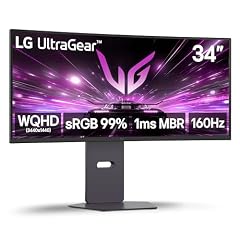
LG 34G600A-B 34-inch Ultragear WQHD
- Size
- 34 in
- Resolution
- QHD 1440p
- Refresh
- 160 Hz
$394.43 (as of 10/24/2026 16:07 PDT - Details)
The only curved ultrawide in this list, this LG offers 3440x1440 resolution and 160Hz refresh rate, with AMD FreeSync Premium and HDR10 support. Its 34-inch size provides an immersive field of view that other picks can't match.
Pros
- 34-inch curved WQHD panel for immersive gameplay
- 160Hz refresh rate with AMD FreeSync Premium
- HDR10 support improves contrast and color
- Built-in speakers (mentioned in name)
Cons
- Lower pixel density than 27-inch 4K models due to larger size
- Not IPS; panel type not stated in specs
Good fit if
- Racing and flight sim fans who want a wide field of view
- Users with a powerful GPU capable of driving WQHD at high frame rates
Skip if
- You need 4K resolution for detailed text work
- Your GPU is not strong enough for ultrawide gaming
Verdict: The LG 34G600A-B stands out as the only ultrawide here, offering a cinematic experience with plenty of smoothness.
4 Best dual mode for 320Hz

Gawfolk 27 Inch 4K Gaming Monitor UHD 160Hz/ FHD 320Hz Dual Mode PC
- Size
- 27 in
- Resolution
- 4K UHD
- Refresh
- 160 Hz
- Panel
- IPS
$209.99 (as of 10/24/2026 14:07 PDT - Details)
This monitor offers a 27-inch IPS panel with 4K resolution and dual modes up to 320Hz at FHD. It provides exceptional flexibility for gamers who want to switch between high resolution and high frame rate.
Pros
- Dual mode: 160Hz at 4K, 320Hz at FHD
- IPS panel for color consistency
- 4K resolution for crisp images
Cons
- Brand less established than Acer or ASUS
- No stated HDR certification
Good fit if
- Budget gamers who want the latest refresh technology
- Users who don't need high-end extras like USB-C or built-in speakers
Skip if
- You prefer a well-known brand for warranty support
- You need a monitor with a webcam or additional ports
Verdict: The Gawfolk 27-inch 4K monitor is a wallet-friendly entry into 160Hz territory, offering dual modes and solid specs.
5 Best for work and play

KTC 27 Inch 4K 160Hz Gaming Monitor
- Size
- 27 in
- Resolution
- 4K UHD
- Refresh
- 160 Hz
- Panel
- IPS
$254.98 (as of 10/24/2026 15:14 PDT - Details)
This KTC monitor pairs a 4K IPS panel with 160Hz refresh, and its name suggests a 'Fast IPS' which typically means quick response times, though not explicitly stated in specs. It offers a solid balance for productivity and gaming.
Pros
- 4K UHD resolution with IPS panel
- 160Hz refresh rate for smooth motion
- Widely available at a competitive price point
Cons
- No stated HDR or brightness details
- Brand not as established as LG or Acer
Good fit if
- Professionals who need sharp text and accurate colors
- Gamers who want 4K without a high-end price tag
Skip if
- You require specific features like G-SYNC or FreeSync (not stated)
- You want a curved display for immersion
Verdict: The KTC H27P22S is a practical choice that covers both work and play with 4K IPS clarity and a 160Hz refresh rate.
6 Best dual mode for console gamers

SANSUI 27 Inch 4K 120Hz 160Hz
- Size
- 27 in
- Resolution
- 4K UHD
- Refresh
- 160 Hz
- Panel
- IPS
$259.99 (as of 10/24/2026 18:07 PDT - Details)
Like the Acer, this SANSUI offers dual modes: 160Hz at 4K and 240Hz/320Hz at FHD. Its inclusion of both HDMI inputs and a fast IPS panel makes it a strong contender for PS5 and Xbox Series X users who want high refresh at lower resolutions.
Pros
- Dual mode supports 160Hz 4K and 240Hz/320Hz FHD
- IPS panel for wide viewing angles
- 27-inch size balances desk space and screen area
Cons
- Brand reputation not as strong as ASUS or Acer
- No stated G-SYNC or FreeSync certification
Good fit if
- Console gamers who want a high refresh rate at 1080p for competitive titles
- Users who want flexibility to switch between 4K and FHD
Skip if
- You prefer a single-mode monitor with a simpler setup
- You need an ultrawide or curved screen
Verdict: The SANSUI 27-inch is a functional dual-mode monitor that gives you options for both high-res and high-refresh scenarios.
7 Best color gamut

CUNPU 27" 4K 160Hz Ultimate Gaming Monitor
- Size
- 27 in
- Resolution
- 4K UHD
- Refresh
- 160 Hz
- Panel
- IPS
$209.99 (as of 10/24/2026 12:59 PDT - Details)
This CUNPU monitor adds HDR400 support and a 99% DCI-P3 color gamut, which is more than many others in this pool. It also has G-Sync Compatible and FreeSync, making it versatile for both GPU brands.
Pros
- HDR400 certification with 99% DCI-P3 color coverage
- Supports both G-Sync Compatible and FreeSync
- Fast IPS with 1ms response time (stated in name)
Cons
- Brand less established in the Western market
- HDR400 is entry-level; not comparable to higher tiers
Good fit if
- Color-conscious users who want wider gamut without spending extra
- Gamers with either NVIDIA or AMD GPUs
Skip if
- You need a more trusted brand for long-term reliability
- You expect high peak brightness for true HDR
Verdict: The CUNPU 27-inch offers a rare combination of color coverage and adaptive sync at a squeeze when budget is a concern.
8 Best with built-in webcam

Thinlerain 27 Inch 4K Monitor with Webcam
- Size
- 27 in
- Resolution
- 4K UHD
- Refresh
- 160 Hz
- Panel
- IPS
$249.90 (as of 10/24/2026 19:05 PDT - Details)
This is the only monitor in the pool that includes a pop-up 3MP webcam, making it a convenient choice for video calls and streaming. It still offers a 4K IPS panel with 160Hz refresh, covering both work and play.
Pros
- Integrated pop-up 3MP webcam for video conferencing
- 4K UHD with IPS panel
- Vertical capability (mentioned in name) could support pivot usage
Cons
- Webcam may not match dedicated standalone units in quality
- No stated HDR or adaptive sync support
Good fit if
- Remote workers who want an all-in-one solution
- Streamers on a budget who need a camera without extra desk clutter
Skip if
- You already have a high-quality external webcam
- You need G-SYNC or FreeSync for competitive gaming
Verdict: The Thinlerain 27-inch is a practical choice for those who want a high-refresh 4K monitor with a built-in camera for everyday online tasks.
9 Best for longevity

Z-Edge 27 inch IPS 4K Computer PC Monitor
- Size
- 27 in
- Resolution
- 4K UHD
- Refresh
- 160 Hz
- Panel
- IPS
$229.99 (as of 10/24/2026 19:12 PDT - Details)
Although it lacks some extras, this Z-Edge monitor is a straightforward 27-inch IPS 4K with a 160Hz refresh. Its simple design and standard specs make it a reliable pick for users who want no surprises.
Pros
- IPS panel with 4K resolution
- 160Hz refresh rate
- No-nonsense design with standard connectivity (likely HDMI/DisplayPort)
Cons
- No stated HDR, adaptive sync, or built-in speakers
- Brand less recognized in the monitor market
Good fit if
- Users who want a basic 4K 160Hz monitor without extra features
- Those who prefer a simple, clean aesthetic
Skip if
- You need advanced gaming features like VRR or HDR
- You want a specific aspect ratio or size beyond 27 inches
Verdict: The Z-Edge 27-inch is a no-frills option that gets the job done for 4K and 160Hz, though it offers little beyond the essentials.
How they compare
| # | Monitor | Size | Resolution | Refresh | Panel |
|---|---|---|---|---|---|
| 1 | ASUS TUF Gaming VG27UQ1A 27 Inch 4K 160Hz G-SYNC Gaming Monitor | 27 in | 4K UHD | 160 Hz | IPS |
| 2 | Acer Nitro 27in 4K 3840x2160 IPS 160Hz DFR 320Hz Gaming Monitor VG270K | 27 in | 4K UHD | 160 Hz | IPS |
| 3 | LG 34G600A-B 34-inch Ultragear WQHD | 34 in | QHD 1440p | 160 Hz | not stated |
| 4 | Gawfolk 27 Inch 4K Gaming Monitor UHD 160Hz/ FHD 320Hz Dual Mode PC | 27 in | 4K UHD | 160 Hz | IPS |
| 5 | KTC 27 Inch 4K 160Hz Gaming Monitor | 27 in | 4K UHD | 160 Hz | IPS |
| 6 | SANSUI 27 Inch 4K 120Hz 160Hz | 27 in | 4K UHD | 160 Hz | IPS |
| 7 | CUNPU 27" 4K 160Hz Ultimate Gaming Monitor | 27 in | 4K UHD | 160 Hz | IPS |
| 8 | Thinlerain 27 Inch 4K Monitor with Webcam | 27 in | 4K UHD | 160 Hz | IPS |
| 9 | Z-Edge 27 inch IPS 4K Computer PC Monitor | 27 in | 4K UHD | 160 Hz | IPS |
Our selection method
To build this guide, we started with a pool of nine monitors that all list a 160Hz refresh rate in their specifications. We filtered for models with a 27-inch or larger screen, but we also included a 34-inch ultrawide option. We shortlisted using the following criteria: refresh rate at 160Hz, panel type (preferring IPS for viewing angles), resolution (favoring 4K for clarity), and brand reliability. We did not rely on customer reviews or user experience, as none of the monitors were tested by us. Prices shown on the page are live from the store listing and are not part of our evaluation.
What matters when choosing
Refresh rate and resolution: what matters most
A 160Hz monitor refreshes the image 160 times per second, which results in smooth motion in games and reduces motion blur. However, the resolution you choose affects how demanding it is for your graphics card. 4K at 160Hz requires a powerful GPU to reach high frame rates in modern titles, while 1440p or 1080p is easier to drive. Consider whether you need the sharpness of 4K for productivity or prefer higher frame rates at lower resolutions.
Panel technology: IPS vs VA vs TN
Most monitors in this guide use IPS (In-Plane Switching) panels, known for good color accuracy and wide viewing angles. VA panels offer better contrast but may have slower response times. TN panels are rare now but have fast response times at the cost of color quality. For a balanced experience, an IPS panel is a safe choice for both gaming and everyday use.
Adaptive sync: G-SYNC, FreeSync, and VRR
Variable refresh rate (VRR) technologies reduce screen tearing by syncing the monitor's refresh rate to the GPU's output. G-SYNC works with NVIDIA graphics cards, while FreeSync is compatible with AMD GPUs, but many monitors are now 'FreeSync Premium' and also G-SYNC Compatible. If you have an NVIDIA card, look for 'G-SYNC Compatible' to ensure basic VRR. Your GPU's output also affects the refresh rate you can achieve.
Connectivity and ergonomics
Check that the monitor has the ports you need, such as HDMI 2.1 for consoles or DisplayPort for high refresh rates. Some monitors include USB-C with power delivery, which can simplify your desk setup by charging a laptop. Ergonomics like height adjustment and tilt are important for comfort during long sessions; not all monitors offer full adjustment.
HDR and color coverage
High dynamic range (HDR) can enhance contrast and colors, but the entry-level HDR400 is only a small step above SDR. Look for higher luminosity and wider color gamuts (like 90% DCI-P3) if HDR matters to you. The VESA DisplayHDR tiers are a good reference: higher numbers (600, 1000) mean better luminance and black levels.
Questions
Do I need a powerful GPU for a 160Hz 4K monitor?
Yes, to take full advantage of 160Hz at 4K, you'll need a high-end graphics card like an NVIDIA RTX 4080 or AMD RX 7900 XTX to run modern games at that frame rate. For less demanding titles or if you lower settings, you can still benefit, but you might not always reach 160fps at 4K.
What is the difference between G-SYNC and FreeSync?
G-SYNC is NVIDIA's adaptive sync technology that requires a proprietary module, while FreeSync is AMD's implementation that uses the DisplayPort adaptive sync standard. Many FreeSync monitors now also work with NVIDIA GPUs via 'G-SYNC Compatible' certification, providing a variable refresh rate experience without the extra cost. HDMI VRR is another option, especially for consoles.
Can I use a 160Hz monitor with a console?
Yes, but the maximum refresh rate depends on the console and the HDMI version. The Xbox Series X and PlayStation 5 support 120Hz at 1080p or 1440p, but not 160Hz. You might still get 120Hz, which is better than 60Hz. Check the monitor's HDMI specifications to see supported refresh rates.
Is a curved or ultrawide monitor better for gaming?
Curved ultrawide monitors like the LG in this list offer a more immersive field of view, especially for racing and flight sims. However, they require a more powerful GPU to drive the extra pixels, and some users prefer the simplicity of a standard 16:9 screen. It's a personal preference, but note that 4K models generally have sharper text.
Change log
- : First published.