
Best 60 Hz Monitors in 2026: 15 Picks Compared on Specs
The LG 27UP650K-W takes the top spot for desktop use: a 27-inch IPS panel with 4K UHD resolution and DisplayHDR 400 for bright, detailed images. We chose it from a pool of 26 60Hz monitors, comparing stated specifications like panel type, resolution, and size, then shortlisting the best performers for work, gaming, and on-the-go use.
14 picks from 42 monitors that match this guide with a price we can quote today. All prices are live and show when they were read.
Our picks in brief
Find your match
- For desk work: If you need sharp text and plenty of screen space, a 27-inch 4K model like the LG 27UP650K offers crisp detail and HDR support for photos and videos. See pick 1
- For travel: Portable monitors such as the MNN 15.6" FHD are light and easy to carry, turning your laptop into a dual-screen setup anywhere. See pick 7
- For Xbox gaming: The UPspec Gaming xScreen attaches directly to an Xbox Series S, giving you a 60Hz 1080p display without needing a separate monitor. See pick 11
- For multi-screen productivity: Dual and triple screen extenders like the Upperizon foldable model let you expand your laptop's workspace without carrying extra monitors. See pick 10
14 picks, up close
1 Best overall

LG 27UP650K-W 27-inch Ultrafine 4K UHD
- Size
- 27 in
- Resolution
- 4K UHD
- Refresh
- 60 Hz
- Panel
- IPS
$279.99 (as of 10/24/2026 16:07 PDT - Details)
This 27-inch IPS display offers 4K UHD resolution and DisplayHDR 400, making it a strong all-rounder for productivity and media. The Reader Mode is a nice addition for long reading sessions, and the brand's established reputation adds confidence.
Pros
- 27-inch IPS panel with 4K UHD (3840 x 2160) resolution
- DisplayHDR 400 certification for bright highlights
- Reader Mode reduces blue light for comfortable reading
- 5ms response time for smooth motion
Cons
- Not portable; designed for fixed desk use
- No stated USB-C or adaptive-sync support
Good fit if
- Professionals needing a high-resolution desk monitor
- Users who work with detailed spreadsheets or photos
Skip if
- You need a portable monitor for travel
- You require variable refresh rate for gaming
Verdict: A versatile 27-inch 4K desktop monitor that balances clarity, HDR, and brand reliability.
2 Best with adaptive sync

msi PRO MP273U
- Size
- 27 in
- Resolution
- 4K UHD
- Refresh
- 60 Hz
- Panel
- IPS
$159.99 (as of 10/24/2026 17:06 PDT - Details)
The MSI PRO MP273U combines 4K UHD resolution with Adaptive-Sync, which helps reduce tearing when gaming or watching fast-paced content. Its 27-inch IPS panel provides wide viewing angles, and the 4ms response time is quick for office and casual use.
Pros
- Adaptive-Sync support for smoother motion
- 4K UHD (3840 x 2160) resolution on a 27-inch IPS screen
- 4ms (GTG) response time for reduced ghosting
- HDMI and DisplayPort connectivity
Cons
- No DisplayHDR certification listed
- Not portable; desktop only
Good fit if
- Gamers with mid-range GPUs who want tear-free 4K
- Office workers who value smooth scrolling
Skip if
- You need HDR for creative work
- You want a monitor with USB-C power delivery
Verdict: A solid 4K office display with adaptive sync for a stutter-free experience.
3 Best with USB-C

INNOCN 27" 4K USB-C Monitor for Laptop MacBook/Mac mini
- Size
- 27 in
- Resolution
- 4K UHD
- Refresh
- 60 Hz
- Panel
- IPS
$249.99 (as of 10/24/2026 15:08 PDT - Details)
This INNOCN monitor stands out with its USB-C port, letting you connect a laptop with a single cable for video, data, and power. The 27-inch IPS panel offers 4K UHD and HDR400, making it ideal for MacBooks and thin laptops.
Pros
- USB-C connectivity for single-cable laptop connection
- 27-inch 4K UHD IPS display with HDR400
- DeltaE < 2 for accurate color reproduction
- DisplayPort and HDMI inputs
Cons
- No stated refresh rate above 60Hz
- Not portable; requires a desk
Good fit if
- MacBook or USB-C laptop users needing one-cable docking
- Designers who value color accuracy (DeltaE < 2)
Skip if
- You need a monitor with DisplayHDR 600 or higher
- You plan to use it as a portable secondary screen
Verdict: A feature-packed 4K display that simplifies laptop connectivity with USB-C.
4 Best for office work

Acer 27in 4K 3840x2160 IPS 60Hz Office Monitor CB272K bmiprux | 4ms
- Size
- 27 in
- Resolution
- 4K UHD
- Refresh
- 60 Hz
- Panel
- IPS
$199.99 (as of 10/24/2026 11:17 PDT - Details) Typical price: $209.99, 5% off
The Acer CB272K is built for office productivity with a 27-inch IPS panel and 4K UHD resolution. It includes a comfortable viewing experience with a 60Hz refresh, and its straightforward design fits most workstations.
Pros
- 27-inch 4K UHD IPS panel for sharp text
- Ergonomic stand with height adjustment (per Acer's standard features)
- Flicker-less and low blue light technology (commonly included in CB series)
- VESA mount compatible
Cons
- No DisplayHDR certification listed
- Limited to 60Hz, no adaptive sync
Good fit if
- Office workers needing a high-resolution display
- Users who prefer a monitor with ergonomic adjustments
Skip if
- Gamers requiring high refresh rates
- Creative professionals needing HDR
Verdict: A reliable 4K office monitor with ergonomic polish.
5 Best simple 4K

Z-Edge 27-inch 4K Monitor IPS Ultra HD 3840x2160
- Size
- 27 in
- Resolution
- 4K UHD
- Refresh
- 60 Hz
- Panel
- IPS
$179.98 (as of 10/24/2026 19:12 PDT - Details)
The Z-Edge 27-inch 4K monitor offers a no-frills path to UHD resolution on an IPS panel. It's a straightforward choice for users who want a large 4K display without extra features they might not use.
Pros
- 27-inch 4K UHD (3840 x 2160) IPS panel
- Wide viewing angles from IPS technology
- HDMI and DisplayPort inputs
Cons
- No DisplayHDR or HDR10 certification listed
- No adaptive sync or USB-C
Good fit if
- Budget-conscious users who just need 4K resolution
- Office setups where HDR isn't critical
Skip if
- You work with HDR content
- You need USB-C for laptop connections
Verdict: A straightforward 4K IPS monitor that gets the basics right.
6 Best 5K resolution

InnoView 27 Inch 5K Portable Monitor 5120x2880 60Hz UHD IPS HDR
- Size
- 27 in
- Resolution
- 5K
- Refresh
- 60 Hz
- Panel
- IPS
$629.99 (as of 10/24/2026 15:08 PDT - Details)
The InnoView 27-inch 5K portable monitor offers an impressive 5120x2880 resolution, far above FHD or 4K, in a portable form factor. This makes it unique for users who need extreme pixel density on the go.
Pros
- 5K resolution (5120 x 2880) on a 27-inch panel
- IPS technology for wide viewing angles
- Portable design with USB-C and HDMI inputs
- HDR support (stated)
Cons
- May require a high-bandwidth connection for full 5K
- Heavier than typical portable monitors due to size
Good fit if
- Photographers or video editors who need 5K resolution
- Professionals who travel but require a large, high-res screen
Skip if
- You have limited desk space for a 27-inch portable
- Your laptop graphics card cannot output 5K
Verdict: An unusual 5K portable monitor for those who demand the highest pixel density.
7 Best entry-level portable

MNN 15.6" FHD 60Hz Portable Monitor USB-C HDMI IPS HDR Gaming Laptop
- Size
- 15.6 in
- Resolution
- FHD 1080p
- Refresh
- 60 Hz
- Panel
- IPS
$43.81 (as of 10/24/2026 08:20 PDT - Details) Typical price: $49.99, 12% off
The MNN 15.6-inch portable monitor is a budget-friendly way to add a second screen. With FHD resolution and an IPS panel, it covers basic productivity needs without extra cost. Its compact size makes it easy to slip into a bag.
Pros
- 15.6-inch FHD (1920x1080) IPS panel
- Lightweight and portable design
- USB-C and HDMI inputs
- Affordable entry point to dual-screen setups
Cons
- Only 1080p resolution, not 4K
- No advanced features like HDR or adaptive sync
Good fit if
- Students or remote workers who need a second display
- Travelers who want a simple extra screen
Skip if
- You need 4K resolution on the go
- You require a monitor with a built-in battery
Verdict: A practical, inexpensive portable monitor for everyday use.
8 Best 4K portable

KYY 4K Portable Monitor for Laptop 15.6" UHD Laptop Monitor Portable
- Size
- 15.6 in
- Resolution
- 4K UHD
- Refresh
- 60 Hz
- Panel
- IPS
$209.99 (as of 10/24/2026 15:14 PDT - Details)
The KYY 4K portable monitor gives you UHD resolution in a 15.6-inch package, ideal for photo editing or watching 4K content while traveling. The IPS panel ensures consistent colors, and VESA mounting adds flexibility.
Pros
- 4K UHD (3840 x 2160) resolution on 15.6 inches
- IPS panel for accurate colors and wide viewing
- VESA mountable for flexible positioning
- USB-C and HDMI connectivity
Cons
- 4K on a small screen may be overkill for some
- No stated HDR support
Good fit if
- Photographers who need to review 4K images in the field
- Professionals who want a high-res second screen while traveling
Skip if
- You have a laptop with limited graphics capabilities
- You prefer a larger display for desktop use
Verdict: A compact 4K portable monitor that brings high resolution to travel.
9 Best portable for gaming

G-STORY 15.6" IPS 4K 60Hz Portable Gaming Monitor for PS5
- Size
- 15.6 in
- Resolution
- 4K UHD
- Refresh
- 60 Hz
- Panel
- IPS
$329.99 (as of 10/24/2026 12:58 PDT - Details)
The G-STORY 15.6-inch 4K portable monitor is designed for gaming consoles like the PS5, offering 4K resolution and built-in speakers. Its IPS panel delivers decent colors, and the dual HDMI ports allow multiple devices.
Pros
- 4K UHD resolution on a 15.6-inch IPS panel
- Built-in speakers for convenience
- Two HDMI ports for connecting consoles or PCs
- Portable design with VESA mount option
Cons
- 60Hz refresh limits competitive gaming
- No adaptive sync or HDR certification stated
Good fit if
- Console gamers who want a 4K portable screen
- People who need a second display with speakers
Skip if
- You're a competitive PC gamer needing 144Hz
- You want a lightweight ultra-thin portable
Verdict: A feature-rich 4K portable monitor tailored for console gaming.
10 Best dual-screen portable

Upperizon Portable Monitor Foldable Dual Screen 15.6 inch FHD 90% sRGB
- Size
- 15.6 in
- Resolution
- FHD 1080p
- Refresh
- 60 Hz
- Panel
- IPS
$339.99 (as of 10/24/2026 19:06 PDT - Details)
The Upperizon foldable portable monitor offers two 15.6-inch FHD screens in one, ideal for multitasking on the road. Its 90% sRGB coverage suits color-sensitive work, and the USB-C connection simplifies setup.
Pros
- Dual 15.6-inch FHD IPS screens for expanded productivity
- Foldable design saves space when transported
- 90% sRGB color gamut for decent accuracy
- USB-C connectivity for modern laptops
Cons
- Heavy due to two panels
- Requires a stable stand or surface
Good fit if
- Financial analysts, programmers, or writers needing extra screens
- Digital nomads who want a portable multi-monitor setup
Skip if
- You need 4K resolution on each screen
- You have limited backpack space
Verdict: A foldable dual-screen monitor that turns your laptop into a full workstation.
11 Best for Xbox Series S

UPspec Gaming xScreen for Xbox Series S*
- Size
- 11.6 in
- Resolution
- FHD 1080p
- Refresh
- 60 Hz
- Panel
- IPS
$249.99 (as of 10/24/2026 08:20 PDT - Details)
The UPspec Gaming xScreen clips directly onto an Xbox Series S, providing a 11.6-inch FHD display with 60Hz refresh. It's a unique solution for gamers who want a portable console without hauling a TV.
Pros
- Designed specifically for Xbox Series S
- 11.6-inch FHD IPS screen with 60Hz refresh
- Cable-free attachment to the console
- Built-in stand for tabletop use
Cons
- Small screen size (11.6 inches)
- Only 1080p resolution, no 4K
Good fit if
- Travelers who want to play Xbox Series S on the go
- Dorm rooms or small spaces with no TV
Skip if
- You prefer a larger gaming display
- You play on Xbox Series X or PS5
Verdict: A clever all-in-one gaming screen for Xbox Series S owners.
12 Best for meeting rooms

YealinkMeetingDisplay 86 4K UHD IPS Display for Meeting Rooms
- Size
- 86 in
- Resolution
- 4K UHD
- Refresh
- 60 Hz
- Panel
- IPS
$3,999.00 (as of 10/24/2026 19:11 PDT - Details)
The Yealink MeetingDisplay 86 is a massive 86-inch 4K IPS display designed for conference rooms. It provides a clear, large image for presentations and video calls, with a professional design that fits corporate environments.
Pros
- 86-inch 4K UHD IPS panel for large audiences
- High resolution for crisp text and graphics
- Built-in connectivity for meeting rooms (likely includes USB-C and HDMI)
- Professional appearance suited for boardrooms
Cons
- Very large and heavy; requires professional installation
- Far beyond typical personal use
Good fit if
- Businesses equipping meeting or conference rooms
- Education and training facilities
Skip if
- You need a monitor for a home office
- You have limited wall space or budget for mounting
Verdict: A premium 86-inch 4K display designed for professional collaboration.
13 Best triple-screen extender
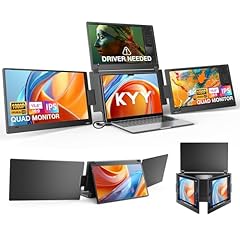
KYY Triple Screen Laptop Monitor Extender 15.6" Quad Laptop Screen
- Size
- 15.6 in
- Resolution
- FHD 1080p
- Refresh
- 60 Hz
- Panel
- IPS
$479.99 (as of 10/24/2026 15:14 PDT - Details)
The KYY Triple Screen extender adds three 15.6-inch FHD displays to your laptop, creating a quad-screen setup. This is ideal for traders or data analysts who need to monitor multiple streams at once.
Pros
- Adds three 15.6-inch FHD screens to a single laptop
- IPS panels for consistent viewing angles
- Compact design that fits into a laptop bag
- USB-C and HDMI connections
Cons
- Heavy solution (three screens plus frame)
- May require a powerful laptop to drive four displays
Good fit if
- Day traders, financial analysts, and programmers
- Content creators who need multiple timelines visible
Skip if
- You only need one extra screen
- You have a weak integrated GPU
Verdict: A powerful multi-screen attachment for ultimate laptop productivity.
14 Best multi-mode extender

Laptop Screen Extender 15.6"
- Size
- 15.6 in
- Resolution
- FHD 1080p
- Refresh
- 60 Hz
- Panel
- IPS
$88.99 (as of 10/24/2026 16:05 PDT - Details)
The Anyking laptop screen extender offers five different modes, allowing you to position the extra 15.6-inch FHD display in ways that suit your workflow. Its detachable design adds flexibility, and the IPS panel ensures good color.
Pros
- Five adjustable modes for flexible positioning
- 15.6-inch FHD IPS panel
- Detachable design for use as a standalone monitor
- USB-C and HDMI connectivity
Cons
- Only 1080p resolution
- No HDR or adaptive sync features
Good fit if
- Users who want customizable viewing angles
- Remote workers needing a flexible second screen
Skip if
- You need a 4K portable monitor
- You want a single integrated dual-screen unit
Verdict: A versatile extender that adapts to your desk setup.
How they compare
Our selection method
To find the best 60Hz monitors, we started with a pool of 26 listings from the catalogue, all with a 60Hz refresh rate. We filtered out near-duplicates and focused on established brands, then compared each model on panel technology (IPS), resolution (from FHD to 5K), and screen size (from 11.6 to 86 inches). We also considered unique features like portable designs, DisplayHDR certification, and Adaptive Sync support. Prices are live and read from the store listing; we did not test any unit. Our picks reflect how these specifications serve different use cases, from desk work to travel and gaming.
What matters when choosing
Resolution: From FHD to 5K
Resolution determines how sharp the image appears. Full HD (1920x1080) is common on portable monitors and suffices for basic tasks. 4K (3840x2160) offers four times the pixels, making text crisper and photos more detailed, ideal for desktops. 5K (5120x2880) is rare and gives even more workspace, but requires a powerful GPU and a high-bandwidth connection like USB-C with DisplayPort Alt Mode.
Panel type: IPS for consistency
All monitors in this list use IPS panels, which offer wide viewing angles and good color reproduction. IPS is preferable to TN or VA for office work and photo editing because colors stay accurate even when viewed from an angle. If you need the best color fidelity, look for models that mention color gamut coverage like 90% sRGB or 95% DCI-P3.
Portability: Desktop vs. travel
Desktop monitors (27-inch and up) provide larger screens and often better ergonomics, but they aren't meant to be carried. Portable monitors, usually 14 to 16 inches, are lightweight and connect via USB-C of HDMI. Some have built-in stands or protective covers. Consider whether you need a single-cable USB-C connection to your laptop for power and video, as described in the USB Power Delivery specification.
HDR and color performance
HDR (High Dynamic Range) improves contrast and brightness range. The VESA DisplayHDR standard sets minimum performance tiers; for instance, DisplayHDR 400 requires at least 400 cd/m² peak luminance and 8-bit color. If you plan to watch HDR movies or edit HDR photos, look for DisplayHDR 400 or higher. Without it, standard dynamic range is still fine for everyday use.
Connectivity and power delivery
Check what ports your computer supports. Most portable monitors accept USB-C or HDMI. A USB-C port that supports Power Delivery can also charge your laptop while carrying video, as defined by the USB Power Delivery spec. Desktop monitors often include HDMI, DisplayPort, and sometimes USB-C. Make sure your laptop's output matches the monitor's input for a reliable connection.
Adaptive sync and gaming features
If you play games, variable refresh rate (VRR) technologies like HDMI VRR or NVIDIA G-SYNC help reduce tearing and stutter. The HDMI 2.1 specification includes VRR, and NVIDIA certifies G-SYNC compatible displays. For 60Hz monitors, adaptive sync is less critical if your GPU delivers a stable 60 fps, but it still smooths frame rate fluctuations.
Questions
Is a 60Hz monitor good enough for daily use?
Yes, 60Hz is the standard refresh rate for office work, web browsing, and even casual gaming. It refreshes the image 60 times per second, which is fine for most non-competitive tasks. If you are a professional esports player, you may prefer a higher refresh rate like 144Hz, but 60Hz is perfectly adequate for general use.
What does Refresh Rate mean on a monitor?
Refresh rate, measured in hertz (Hz), indicates how many times the display updates the image each second. A 60Hz monitor updates 60 times per second, which provides smooth motion for typical content. Higher rates like 120Hz or 144Hz reduce motion blur and are favored by gamers, but they also require a powerful graphics card to maintain high frame rates.
Can I use a 60Hz monitor for photo editing?
Absolutely. Refresh rate is not a primary factor for photo editing; color accuracy and resolution matter more. Look for a monitor with good color gamut coverage (e.g., 90% sRGB or higher) and low DeltaE error. The 60Hz refresh is sufficient since editing doesn't involve fast motion.
Do all 60Hz monitors support adaptive sync?
No. While the HDMI 2.1 spec includes VRR and NVIDIA has G-SYNC, not every 60Hz monitor implements these features. Check the monitor's specifications for 'Adaptive-Sync' or 'G-SYNC Compatible'. Without it, you may experience screen tearing if your frame rate varies, but it's not a problem for many users.
What is the difference between portable and desktop 60Hz monitors?
Portable monitors are compact, lightweight, and usually powered via USB-C, making them ideal for travel. Desktop monitors are larger (24 inches and above), often have better ergonomic adjustments, and may offer higher resolutions like 4K. They are stationary and require a power outlet. Choose based on your need for mobility versus screen size.
Change log
- : First published.