
Best 4K UHD Monitors in 2026: 15 Picks Compared on Specs
The Dell S2725QC combines a 27-inch IPS panel, a 120Hz refresh rate, and 99% sRGB coverage, making it the most versatile all-around 4K UHD monitor on this list. We drew from a pool of 100 priced listings and compared only stated specifications, advertised features, and maker-published details. Prices are live and read from the store listing at the time of writing, so watch the page for current figures.
14 picks from 121 monitors that match this guide with a price we can quote today. All prices are live and show when they were read.
Our picks in brief
Find your match
- For competitive gamers: A 27-inch panel with 160Hz or higher and Adaptive Sync keeps motion fluid and reduces tearing. See pick 2
- For content creators: A 4K panel with wide color coverage and USB-C connectivity helps keep colors consistent when editing. See pick 3
- For frequent travelers: A portable 4K display that runs over USB-C lets you extend your laptop without extra adapters. See pick 13
- For Mac users: A monitor with dual USB-C and good power delivery can keep your MacBook charged while it displays. See pick 4
14 picks, up close
1 Best overall

Dell 27 Monitor S2725QC
- Size
- 27 in
- Resolution
- 4K UHD
- Refresh
- 120 Hz
- Panel
- IPS
$329.99 (as of 10/24/2026 12:19 PDT - Details)
The Dell S2725QC pairs a 27-inch IPS panel with a 120Hz refresh rate and 99% sRGB coverage, making it equally useful for work and play. FreeSync Premium support helps reduce tearing on compatible graphics cards.
Pros
- 120Hz refresh rate for smooth motion
- 99% sRGB coverage for accurate colors
- 27-inch IPS panel with wide viewing angles
- FreeSync Premium for tear-free gaming
Cons
- 4ms response time, slower than some gaming monitors
- No stated HDR certification
- No height adjustment mentioned
Good fit if
- Office workers who want a sharp 4K text experience with smooth scrolling
- Casual gamers who play a mix of titles and want one monitor for everything
Skip if
- You need a dedicated esports display with 240Hz or higher
- You do color-critical work that demands wide DCI-P3 coverage
Verdict: A balanced 27-inch 4K monitor that does most things well without major compromises.
2 Best dual-mode gaming
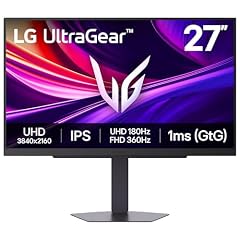
LG 27G810A-B 27-inch Ultragear 4K UHD
- Size
- 27 in
- Resolution
- 4K UHD
- Refresh
- 180 Hz
- Panel
- IPS
$399.99 (as of 10/24/2026 16:07 PDT - Details)
The LG Ultragear 27G810A-B offers a dual-mode capability that switches between 180Hz at 4K and 360Hz at 1080p, giving you both high resolution and extreme refresh rates on the same IPS panel. Its 1ms response time is among the fastest in this list.
Pros
- Dual-mode: 180Hz at 4K, 360Hz at 1080p
- 1ms response time for low ghosting
- 27-inch IPS panel
- NVIDIA G-SYNC compatible (listed in name)
Cons
- No stated HDR certification
- High refresh rates require a powerful GPU
- No mention of USB-C or power delivery
Good fit if
- Gamers who want both high-resolution and high-refresh modes
- Players with GeForce RTX 40 or 50 series cards
Skip if
- You primarily use productivity apps and rarely game
- You need built-in speakers or USB hub functionality
Verdict: A versatile gaming monitor that adapts to your frame rate needs.
3 Best for content creation

ASUS ProArt PA279CRV 27 Inch 4K UHD USB-C HDR Professional Monitor
- Size
- 27 in
- Resolution
- 4K UHD
- Panel
- IPS
$399.69 (as of 10/24/2026 11:52 PDT - Details)
The ASUS ProArt PA279CRV is designed for professional color work, with USB-C connectivity and HDR support stated in the listing. Its 27-inch 4K IPS panel is a standard size for editing, and the ProArt line is positioned for fidelity.
Pros
- USB-C connectivity for easy laptop hookup
- HDR support stated
- 27-inch IPS panel
- Professional monitor series with color focus
Cons
- Refresh rate not stated, likely 60Hz
- No specific color gamut percentage in the listing
- Limited to 27 inches
Good fit if
- Photographers and video editors
- Mac users who need a single cable for video and data
Skip if
- You play fast-paced shooters at 120Hz or more
- You need a built-in KVM switch or USB hub
Verdict: A reliable 4K editor's monitor with essential connectivity.
4 Best for Mac

BenQ MA270U 27” 4K 3840x2160 Monitor for MacBook® Pro/Air
- Size
- 27 in
- Resolution
- 4K UHD
$549.99 (as of 10/24/2026 12:08 PDT - Details)
The BenQ MA270U is built around MacBook compatibility, with dual USB-C, 90W power delivery, and a Mac Color Match feature. It's a practical pick for Mac users who want a single cable to charge and display.
Pros
- Dual USB-C ports
- 90W power delivery for charging laptops
- Mac Color Match feature
- USB hub capability (stated in name)
Cons
- No stated panel type
- Refresh rate not listed, likely 60Hz
- No HDR certification mentioned
Good fit if
- MacBook Pro and Air owners who want a clean desk
- Video editors working in Final Cut Pro
Skip if
- You have a Windows desktop and don't need USB-C
- You need 120Hz or higher for gaming
Verdict: A Mac-centric 4K monitor that simplifies connectivity and charging.
5 Best 32-inch

Dell 32 Monitor S3225QS
- Size
- 31.5 in
- Resolution
- 4K UHD
- Refresh
- 120 Hz
- Panel
- VA
$329.00 (as of 10/24/2026 12:19 PDT - Details)
The Dell S3225QS brings 4K to a 32-inch VA panel with a 120Hz refresh rate and FreeSync Premium. The larger screen makes text and video more comfortable to view, while the high refresh keeps motion smooth.
Pros
- 32-inch VA panel for a larger viewing area
- 120Hz refresh rate
- FreeSync Premium
- Eye Comfort feature (stated in name)
Cons
- VA panel may have narrower viewing angles
- No stated sRGB or DCI-P3 coverage
- No USB-C or power delivery mentioned
Good fit if
- Users who want a bigger screen without going to 4K on a small panel
- People who mix office work and casual gaming
Skip if
- You need accurate colors for photo editing (VA may shift)
- You have a small desk that can't fit 32 inches
Verdict: A spacious 4K display with a useful 120Hz refresh.
6 Best for productivity

Samsung 27" ViewFinity S7
- Size
- 27 in
- Resolution
- 4K UHD
- Panel
- IPS
$179.99 (as of 10/24/2026 18:06 PDT - Details)
The Samsung ViewFinity S7 (S71H) is a straightforward 27-inch IPS 4K monitor with HDR10 support. It has no extreme features, but its balance of panel quality and simplicity makes it a solid office choice.
Pros
- 27-inch IPS panel
- HDR10 support
- 4K UHD resolution
- No gaming overhead, likely lower cost
Cons
- No stated refresh rate (likely 60Hz)
- No USB-C or power delivery
- No height adjustment mentioned
Good fit if
- Office workers who need sharp text for spreadsheets
- Students who want a reliable 4K display
Skip if
- You want a high refresh rate for gaming
- You need a single USB-C cable for your laptop
Verdict: A dependable 4K monitor for everyday productivity.
7 Best for office work

msi PRO MP273U
- Size
- 27 in
- Resolution
- 4K UHD
- Refresh
- 60 Hz
- Panel
- IPS
$159.99 (as of 10/24/2026 17:06 PDT - Details)
The MSI PRO MP273U is a no-frills 27-inch IPS 4K monitor with a 60Hz refresh rate and Adaptive Sync. It's a straightforward choice for businesses or home offices where reliability matters more than gaming features.
Pros
- 27-inch IPS panel
- 4K UHD resolution
- Adaptive Sync for tear-free video
- 4ms response time (listed)
Cons
- 60Hz refresh, not for fast gaming
- No HDR certification stated
- No USB-C or speakers mentioned
Good fit if
- Corporate users who need a sharp 4K desktop display
- Anyone with a tight budget (no price mentioned, but specs are modest)
Skip if
- You want to play competitive FPS games
- You need built-in speakers or a USB hub
Verdict: A functional 4K workhorse without unnecessary extras.
8 Best for everyday 4K

ViewSonic VA2756-4K-MHD 27 Inch 4K UHD Computer Monitor
- Size
- 27 in
- Resolution
- 4K UHD
- Panel
- IPS
$229.99 (as of 10/24/2026 19:08 PDT - Details)
The ViewSonic VA2756-4K-MHD packs a 27-inch IPS panel with HDR10 into a simple package. It's a practical pick for users who want 4K without paying for gaming or creator-specific extras.
Pros
- 27-inch IPS panel
- HDR10 support
- 4K UHD resolution
- HDMI connectivity (listed)
Cons
- No stated refresh rate (likely 60Hz)
- No USB-C or power delivery
- No adjustable height mentioned
Good fit if
- Home users who stream 4K video
- People who want a large, clear screen for general tasks
Skip if
- You need a high refresh for gaming
- You require USB-C with power delivery
Verdict: A no-fuss 4K monitor for everyday use.
9 Best for HDR

LG 27UP650K-W 27-inch Ultrafine 4K UHD
- Size
- 27 in
- Resolution
- 4K UHD
- Refresh
- 60 Hz
- Panel
- IPS
$279.99 (as of 10/24/2026 16:07 PDT - Details)
The LG 27UP650K-W is one of the few monitors in this list with a stated DisplayHDR 400 certification, meaning it meets VESA's baseline HDR brightness and color requirements. Its IPS panel and Reader Mode add to its versatility.
Pros
- DisplayHDR 400 certified
- 27-inch IPS panel
- Reader Mode for eye comfort
- 5ms response time (listed)
Cons
- 60Hz refresh rate
- No USB-C port (likely, not stated)
- Only 27 inches, no larger option
Good fit if
- Users who watch HDR movies or play HDR games on PC
- Workers who want a bright, sharp 4K screen
Skip if
- You need a high refresh for fast gaming
- You rely on USB-C for your laptop
Verdict: A solid 4K monitor with certified HDR for better visual content.
10 Best for esports

AOC 27" Gaming Monitor 4K Mini-LED Dual Mode 320Hz NVIDIA G-SYNC U27G4XM
- Size
- 27 in
- Resolution
- 4K UHD
- Refresh
- 320 Hz
$349.99 (as of 10/24/2026 11:40 PDT - Details)
The AOC U27G4XM pushes the refresh rate to 320Hz on a 27-inch 4K panel, using Mini-LED backlighting. It's an extreme performer for competitive gamers who want both resolution and speed.
Pros
- 320Hz refresh rate (highest in this list)
- Mini-LED backlight for local dimming
- 4K resolution on a 27-inch panel
- NVIDIA G-SYNC compatible (stated in name)
Cons
- Requires a very powerful GPU to reach 320Hz at 4K
- No stated HDR certification
- Likely premium pricing (no price mentioned)
Good fit if
- Esports enthusiasts with top-tier GPUs
- Gamers who play fast shooters and want minimal motion blur
Skip if
- You play mostly single-player games at 60Hz
- You need USB-C or productivity features
Verdict: The fastest 4K monitor in this selection, built for esports.
11 Best for high refresh 4K

KTC 27 Inch 4K 160Hz Gaming Monitor
- Size
- 27 in
- Resolution
- 4K UHD
- Refresh
- 160 Hz
- Panel
- IPS
$254.98 (as of 10/24/2026 15:14 PDT - Details)
The KTC H27P22S offers a 27-inch Fast IPS panel at 160Hz, bringing high refresh to 4K without the extreme cost of 240Hz or 320Hz models. It's a practical pick for gamers who want smooth motion in 4K.
Pros
- 160Hz refresh rate on a 4K IPS panel
- Fast IPS for low response time
- 27-inch 4K resolution
- Likely good value (no price comparison made)
Cons
- No HDR certification stated
- Less established brand compared to Dell or LG
- No USB-C or power delivery
Good fit if
- Gamers who want 4K and 100+ Hz without paying a premium
- People who play a mix of fast and slow games
Skip if
- You need a known brand with rigorous quality control
- You want 240Hz or higher for competitive play
Verdict: A high-refresh 4K monitor that balances price and performance.
12 Best portable gaming

VisionOwl Portable Monitor 19 Inch 4K UHD 144Hz 560 nits 125% sRGB
- Size
- 19 in
- Resolution
- 4K UHD
- Refresh
- 144 Hz
$489.99 (as of 10/24/2026 19:08 PDT - Details)
The VisionOwl 19-inch portable monitor combines a 4K resolution with a 144Hz refresh rate, making it rare for a small display. Its 560 nits brightness and USB-C/HDMI inputs let you game on the go.
Pros
- 19-inch portable size
- 144Hz refresh rate
- 4K UHD resolution
- 125% sRGB coverage
Cons
- Smaller than typical desktop monitors
- No stated panel type (likely IPS but not listed)
- No battery, requires external power
Good fit if
- Travelers who want a high-refresh gaming screen for laptops
- Console players who need a second portable display
Skip if
- You need a large main monitor for work
- You prefer a solid desktop stand over a portable screen
Verdict: A high-refresh portable 4K monitor for gaming on the road.
13 Best portable for travel

KYY 4K Portable Monitor for Laptop 15.6" UHD Laptop Monitor Portable
- Size
- 15.6 in
- Resolution
- 4K UHD
- Refresh
- 60 Hz
- Panel
- IPS
$209.99 (as of 10/24/2026 15:14 PDT - Details)
The KYY 15.6-inch portable monitor is a lightweight 4K IPS display that connects via USB-C or HDMI, making it easy to extend your laptop screen anywhere. Its 60Hz refresh is fine for productivity.
Pros
- 15.6-inch portable design
- 4K UHD resolution
- IPS panel
- USB-C and HDMI connectivity (stated in name)
Cons
- 60Hz refresh rate, not for fast gaming
- Small screen for a main display
- No VESA mounting (not stated)
Good fit if
- Business travelers who need a second screen for presentations
- Laptop users who want a sharper portable display
Skip if
- You want to play competitive games at high refresh
- You need a large main monitor for home office
Verdict: A convenient travel companion for extra 4K screen space.
14 Best dual-mode alternative

SANSUI 27 Inch 4K 120Hz 160Hz
- Size
- 27 in
- Resolution
- 4K UHD
- Refresh
- 160 Hz
- Panel
- IPS
$259.99 (as of 10/24/2026 18:07 PDT - Details)
The SANSUI 27-inch monitor offers dual-mode switching between 120/160Hz at 4K and 240/320Hz at 1080p, similar to larger brands but at a lower entry point. It's a flexible choice for gamers who can't decide between resolution and speed.
Pros
- Dual-mode: up to 160Hz at 4K, 320Hz at 1080p
- 27-inch IPS panel
- 4K UHD resolution
- Suitable for both work and gaming
Cons
- Less established brand compared to Dell or LG
- No HDR certification stated
- No USB-C or power delivery
Good fit if
- Budget-conscious gamers who want dual-mode flexibility
- Users who play at various frame rates
Skip if
- You prefer a brand with a longer warranty track record
- You don't need the dual-mode feature and want simplicity
Verdict: A flexible dual-mode 4K monitor at an approachable price.
How they compare
| # | Monitor | Size | Resolution | Refresh | Panel |
|---|---|---|---|---|---|
| 1 | Dell 27 Monitor S2725QC | 27 in | 4K UHD | 120 Hz | IPS |
| 2 | LG 27G810A-B 27-inch Ultragear 4K UHD | 27 in | 4K UHD | 180 Hz | IPS |
| 3 | ASUS ProArt PA279CRV 27 Inch 4K UHD USB-C HDR Professional Monitor | 27 in | 4K UHD | not stated | IPS |
| 4 | BenQ MA270U 27” 4K 3840x2160 Monitor for MacBook® Pro/Air | 27 in | 4K UHD | not stated | not stated |
| 5 | Dell 32 Monitor S3225QS | 31.5 in | 4K UHD | 120 Hz | VA |
| 6 | Samsung 27" ViewFinity S7 | 27 in | 4K UHD | not stated | IPS |
| 7 | msi PRO MP273U | 27 in | 4K UHD | 60 Hz | IPS |
| 8 | ViewSonic VA2756-4K-MHD 27 Inch 4K UHD Computer Monitor | 27 in | 4K UHD | not stated | IPS |
| 9 | LG 27UP650K-W 27-inch Ultrafine 4K UHD | 27 in | 4K UHD | 60 Hz | IPS |
| 10 | AOC 27" Gaming Monitor 4K Mini-LED Dual Mode 320Hz NVIDIA G-SYNC U27G4XM | 27 in | 4K UHD | 320 Hz | not stated |
| 11 | KTC 27 Inch 4K 160Hz Gaming Monitor | 27 in | 4K UHD | 160 Hz | IPS |
| 12 | VisionOwl Portable Monitor 19 Inch 4K UHD 144Hz 560 nits 125% sRGB | 19 in | 4K UHD | 144 Hz | not stated |
| 13 | KYY 4K Portable Monitor for Laptop 15.6" UHD Laptop Monitor Portable | 15.6 in | 4K UHD | 60 Hz | IPS |
| 14 | SANSUI 27 Inch 4K 120Hz 160Hz | 27 in | 4K UHD | 160 Hz | IPS |
Our selection method
From a pool of 100 4K UHD monitor listings, we selected 15 that cover a range of use cases: office work, gaming, content creation, and portability. We shortlisted by checking that each model has a listed resolution of 4K UHD, preferring established makers, and folding near-duplicate configurations into a single pick. We did not test any unit; all specifications come from the seller's listing or the manufacturer's published information. Live prices are displayed with the page, and our commentary does not rely on price comparisons that could change.
What matters when choosing
Panel type: IPS, VA, or OLED
IPS panels are the most common in 4K monitors, offering wide viewing angles and decent color accuracy. VA panels provide higher contrast but may shift in color when viewed from an angle. OLED panels deliver true blacks and fast response, but they cost more and can have image retention concerns. For most users, an IPS panel is a safe choice.
Refresh rate and VRR
A standard monitor refreshes at 60Hz, but 120Hz or higher makes motion smoother and reduces perceived flicker. For gaming, variable refresh rate (VRR) such as FreeSync or G-SYNC prevents screen tearing. HDMI 2.1 also supports VRR for consoles. Higher refresh rates require a GPU that can push the frames.
HDR support and certification
HDR increases brightness and color range. The VESA DisplayHDR specification defines minimum performance criteria for luminance and color. For example, DisplayHDR 400 specifies a minimum luminance level, and True Black tiers apply to OLED panels. Windows includes HDR calibration tools for supported displays.
Connectivity: USB-C and power delivery
USB-C with Power Delivery can transmit video, data, and power over a single cable. The USB PD specification defines power levels up to 240W. Check the monitor's stated power delivery value to see if it can charge your laptop.
Color accuracy and gamut
For photo or video editing, look for a monitor with stated color coverage like 99% sRGB or 95% DCI-P3. Some monitors list Delta E values for color precision. Wide gamut support matters if you work in color-managed apps. Check your software's system requirements to see what coverage you need.
Portability and secondary use
Portable 4K monitors range from 13 to 19 inches and often connect through USB-C or HDMI. They are handy for trips, but they lack the ergonomics of a desktop stand. If you travel a lot, consider a model with a foldable stand and a slim case.
Questions
What does 4K UHD mean for a monitor?
4K UHD stands for 3840 x 2160 pixels, which is four times the resolution of 1080p. It provides a much sharper image, especially on larger screens. For productivity, it lets you fit more windows side by side without scaling issues. For gaming, it demands more from your graphics card to run smoothly.
Do I need a special graphics card for 4K?
Most modern graphics cards output 4K, but for gaming at high refresh rates, you need a powerful GPU. Entry-level cards may handle everyday tasks, but 4K gaming at 120Hz or more typically requires a high-end card like the NVIDIA GeForce RTX 40 series or AMD Radeon RX 7000 series. Check your GPU's specification for maximum supported resolution and refresh rate.
What is the difference between a 4K monitor and a UHD monitor?
In the consumer market, 4K and UHD are often used interchangeably. Strictly, 4K is a cinema standard of 4096 x 2160, while UHD is 3840 x 2160. For monitors, almost all use UHD resolution, so when you see '4K' it means 3840 x 2160. Always confirm the exact resolution in the specifications.
Is HDR worth it on a 4K monitor?
HDR can significantly improve contrast and color, but the benefit depends on the certification level. A DisplayHDR 400 monitor offers a basic boost, while higher tiers like DisplayHDR 600 or True Black provide more noticeable improvements. If you watch HDR movies or play HDR games, look for a certified display rather than one that only claims HDR support.
Can I use a 4K monitor with a MacBook?
Yes, many 4K monitors work well with MacBooks, especially those with USB-C or Thunderbolt connectivity. Look for monitors with USB-C that support Power Delivery to charge your MacBook through the same cable. Some monitors, like the BenQ MA270U, offer features like Mac Color Match for better color consistency.
Change log
- : First published.