
Best Monitors Under $400 in 2026: 15 Picks Compared on Specs
The top pick under $400 is the Samsung 27-inch Odyssey OLED G6 (G61SH): a QD-OLED panel with QHD resolution and a 240Hz refresh rate, the fastest OLED specification in this guide along with the LG 27GX704A-B. Other picks were chosen from 49 monitor listings by comparing stated specifications and the makers' published information. Live prices are printed next to each pick on this page.
13 picks from 56 monitors that match this guide with a price we can quote today. All prices are live and show when they were read.
Our picks in brief
Find your match
- For esports on a budget: If you want the fastest refresh rate and motion clarity without leaving this budget, the Samsung 27-inch Odyssey OLED G6 pairs a QD-OLED panel with a 240Hz refresh rate. The LG 27GX704A-B is the alternative if you prefer an OLED with G-Sync Compatible certification. See pick 1
- For 4K productivity: Need a sharp screen for spreadsheets, design, or editing? The Dell 27 Monitor S2725QC combines 4K UHD with a 120Hz refresh rate and 99% sRGB coverage, and the ASUS ProArt PA279CV is the color-focused pick with USB-C connectivity. See pick 2
- For ultrawide work and play: A 34-inch curved panel gives you room for several windows at once. The Samsung 34 ViewFinity S65UC includes a 100Hz refresh rate and ultrawide QHD resolution, while the Dell 34 Monitor S3425DW adds FreeSync Premium for smoother gaming. See pick 7
- For laptop users who want one cable: If you want to charge your laptop and drive the display over a single USB-C connection, the ASUS VA34VCPSR offers 96W USB Power Delivery, and the Philips 32B2U3601 adds an RJ-45 port for wired networking. See pick 9
13 picks, up close
1 Best overall

Samsung 27" Odyssey OLED G6
- Size
- 27 in
- Resolution
- QHD 1440p
- Refresh
- 240 Hz
- Panel
- OLED
$424.99 (as of 10/24/2026 18:06 PDT - Details)
Outside this guide's budget at today's price.
This is the only QD-OLED panel in the pool, and with a QHD resolution and a 240Hz refresh rate it beats every VA and IPS pick here on contrast and motion handling. The LG 27GX704A-B is the closest rival, but the Samsung has an OLED panel and a 240Hz refresh rate at QHD resolution, making it the strongest all-around gaming screen in this guide.
Pros
- QD-OLED panel, the only OLED brand in this list with a stated panel type
- 240Hz refresh rate, tied for the fastest in this guide
- QHD 1440p resolution on a 27-inch screen
Cons
- No stated weight or ergonomics details
- Not a good fit if you need a 4K resolution
- OLED burn-in risk if used for static desktop work
Good fit if
- Competitive gamers who want OLED contrast and a high refresh rate
- People playing fast-paced titles like shooters or racing games
Skip if
- Anyone who needs 4K resolution for productivity
- Static desktop users concerned about OLED panel wear
Verdict: The Samsung Odyssey OLED G6 is the best single monitor under $400 for gaming because it combines an OLED panel with a 240Hz refresh rate and QHD resolution.
2 Best 4K for productivity

Dell 27 Monitor S2725QC
- Size
- 27 in
- Resolution
- 4K UHD
- Refresh
- 120 Hz
- Panel
- IPS
$329.99 (as of 10/24/2026 12:19 PDT - Details)
The Dell S2725QC gives you 4K UHD on an IPS panel with a 120Hz refresh rate, which is a rare combination in this price range and beats the 60Hz LG 27-inch 4K UHD IPS. It also lists 99% sRGB coverage, which is useful for photo and design work.
Pros
- 4K UHD IPS panel with 120Hz refresh rate
- 99% sRGB color coverage as stated by Dell
- FreeSync Premium support for smoother gaming
Cons
- No USB-C charging mentioned in the listing
- No stated HDR certification
- 4K at 27 inches needs scaling on many operating systems
Good fit if
- Office workers and creators who want sharp text and images
- People who want one monitor for both work and light gaming
Skip if
- Hardcore esports players who need a faster refresh rate
- Anyone who needs a monitor larger than 27 inches
Verdict: The Dell S2725QC is the best 4K productivity pick under $400 because it combines IPS color, a high refresh rate, and 99% sRGB coverage.
3 Best for color work
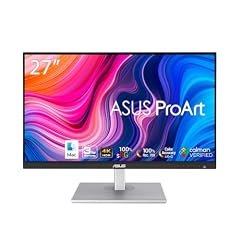
ASUS ProArt PA279CV 27 Inch 4K UHD USB-C Professional Monitor
- Size
- 27 in
- Resolution
- 4K UHD
- Panel
- IPS
$375.16 (as of 10/24/2026 11:52 PDT - Details)
The ASUS ProArt PA279CV is built for color-sensitive work and includes USB-C connectivity, which the Dell S2725QC does not list. Its 4K UHD IPS panel and ProArt line positioning make it the pick for photo editing and design, though its refresh rate is not stated by the seller.
Pros
- 4K UHD IPS panel from ASUS's ProArt line
- USB-C connectivity, useful for laptops and one-cable setups
- Established maker with broad professional monitor support
Cons
- Refresh rate not stated by the seller
- No stated HDR certification or color gamut figure
- No VESA mount details in the pool entry
Good fit if
- Photographers and designers who want a color-focused monitor
- Laptop users who want USB-C connectivity
Skip if
- Gamers who need a high refresh rate
- Anyone who prefers a brighter, more entertainment-oriented panel
Verdict: The ASUS ProArt PA279CV is the best pick for color work in this guide because of its ProArt positioning and USB-C connectivity, but check the listing for refresh rate details.
4 Fastest refresh rate

AOC 27" Gaming Monitor 4K Mini-LED Dual Mode 320Hz NVIDIA G-SYNC U27G4XM
- Size
- 27 in
- Resolution
- 4K UHD
- Refresh
- 320 Hz
$349.99 (as of 10/24/2026 11:40 PDT - Details)
The AOC U27G4XM has a 320Hz refresh rate in dual-mode 4K, the fastest in this pool, and supports NVIDIA G-Sync. The next fastest refresh rates here are 250Hz and 240Hz, so this is the pick for competitive players who want 4K as a bonus.
Pros
- 320Hz refresh rate, the fastest in this guide
- 4K UHD resolution with dual-mode support as stated in the name
- NVIDIA G-Sync support listed
Cons
- No panel type stated by the seller
- No stated response time
- 4K panel may be wasted if you mostly play at lower refresh rates
Good fit if
- Competitive gamers who want the highest refresh rate in the budget
- NVIDIA GPU owners who want G-Sync support
Skip if
- Color-critical creators who need panel details
- Anyone who prefers a bigger ultrawide screen
Verdict: The AOC U27G4XM is the fastest monitor in this guide with a 320Hz refresh rate, making it the top pick for esports players who also want 4K.
5 Best ultrawide for gaming

ASUS TUF Gaming VG34WQML5A 34 Inch 1440p 250Hz Ultrawide HDR Gaming
- Size
- 34 in
- Resolution
- QHD 1440p
- Refresh
- 250 Hz
$289.99 (as of 10/24/2026 11:54 PDT - Details)
Outside this guide's budget at today's price.
The ASUS TUF Gaming VG34WQML5A combines a 34-inch ultrawide QHD panel with a 250Hz refresh rate, which beats the 200Hz ASUS VG34WQL5A and the 240Hz AOC CU34G4Z on refresh while staying in the same size class. It is the only 250Hz ultrawide in this pool.
Pros
- 34-inch QHD ultrawide with 250Hz refresh rate
- HDR support listed in the monitor name
- ASUS TUF Gaming branding suggests gaming-focused features
Cons
- Panel type not stated by the seller
- No VESA mount details in the pool entry
- No stated response time
Good fit if
- Sim racers and strategy gamers who want an ultrawide field of view
- Gamers who want a high refresh rate and a large screen in one package
Skip if
- Anyone who wants a flat 16:9 screen for productivity
- People with a desk too small for a 34-inch monitor
Verdict: The ASUS TUF Gaming VG34WQML5A is the best ultrawide gaming monitor under $400 thanks to its 250Hz refresh rate and QHD resolution.
6 Best 240Hz ultrawide

AOC 34" Curved Gaming Monitor UWQHD 240Hz VA AMD FreeSync Premium
- Size
- 34 in
- Resolution
- 3440x1440
- Refresh
- 240 Hz
- Panel
- VA
$279.99 (as of 10/24/2026 11:40 PDT - Details)
Outside this guide's budget at today's price.
The AOC CU34G4Z delivers a 34-inch curved VA panel with UWQHD resolution and a 240Hz refresh rate, and it adds AMD FreeSync Premium. It is a strong alternative to the ASUS VG34WQML5A for shoppers who want a curved VA panel and a 240Hz refresh rate.
Pros
- 34-inch curved VA panel with UWQHD resolution
- 240Hz refresh rate, tied for the fastest ultrawide in this guide
- AMD FreeSync Premium support
Cons
- No USB-C charging mentioned
- No HDR certification stated
- Only AMD FreeSync listed, not G-Sync
Good fit if
- AMD GPU owners who want FreeSync Premium on an ultrawide
- Gamers who want a large curved screen with a 240Hz refresh rate
Skip if
- Creators who need IPS color accuracy
- Anyone who wants a refresh rate above 240Hz
Verdict: The AOC CU34G4Z gives you curved ultrawide gaming with 240Hz and FreeSync Premium, making it the best 240Hz ultrawide under $400.
7 Best ultrawide for work

Samsung 34” ViewFinity S65UC
- Size
- 34 in
- Resolution
- QHD 1440p
- Refresh
- 100 Hz
$475.00 (as of 10/24/2026 18:07 PDT - Details)
Outside this guide's budget at today's price.
The Samsung ViewFinity S65UC is a 34-inch ultrawide QHD curved monitor with a 100Hz refresh rate and Samsung's ViewFinity productivity positioning. It is a more work-oriented alternative to the gaming-focused AOC and ASUS ultrawides in this list, and it does not emphasize gaming certifications.
Pros
- 34-inch curved ultrawide QHD resolution
- 100Hz refresh rate, enough for smooth office work and light gaming
- Samsung ViewFinity line, designed for productivity
Cons
- Panel type not stated by the seller
- No FreeSync or G-Sync certification listed
- Only 100Hz, lower than gaming-focused ultrawides here
Good fit if
- Office workers who want a wide desktop for multitasking
- People who want a Samsung productivity monitor without gaming extras
Skip if
- Competitive gamers who need 200Hz or higher
- Anyone who requires a specific panel type like IPS
Verdict: The Samsung ViewFinity S65UC is the pick for ultrawide productivity under $400, with a curved QHD screen and a comfortable 100Hz refresh rate.
8 Best 34-inch for mixed use

Dell 34 Monitor S3425DW
- Size
- 34 in
- Resolution
- QHD 1440p
- Refresh
- 120 Hz
- Panel
- VA
$399.99 (as of 10/24/2026 12:19 PDT - Details)
The Dell S3425DW is a 34-inch WQHD VA monitor with a 120Hz refresh rate, FreeSync Premium, and Eye Comfort features, which makes it a balanced choice for both work and play. Its refresh rate sits between the 100Hz productivity ultrawides and the 240Hz gaming models, and Dell's Eye Comfort positioning helps for long sessions.
Pros
- 34-inch WQHD VA panel
- 120Hz refresh rate and FreeSync Premium
- Eye Comfort features as stated by Dell in the name
Cons
- VA panel, not ideal for color-critical work
- No USB-C charging mentioned
- No stated response time
Good fit if
- Users who split time between office tasks and gaming
- People who want a Dell monitor with Eye Comfort features
Skip if
- Hardcore esports players who want 240Hz or more
- Creators who need IPS color accuracy
Verdict: The Dell S3425DW is a balanced 34-inch monitor for mixed use, combining a VA panel, 120Hz, FreeSync Premium, and Eye Comfort features.
9 Best for USB-C charging

ASUS VA34VCPSR 34" 1440P Curved Monitor
- Size
- 34 in
- Resolution
- QHD 1440p
- Refresh
- 100 Hz
$359.99 (as of 10/24/2026 11:54 PDT - Details)
The ASUS VA34VCPSR is the only pick in this guide with 96W USB Power Delivery, which can charge a laptop while it drives the 34-inch QHD curved display. USB PD is defined by the USB-IF to enable power and data over one USB Type-C cable, making this the best one-cable workstation monitor in the pool.
Pros
- 96W USB Power Delivery over USB-C, the highest in this guide
- 34-inch QHD curved monitor with 100Hz refresh rate
- USB docking and RJ45 networking listed in the name
Cons
- 100Hz refresh rate, lower than gaming-focused ultrawides
- Panel type not stated by the seller
- No HDR certification mentioned
Good fit if
- Laptop users who want to charge and connect with one USB-C cable
- Office workers who need networking through the monitor's RJ45 port
Skip if
- Gamers who need a refresh rate above 100Hz
- Anyone who doesn't need laptop charging or docking
Verdict: The ASUS VA34VCPSR is the best one-cable monitor under $400, with 96W USB PD, dock-style ports, and a curved 34-inch QHD screen.
10 Best 32-inch IPS for office

PHILIPS 32B2U3601 32" QHD Monitor with USB-C
- Size
- 32 in
- Resolution
- QHD 1440p
- Panel
- IPS
$327.70 (as of 10/24/2026 17:11 PDT - Details)
The Philips 32B2U3601 is a 32-inch IPS QHD monitor with USB-C and RJ-45, making it the only 32-inch IPS pick in this guide and a good match for office setups that need a larger screen without moving to an ultrawide. EPEAT is mentioned in the name, which matters for buyers looking for an environmentally rated display.
Pros
- 32-inch IPS QHD panel, good for text-heavy work
- USB-C connection and RJ45 port for a clean office setup
- EPEAT mentioned in the product name, useful for sustainability-minded buyers
Cons
- Refresh rate not stated by the seller
- No HDR certification mentioned
- No gaming features listed
Good fit if
- Office workers who want a large IPS screen for spreadsheets and documents
- People who want an Ethernet port on their monitor
Skip if
- Gamers who need high refresh rates
- Anyone who wants 4K resolution at 32 inches
Verdict: The Philips 32B2U3601 is a sensible 32-inch office monitor with IPS, USB-C, and RJ-45, and it is the only 32-inch IPS pick in this guide.
11 Best IPS ultrawide

LG 34U650A-B 34-inch UltraWide IPS WQHD 100Hz HDR10 Curved Monitor
- Size
- 34 in
- Resolution
- QHD 1440p
- Refresh
- 100 Hz
- Panel
- IPS
$399.99 (as of 10/24/2026 16:07 PDT - Details)
The LG 34U650A-B is one of the few 34-inch ultrawides in this list with an IPS panel, which makes it a better option for color work than the VA ultrawides from AOC, SANSUI, and Dell. It runs at 100Hz with QHD resolution and HDR10 support, so it balances office sharpness with a smooth desktop.
Pros
- 34-inch IPS ultrawide QHD panel
- 100Hz refresh rate and HDR10 support listed in the name
- IPS is stronger than VA for color work
Cons
- 100Hz is lower than the 240Hz gaming ultrawides
- No FreeSync or G-Sync certification stated
- No USB-C charging mentioned
Good fit if
- Designers who want an ultrawide with IPS color
- Office workers who want a large screen with a high refresh for scrolling
Skip if
- Gamers who want 200Hz or higher
- Anyone who wants a bright HDR gaming panel
Verdict: The LG 34U650A-B is the best IPS ultrawide in this guide, giving you wide viewing angles and QHD sharpness on a 34-inch screen.
12 Best 4K gaming hybrid

Samsung 27” Odyssey G7
- Size
- 27 in
- Resolution
- 4K UHD
- Refresh
- 180 Hz
- Panel
- IPS
$399.99 (as of 10/24/2026 18:06 PDT - Details)
The Samsung Odyssey G7 G70F is a 27-inch IPS panel with 4K UHD resolution and a 180Hz refresh rate, which makes it a strong hybrid for people who want both 4K desktop sharpness and smooth gaming. It sits between the 120Hz Dell 4K and the 240Hz OLED gaming picks.
Pros
- 4K UHD IPS panel with 180Hz refresh rate
- Samsung Odyssey gaming line
- Good for both 4K work and high-refresh gaming
Cons
- No FreeSync or G-Sync certification mentioned in the pool
- No HDR certification stated
- No stated response time
Good fit if
- Gamers who also want 4K resolution for desktop use
- People who want a 27-inch IPS screen with a fast refresh rate
Skip if
- Esports players who want 240Hz or more
- Anyone who prefers an OLED panel
Verdict: The Samsung Odyssey G7 G70F is the best 4K gaming hybrid under $400, combining an IPS panel, 4K resolution, and a 180Hz refresh rate.
13 Best portable dual-screen

Upperizon Portable Monitor Foldable Dual Screen 15.6 inch FHD 90% sRGB
- Size
- 15.6 in
- Resolution
- FHD 1080p
- Refresh
- 60 Hz
- Panel
- IPS
$339.99 (as of 10/24/2026 19:06 PDT - Details)
The Upperizon Portable Monitor is the only foldable dual-screen design in the pool: a 15.6-inch IPS FHD panel with a 60Hz refresh rate and USB-C connectivity. It is a travel-focused pick for laptop users, not a desktop replacement, and its 90% sRGB coverage is the only color figure stated among the portable monitors here.
Pros
- Foldable dual-screen 15.6-inch IPS FHD design
- 90% sRGB coverage as stated in the name
- USB-C connectivity for laptops and Macs as stated in the name
Cons
- 60Hz refresh rate, not for gaming
- No stated resolution beyond FHD 1080p
- Portable form factor limits desk use
Good fit if
- Travelers who want a second screen without a heavy monitor
- Laptop users who need extra screen space on the road
Skip if
- Gamers who need high refresh rates
- Anyone who wants a single large desktop monitor
Verdict: The Upperizon foldable dual-screen is the best portable pick under $400 for travelers who need an extra IPS screen that packs into a bag.
How they compare
| # | Monitor | Size | Resolution | Refresh | Panel |
|---|---|---|---|---|---|
| 1 | Samsung 27" Odyssey OLED G6 | 27 in | QHD 1440p | 240 Hz | OLED |
| 2 | Dell 27 Monitor S2725QC | 27 in | 4K UHD | 120 Hz | IPS |
| 3 | ASUS ProArt PA279CV 27 Inch 4K UHD USB-C Professional Monitor | 27 in | 4K UHD | not stated | IPS |
| 4 | AOC 27" Gaming Monitor 4K Mini-LED Dual Mode 320Hz NVIDIA G-SYNC U27G4XM | 27 in | 4K UHD | 320 Hz | not stated |
| 5 | ASUS TUF Gaming VG34WQML5A 34 Inch 1440p 250Hz Ultrawide HDR Gaming | 34 in | QHD 1440p | 250 Hz | not stated |
| 6 | AOC 34" Curved Gaming Monitor UWQHD 240Hz VA AMD FreeSync Premium | 34 in | 3440x1440 | 240 Hz | VA |
| 7 | Samsung 34” ViewFinity S65UC | 34 in | QHD 1440p | 100 Hz | not stated |
| 8 | Dell 34 Monitor S3425DW | 34 in | QHD 1440p | 120 Hz | VA |
| 9 | ASUS VA34VCPSR 34" 1440P Curved Monitor | 34 in | QHD 1440p | 100 Hz | not stated |
| 10 | PHILIPS 32B2U3601 32" QHD Monitor with USB-C | 32 in | QHD 1440p | not stated | IPS |
| 11 | LG 34U650A-B 34-inch UltraWide IPS WQHD 100Hz HDR10 Curved Monitor | 34 in | QHD 1440p | 100 Hz | IPS |
| 12 | Samsung 27” Odyssey G7 | 27 in | 4K UHD | 180 Hz | IPS |
| 13 | Upperizon Portable Monitor Foldable Dual Screen 15.6 inch FHD 90% sRGB | 15.6 in | FHD 1080p | 60 Hz | IPS |
Our selection method
Selection method: The pool contained 49 monitor listings in this budget band. Near-duplicate listings were removed, and 15 models were chosen to cover the main uses: gaming, 4K work, ultrawide productivity, and portable displays. Picks are based on the stated specifications in each listing and the maker's published product information; they do not come from physical inspection. Prices shown are live and are read from the store listing at the time printed next to each price. No monitor was physically inspected.
What matters when choosing
Start with the panel: IPS, VA, or OLED
Panel type is the first spec to settle because it decides viewing angles, contrast, and color. IPS panels are tuned for color accuracy and wide viewing angles, which makes them a good fit for office work and design. VA panels usually show higher contrast and deep blacks, but they have narrower viewing angles and can look washed out from the side. OLED panels go further on contrast with per-pixel black levels, which is why the Samsung Odyssey OLED G6 and the LG 27GX704A-B stand out in this price range. The trade-off is that OLED is usually more expensive and can suffer image retention if you leave static elements on screen for long stretches.
Resolution: how sharp should the image be?
On a 27-inch screen, QHD 1440p is the sweet spot for gaming and everyday work, while 4K UHD gives you more desktop space and crisper text, especially for design or spreadsheets. If you choose 4K, remember that Windows scaling is important: the desktop becomes very small at 100% scaling, and you will likely set Windows to 125% or 150%. Ultrawide QHD panels, usually 3440x1440 on a 34-inch screen, add horizontal space for side-by-side windows and a wider field of view in games, at the cost of some vertical height compared with a 16:9 QHD display.
Refresh rate: which number do you need?
Refresh rate measures how many times the screen updates per second. A 60Hz monitor is fine for office work and video, but 100Hz or 120Hz makes scrolling and window moving feel noticeably smoother. For shooters and fast multiplayer games, look for 144Hz or higher; the fastest models in this guide, like the AOC 27-inch 4K Mini-LED with a 320Hz refresh rate, are built for competitive play. Variable refresh rate technology, such as AMD FreeSync, NVIDIA G-Sync, or HDMI VRR, synchronizes the monitor with your GPU's frame output to reduce tearing. HDMI's variable refresh rate specification is documented by HDMI LA, and NVIDIA explains the difference between G-Sync and G-Sync Compatible on its monitor page.
USB-C and laptop charging
If you use a laptop, a monitor with USB-C can carry video, data, and power over one cable. The USB-IF's Power Delivery specification allows a monitor to charge a laptop while it displays content, with the exact wattage depending on the monitor and the laptop. The ASUS VA34VCPSR lists 96W USB Power Delivery, which is the highest figure in this guide, while models like the Philips 32B2U3601 add an RJ-45 Ethernet port for wired networking. Without USB-C, you will need a separate power cable for the laptop and a video connection through HDMI or DisplayPort.
Check the HDR claims
Many monitors in this range list HDR10 support, which means they accept an HDR10 signal, but it does not guarantee a bright or wide-gamut display. VESA's DisplayHDR certification is a better signal: tiers such as DisplayHDR 400, 600, and 1000 set minimum luminance, color gamut, black level, and bit-depth requirements. The pool entries here rarely state a DisplayHDR tier, so treat plain HDR10 support as a compatibility feature, not a performance guarantee. Windows has settings for HDR, but as Microsoft notes, certified HDR displays are designed and tested for a wide range of PC uses, while many displays are built mainly for video.
Size, curved versus flat, and your desk
The monitors in this guide range from 14 inches up to 34 inches. A 27-inch flat screen is the most flexible size, while 34-inch ultrawides give you a panoramic desktop and immersive gaming but need a deep desk and often a stronger arm or stand. Curved panels are common on 34-inch VA monitors, and the curve helps keep the edges in view on an ultrawide. Portable monitors, like the Upperizon and Xenotik picks, trade size and refresh rate for easy travel. Before you buy, measure your desk and check the monitor's stand depth and VESA mounting options if you plan to use an arm.
Questions
What is the best monitor under $400 for gaming?
The Samsung 27-inch Odyssey OLED G6 is the best gaming pick because it pairs a QD-OLED panel with a 240Hz refresh rate and QHD resolution. If you want G-Sync Compatible certification as well, the LG 27GX704A-B is the closest OLED alternative. For a bigger screen, the ASUS TUF Gaming VG34WQML5A offers a 34-inch ultrawide QHD panel with a 250Hz refresh rate.
Can I get a good 4K monitor under $400?
Yes. The Dell S2725QC is a 27-inch 4K UHD IPS monitor with a 120Hz refresh rate and 99% sRGB coverage. The Samsung Odyssey G7 G70F combines 4K UHD with a 180Hz refresh rate. The ASUS ProArt PA279CV is the color-focused 4K option with USB-C, though its refresh rate is not stated by the seller. Check the listing for HDR certification if you plan to watch HDR movies.
What does G-Sync Compatible mean?
G-Sync Compatible is NVIDIA's validation that a display without a full G-Sync module still delivers a basic variable refresh rate experience, reducing tearing and stuttering. NVIDIA states that G-Sync monitors use a dedicated processor while G-Sync Compatible models are validated to offer a good basic VRR experience. AMD's equivalent is FreeSync, which is found on several picks in this guide, including the Dell S3425DW and the AOC CU34G4Z.
Is a 240Hz monitor worth it over 144Hz?
For competitive gamers, a higher refresh rate means more frequent screen updates and lower perceived latency, so 240Hz can help in fast-paced shooters and rhythm games. The Samsung OLED G6 and the LG 27GX704A-B both hit 240Hz, and the AOC U27G4XM reaches 320Hz. If you mostly play slower games or work in documents, the difference between 144Hz and 240Hz is much less noticeable, and a 100Hz or 120Hz monitor may be enough.
Can a monitor charge my laptop over USB-C?
Yes, if the monitor supports USB Power Delivery. The ASUS VA34VCPSR lists 96W PD, which is the highest in this guide, and the USB-IF Power Delivery specification allows power and data over a single USB Type-C cable. The wattage must be at least as high as your laptop's charging requirement for full-speed charging, so check both figures before relying on a monitor as your only charger.
Is HDR10 support the same as DisplayHDR certification?
No. HDR10 support usually just means the monitor accepts an HDR10 signal, while DisplayHDR certification from VESA sets minimum luminance, color, black level, and bit-depth requirements. A DisplayHDR 600 monitor, for example, must meet stricter brightness and color targets than DisplayHDR 400. In this price range, most monitors list HDR10 without a DisplayHDR tier, so do not expect movie-theater brightness from every 'HDR' model.
Change log
- : First published.