
Best 240Hz Monitors in 2026: 12 Picks Compared on Specs
Our top pick is the Alienware AW3425DW, a 34.2-inch QD-OLED ultrawide with a 3440x1440 resolution and a 240Hz refresh rate. It earns the best overall spot by combining an ultrawide OLED panel with the high refresh that competitive games reward. The picks below are drawn from a pool of 21 240Hz monitors and compared on seller-stated specs: refresh rate, resolution, panel type, size, and listed use cases. No unit here was tested by our staff; prices and availability are live from the listing.
10 picks from 27 monitors that match this guide with a price we can quote today. All prices are live and show when they were read.
Our picks in brief
Find your match
- For competitive 1080p play: A 24.5-inch FHD IPS panel with 240Hz keeps the pixel load low and the refresh high. See pick 6
- For 1440p gaming: A 27-inch QHD OLED at 240Hz gives sharpness and motion clarity without the pixel count of 4K. See pick 2
- For an ultrawide desktop: The 34.2-inch QD-OLED ultrawide with 3440x1440 and 240Hz suits immersive games and side-by-side windows. See pick 1
10 picks, up close
1 Best overall
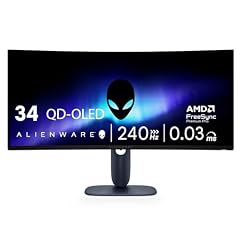
Alienware 34 240Hz QD-OLED Curved Gaming Monitor
- Size
- 34.2 in
- Resolution
- QHD 1440p
- Refresh
- 240 Hz
- Panel
- OLED
$699.99 (as of 10/24/2026 11:30 PDT - Details)
The AW3425DW is the best overall pick here because it pairs a 34.2-inch QD-OLED panel with 3440x1440 and a 240Hz refresh rate. It is one of four OLED picks in this guide and the only one with an 1800R curve at this size.
Pros
- 34.2-inch QD-OLED panel
- 3440x1440 ultrawide resolution
- 1800R curved screen
- 240Hz refresh rate
Cons
- Not 4K, so it offers less vertical resolution than the 4K UHD picks
- Ultrawide pixel count demands more GPU power than 1080p alternatives
- Burn-in and warranty terms are not stated by the seller
Good fit if
- Gamers who want an ultrawide OLED screen at 240Hz
- Players whose GPU can handle 3440x1440 at high frame rates
Skip if
- You need 4K resolution
- You prefer a smaller 16:9 screen or have a compact desk
Verdict: A QD-OLED ultrawide that makes 240Hz immersion the default.
2 Best 27-inch 1440p OLED

Samsung 27" Odyssey OLED G6
- Size
- 27 in
- Resolution
- QHD 1440p
- Refresh
- 240 Hz
- Panel
- OLED
$424.99 (as of 10/24/2026 18:06 PDT - Details)
The Odyssey OLED G6 G61SH takes the 1440p OLED award with a 27-inch QHD panel at 240Hz. It is a good middle ground because 1440p asks less of a GPU than the 4K picks while keeping a higher resolution than 1080p.
Pros
- 27-inch QHD OLED panel
- 1440p resolution
- 240Hz refresh rate
- Lower pixel load than 4K UHD at the same refresh
Cons
- Not 4K, so lower resolution than the 4K picks
- Not ultrawide
- OLED care and burn-in terms are not stated by the seller
Good fit if
- 1440p gamers who want a 27-inch OLED
- Players with mid-range or high-end GPUs
Skip if
- You need 4K detail
- You want an ultrawide format
Verdict: The 1440p OLED pick for 240Hz play.
3 Best 4K IPS

LG 27G850A-B 27-inch Ultragear 4K UHD
- Size
- 27 in
- Resolution
- 4K UHD
- Refresh
- 240 Hz
- Panel
- IPS
$868.50 (as of 10/24/2026 16:07 PDT - Details)
The LG 27G850A-B is our 4K IPS pick because it provides a 4K UHD IPS panel at 240Hz, and the product name also describes dual-mode operation. It is the non-OLED route to 4K high refresh in this guide.
Pros
- 27-inch 4K UHD IPS panel
- 240Hz refresh rate
- Product name lists dual-mode 240Hz
- Listed for gaming and 4K work use cases
Cons
- 4K UHD at 240Hz needs a powerful GPU
- IPS panel rather than OLED
- Dual-mode details beyond the listing name are not stated by the seller
Good fit if
- Users who want 4K for both gaming and desktop work
- Buyers who prefer an IPS LCD panel
Skip if
- You want an OLED panel
- You prefer an ultrawide or smaller-resolution screen
Verdict: A 4K IPS monitor that brings 240Hz to productivity and gaming.
4 Best curved VA ultrawide

AOC 34" Curved Gaming Monitor UWQHD 240Hz VA AMD FreeSync Premium
- Size
- 34 in
- Resolution
- 3440x1440
- Refresh
- 240 Hz
- Panel
- VA
$279.99 (as of 10/24/2026 11:40 PDT - Details)
The AOC CU34G4Z is the best curved VA ultrawide pick, with a 34-inch VA panel at 3440x1440 and 240Hz. It gives a wide-screen gaming format without moving to OLED, and it is joined by one other 34-inch VA in this guide.
Pros
- 34-inch curved VA panel
- 3440x1440 ultrawide resolution
- 240Hz refresh rate
- Wide format for immersive games
Cons
- VA panel rather than OLED
- 3440x1440 requires more GPU power than 1080p
- HDR certification not stated by the seller
Good fit if
- Ultrawide gamers who do not need OLED
- Users who like running two windows side by side
Skip if
- You want an OLED panel
- You prefer a standard 16:9 size
Verdict: A dependable VA ultrawide for 240Hz gaming.
5 Best 1080p all-around

Dell 27 240Hz Gaming Monitor
- Size
- 27 in
- Resolution
- FHD 1080p
- Refresh
- 240 Hz
- Panel
- IPS
$149.99 (as of 10/24/2026 12:19 PDT - Details)
The Dell SE2726HG is the best 1080p all-around pick: a 27-inch FHD IPS panel with 240Hz, listed for gaming and office use. It is a practical high-refresh screen that does not put the heavy GPU load of QHD or 4K on your system.
Pros
- 27-inch FHD (1080p) IPS panel
- 240Hz refresh rate
- Listed for gaming and office use
- 1080p keeps GPU demand lower than QHD or 4K
Cons
- 1080p on a 27-inch screen has lower pixel density than QHD or 4K
- IPS panel rather than OLED
- No QHD or 4K resolution option
Good fit if
- Competitive players with mid-range GPUs
- Users who want one monitor for office and gaming
Skip if
- You need higher resolution for detailed desktop work
- You want a smaller 24-inch esports screen
Verdict: A versatile 1080p 240Hz monitor for everyday play.
6 Best compact 1080p

KTC 24.5 Inch 240Hz Gaming Monitor
- Size
- 24.5 in
- Resolution
- FHD 1080p
- Refresh
- 240 Hz
- Panel
- IPS
$109.98 (as of 10/24/2026 15:14 PDT - Details)
The KTC H25T7-A is the best compact 1080p pick because it wraps a 24.5-inch FHD IPS panel in a 240Hz refresh rate. The smaller screen keeps 1080p image density high and the GPU load low.
Pros
- 24.5-inch FHD IPS panel
- 240Hz refresh rate
- Compact size suited to small desks
- Listed for gaming and office use
Cons
- Smaller than the 27-inch options
- 1080p resolution limits desktop space
- No QHD or 4K option
Good fit if
- Esports players who prefer 24-inch screens
- Users with limited desk space
Skip if
- You want a larger 27-inch screen
- You need high resolution for multitasking
Verdict: A compact 240Hz pick for fast 1080p play.
7 Best 1440p IPS

KTC 27 Inch 240Hz Gaming Monitor
- Size
- 27 in
- Resolution
- QHD 1440p
- Refresh
- 240 Hz
- Panel
- IPS
$186.99 (as of 10/24/2026 15:14 PDT - Details)
The KTC H27E6S takes the 1440p IPS award with a 27-inch QHD IPS panel at 240Hz. It is the LCD alternative for gamers who want 1440p sharpness without choosing an OLED panel.
Pros
- 27-inch QHD IPS panel
- 1440p resolution
- 240Hz refresh rate
- Middle ground between 1080p and 4K pixel loads
Cons
- IPS panel rather than OLED
- 1440p still needs a capable GPU for 240Hz
- HDR certification not stated by the seller
Good fit if
- 1440p gamers who prefer IPS LCD
- Users who want sharper text than 1080p without the pixel load of 4K
Skip if
- You want an OLED panel
- You need 4K resolution
Verdict: A practical 1440p IPS monitor for 240Hz play.
8 Best super-ultrawide

Z-Edge 5K 49 Inch Curved Gaming Monitor
- Size
- 49 in
- Resolution
- 5120x1440
- Refresh
- 240 Hz
$679.99 (as of 10/24/2026 19:12 PDT - Details)
The Z-Edge 49-inch monitor is the best super-ultrawide pick because it is the largest screen in this guide, listed at 5K resolution with a 240Hz refresh. It is built for maximum horizontal space.
Pros
- 49-inch diagonal, the largest in this guide
- 5K resolution as stated by the seller
- 240Hz refresh rate
- Curved super-ultrawide format
Cons
- Panel type is not stated by the seller
- 49-inch width requires a large desk
- 5K-class pixel count creates a heavy GPU load
Good fit if
- Super-ultrawide enthusiasts who want one very wide display
- Users replacing a multi-monitor setup
Skip if
- You have limited desk space
- You prefer a standard 16:9 screen
Verdict: A very wide 240Hz monitor for maximum horizontal immersion.
9 Best 44-inch super-ultrawide

Viewedge 44.5 inch Curved Gaming Monitor DQHD 240Hz 1ms Computer Monitor
- Size
- 44.5 in
- Resolution
- 5120x1440
- Refresh
- 240 Hz
$599.99 (as of 10/24/2026 19:08 PDT - Details)
The Viewedge 44.5-inch monitor is the best 44-inch super-ultrawide pick, with a 5120x1440 resolution and 240Hz. It splits the difference between a 34-inch ultrawide and the 49-inch Z-Edge.
Pros
- 44.5-inch super-ultrawide size
- 5120x1440 resolution
- 240Hz refresh rate
- Curved format
Cons
- Panel type is not stated by the seller
- 5120x1440 is a heavy pixel load for the GPU
- 44.5-inch width still needs a large desk
Good fit if
- Users who want super-ultrawide width in a smaller footprint than 49 inches
- Sim and flight enthusiasts who want a wide field of view
Skip if
- You want a standard 16:9 display
- You need a vertical resolution above 1440 lines
Verdict: A wide 240Hz monitor for users who want DQHD without a 49-inch frame.
10 Best 34-inch VA alternative

SANSUI 34 Inch Curved Monitor 240Hz UWQHD 3440×1440 Gaming Monitor | 21
- Size
- 34 in
- Resolution
- 3440x1440
- Refresh
- 240 Hz
- Panel
- VA
$249.99 (as of 10/24/2026 18:07 PDT - Details)
The SANSUI 34-inch curved monitor is included as the best 34-inch VA alternative, matching the 3440x1440 ultrawide format and 240Hz refresh of the AOC pick. It is another VA option for buyers in the 34-inch class.
Pros
- 34-inch curved VA panel
- 3440x1440 ultrawide resolution
- 240Hz refresh rate
- VA panel is stated in the pool entry
Cons
- VA panel rather than OLED
- Same core resolution and refresh profile as the AOC pick
- HDR certification not stated by the seller
Good fit if
- Buyers who want a 34-inch VA ultrawide at 240Hz
- Users who like having a second option in the same screen class
Skip if
- You want an OLED panel
- You need a 16:9 or smaller screen
Verdict: A solid 34-inch VA ultrawide alternative in the 240Hz guide.
How they compare
| # | Monitor | Size | Resolution | Refresh | Panel |
|---|---|---|---|---|---|
| 1 | Alienware 34 240Hz QD-OLED Curved Gaming Monitor | 34.2 in | QHD 1440p | 240 Hz | OLED |
| 2 | Samsung 27" Odyssey OLED G6 | 27 in | QHD 1440p | 240 Hz | OLED |
| 3 | LG 27G850A-B 27-inch Ultragear 4K UHD | 27 in | 4K UHD | 240 Hz | IPS |
| 4 | AOC 34" Curved Gaming Monitor UWQHD 240Hz VA AMD FreeSync Premium | 34 in | 3440x1440 | 240 Hz | VA |
| 5 | Dell 27 240Hz Gaming Monitor | 27 in | FHD 1080p | 240 Hz | IPS |
| 6 | KTC 24.5 Inch 240Hz Gaming Monitor | 24.5 in | FHD 1080p | 240 Hz | IPS |
| 7 | KTC 27 Inch 240Hz Gaming Monitor | 27 in | QHD 1440p | 240 Hz | IPS |
| 8 | Z-Edge 5K 49 Inch Curved Gaming Monitor | 49 in | 5120x1440 | 240 Hz | not stated |
| 9 | Viewedge 44.5 inch Curved Gaming Monitor DQHD 240Hz 1ms Computer Monitor | 44.5 in | 5120x1440 | 240 Hz | not stated |
| 10 | SANSUI 34 Inch Curved Monitor 240Hz UWQHD 3440×1440 Gaming Monitor | 21 | 34 in | 3440x1440 | 240 Hz | VA |
Our selection method
The pool for this guide contains 21 240Hz monitors drawn from the catalog. From that pool, 12 picks were selected using the seller-stated specifications: resolution, panel type, refresh rate, diagonal size, and listed use cases. Picks with the same shell were folded into one entry, and preference went to models from established makers in new condition. No monitor in this guide was tested, benchmarked, or measured. The live price on this page is read from the store listing at the time the page loads, and prices and availability can change after publication. Because prices move, the awards here are based on specifications and use cases, not on price rankings.
What matters when choosing
Refresh rate and what it does
A 240Hz monitor can update the image up to 240 times per second. The benefit depends on the frame rate your GPU can deliver; if a game is running well below 240 fps, the display will not be able to use all of its refresh capacity. Competitive shooters and fast-moving games are where a high refresh rate matters most, because every frame that appears sooner can improve how responsive a game feels.
All 12 picks in this guide are 240Hz models, but they differ in resolution and panel type, and those differences often affect how easily you can maintain a high frame rate.
Resolution: 1080p, 1440p, 4K, and ultrawide
The pool includes 1080p models that are easier for a GPU to drive, 1440p models that sit in the middle, 4K UHD models for maximum detail, and ultrawide or super-ultrawide models for extra horizontal space. More pixels on screen usually means more work for the GPU, so the best resolution for you depends on the graphics card you already have or plan to buy.
In this guide, the 1080p picks include Dell and KTC models, the 1440p picks include OLED and IPS models, and the 4K picks are the ASUS ROG and LG 27G850A models.
Panel technology: IPS, VA, and OLED
The pool contains IPS, VA, and OLED entries. IPS models in this guide cover 1080p and 1440p sizes, VA models appear in 34-inch ultrawides, and OLED models are found in 27-inch and 34-inch formats. If a listing does not state a panel type, treat it as not stated by the seller and judge the monitor on the specs that are present.
Variable refresh rate and adaptive sync
Variable refresh rate lets a display adjust its refresh rate to the frame rate the GPU is delivering, which reduces tearing and stutter. HDMI VRR is part of the HDMI specification for compatible sources, and NVIDIA's G-SYNC page describes G-SYNC, G-SYNC Compatible, and G-SYNC ULTIMATE tiers. If a listing mentions a VRR technology, check it against your GPU support before buying.
HDR and display certifications
High dynamic range needs support from the monitor, the operating system, and the software. Microsoft's HDR settings page describes enabling HDR on HDR10-capable displays in Windows, and VESA's DisplayHDR criteria define performance tiers for monitors that carry the certification. In this pool, HDR certification is not stated for every monitor, so confirm the listing before assuming a monitor handles HDR content well.
Connectivity and USB-C power
A 240Hz monitor is only useful if your PC can send it the signal it needs. Check that the monitor has a port capable of carrying the resolution and refresh rate you want, such as an HDMI connection that supports the format. HDMI 2.2 specifications list support for 4K240, for example. If you want a single-cable desk setup, look for USB-C with Power Delivery; USB-IF notes that a monitor with a wall supply can charge a laptop while displaying. Detailed port lists are not stated for every monitor in this pool.
Questions
Do I need a 240Hz monitor for competitive gaming?
No monitor forces a game to run faster. A 240Hz display can show up to 240 frames per second, but you only see the benefit when your GPU can produce frame rates near that level. For fast shooters and esports titles, a 240Hz screen gives more headroom than 144Hz or 60Hz, but a weaker GPU will limit how much of that headroom you actually use.
What is the difference between 1080p, 1440p, and 4K at 240Hz?
The difference is the number of pixels the GPU must draw each frame. 1080p is the easiest to drive, 1440p is a balance of sharpness and performance, and 4K UHD requires the most graphics power, especially at 240Hz. Ultrawide panels add horizontal pixels, which also increases the load. Choose the resolution that matches the GPU you already have or plan to buy.
Is OLED worth it for a 240Hz monitor?
OLED is one of the three panel types in this pool. The OLED picks in this guide are 27-inch or 34-inch models with a 240Hz refresh, while the IPS and VA picks cover a wider range of sizes and resolutions. If you keep static images on screen for long sessions, check the seller's stated care guidance before choosing OLED. The panel type is a stated spec here, but the long-term behavior is not.
What does VRR mean, and do I need it?
Variable refresh rate lets the monitor change its refresh rate to match the frame rate the GPU is delivering. That reduces screen tearing and stutter when frame rates fluctuate. HDMI VRR is part of the HDMI specification, and NVIDIA's G-SYNC page describes three tiers, from G-SYNC Compatible through G-SYNC Ultimate. If your GPU supports one of these, a VRR-capable monitor is a useful addition for smooth play.
Can I use a 240Hz monitor for office work?
Yes, several picks in this guide are listed for gaming and office use. The same 240Hz panel makes scrolling and cursor movement feel fluid, and a QHD or 4K model adds screen space for documents. For office work, panel size and resolution often matter at least as much as the refresh rate.
What should I do if a listing doesn't state the panel type?
Some 34-inch and super-ultrawide listings in this pool do not state whether they use IPS, VA, or OLED. Treat the screen as unspecified and judge the monitor on the specs that are listed, such as resolution, refresh rate, curve, and size. If panel type matters to you, choose a pick where the seller states it.
Change log
- : First published.