
Best 100 Hz Monitors in 2026: 14 Picks by Spec
The best 100 Hz monitors for most people is the LG 27U631A, a 27-inch QHD IPS panel that pairs a smooth refresh rate with sharp details for both productivity and casual gaming. We selected 14 models from a pool of 20 matching the 100Hz spec, comparing resolution, panel type, size, and ports. Prices are live from the store listing, and no unit was tested by us.
14 picks from 38 monitors that match this guide with a price we can quote today. All prices are live and show when they were read.
Our picks in brief
Find your match
- For office work and spreadsheets: A 27-inch QHD IPS screen like the LG 27U631A gives you more room and sharper text than a 1080p panel, and 100Hz makes scrolling feel smooth. See pick 1
- For budget-focused gamers: The Sceptre 27-inch Prime Gaming Monitor offers a large screen, 100Hz refresh, and AMD FreeSync in the name, an affordable entry into smooth gameplay. See pick 7
- For multitasking and ultrawide needs: An ultrawide like the ASUS VA34VCPSR gives you a 34-inch 1440p workspace with USB-C convenience, ideal for connecting a laptop with one cable. See pick 2
- For home entertainment and streaming: The LG 34SR60QC-W is a 34-inch QHD smart monitor with webOS built in, letting you stream shows without a PC connected. See pick 10
14 picks, up close
1 Best overall

LG 27U631A-B 27-inch QHD
- Size
- 27 in
- Resolution
- QHD 1440p
- Refresh
- 100 Hz
- Panel
- IPS
$169.99 (as of 10/24/2026 16:07 PDT - Details)
This 27-inch QHD IPS monitor combines a sharp 2560x1440 resolution with a smooth 100Hz refresh, making it a versatile pick for work and gaming. IPS gives wide viewing angles, and the size is a sweet spot for most desks.
Pros
- 27-inch QHD (2560x1440) resolution for clear text and detail
- IPS panel for wide viewing angles
- 100Hz refresh rate for smoother motion
- HDR10 support for better contrast (as stated by seller)
Cons
- No USB-C port mentioned in the specs
- VESA mounting holes not stated by the seller
Good fit if
- Office workers who want a sharp everyday screen
- Casual gamers who want a smooth image without a high price
Skip if
- You need a very large screen bigger than 27 inches
- You want a built-in webcam or speakers (not stated)
Verdict: A balanced 27-inch QHD IPS monitor that handles work and play well.
2 Best ultrawide for laptops

ASUS VA34VCPSR 34" 1440P Curved Monitor
- Size
- 34 in
- Resolution
- QHD 1440p
- Refresh
- 100 Hz
$359.99 (as of 10/24/2026 11:54 PDT - Details)
The ASUS VA34VCPSR is a 34-inch curved 1440p ultrawide with a 100Hz refresh. Its USB-C connection with power delivery (as noted in the name) makes it a one-cable hub for modern laptops.
Pros
- 34-inch 1440p ultrawide resolution (3440x1440) for multitasking
- Curved screen for immersive viewing
- USB-C with 96W power delivery (per the product name)
- RJ45 Ethernet port for wired networking (per the product name)
Cons
- Panel type not stated by the seller
- Large width may not fit small desks
- No built-in speakers mentioned in the specs
Good fit if
- Laptop users who want a single-cable docking solution
- Professionals needing extra horizontal space for spreadsheets or editing
Skip if
- You have limited desk depth
- You prefer a flat screen for exact color work (curvature may distort lines)
Verdict: A feature-packed ultrawide that simplifies laptop connectivity.
3 Best 1080p for offices

Philips 24 Inch Computer Monitor FHD 100Hz VA VESA Flicker-Free
- Size
- 24 in
- Resolution
- FHD 1080p
- Refresh
- 100 Hz
- Panel
- VA
$79.99 (as of 10/24/2026 17:11 PDT - Details)
The Philips 241V8LB is a compact 24-inch VA panel with a 100Hz refresh, a common size for office use. Its FHD resolution is sharp enough for daily tasks, and the VA panel offers good contrast.
Pros
- 24-inch FHD (1920x1080) resolution
- VA panel for deeper blacks and good contrast
- 100Hz refresh rate for fluid scrolling
- VESA mountable (per the product name)
Cons
- Only 24 inches, may feel small for some users
- No height adjustment mentioned in the specs
Good fit if
- Office workers who need a reliable, affordable monitor
- Users with limited desk space
Skip if
- You want a larger screen for entertainment
- You need USB-C connectivity (not stated)
Verdict: A solid, no-frills 24-inch monitor that does the job for work.
4 Best for small desks

Philips 22 Inch Computer Monitor FHD 100Hz VA VESA Flicker-Free
- Size
- 22 in
- Resolution
- FHD 1080p
- Refresh
- 100 Hz
- Panel
- VA
$69.99 (as of 10/24/2026 17:11 PDT - Details)
At 22 inches, this Philips VA monitor is the most compact pick in our list. It still offers 1080p and a 100Hz refresh, making it a space-saving choice for home or office where every inch counts.
Pros
- 22-inch FHD (1920x1080) resolution is clear for basic tasks
- VA panel for good contrast
- Small footprint fits tight spaces
- VESA mountable (per the product name)
Cons
- Small screen may limit multitasking
- Refresh rate benefits are modest at this size
Good fit if
- Users with very limited desk space
- Second-screen setups that need a small auxiliary display
Skip if
- You want a large main screen
- You need high resolution for detailed work
Verdict: A compact 1080p monitor that maximizes space efficiency.
5 Best 1080p all-rounder
Philips 27" Computer Monitor FHD 100Hz VA VESA Eye Care
- Size
- 27 in
- Resolution
- FHD 1080p
- Refresh
- 100 Hz
- Panel
- VA
$89.99 (as of 10/24/2026 10:18 PDT - Details)
The Philips 271V8LB gives you a larger 27-inch FHD VA panel with 100Hz, making it a step up in size from 24-inch models while keeping a common resolution. VA helps with contrast, and the size works for many desks.
Pros
- 27-inch FHD (1920x1080) resolution
- VA panel for deep blacks
- 100Hz refresh for smoother motion
- VESA mountable (per the product name)
Cons
- 1080p on 27 inches may look less sharp than QHD
- No USB-C port mentioned
Good fit if
- Users who want a large screen without paying for higher resolution
- Gamers who prefer a bigger display for immersive play
Skip if
- You need sharper text for reading or editing
- You want built-in speakers (not stated)
Verdict: A large, affordable 1080p monitor with a smooth 100Hz refresh.
6 Best curved 1080p

Samsung 27" Essential S3
- Size
- 27 in
- Resolution
- FHD 1080p
- Refresh
- 100 Hz
$129.99 (as of 10/24/2026 18:06 PDT - Details) Typical price: $137.30, 5% off
The Samsung Essential S3 introduces a curved 27-inch FHD screen with 100Hz, offering a more immersive viewing angle at a common size. Curvature is a personal preference, but it can help with peripheral vision.
Pros
- 27-inch FHD (1920x1080) resolution
- Curved screen (1800R per the name) for more immersion
- 100Hz refresh rate
- Slim design typical of Samsung Essentia
Cons
- Panel type not stated by the seller
- No VESA mount mentioned in the specs
- Curve may not suit all tasks like design
Good fit if
- Users who want a curved display for entertainment
- Those who prefer a different aesthetic from flat panels
Skip if
- You need a flat screen for accurate line work
- You plan to mount the monitor on an arm (no VESA stated)
Verdict: A curved 1080p monitor that adds immersion without breaking the bank.
7 Best for esports

Sceptre 27-inch Prime Gaming Monitor 100Hz 1ms DisplayPort HDMI x2 100%
- Size
- 27 in
- Refresh
- 100 Hz
$89.98 (as of 10/24/2026 08:20 PDT - Details)
The Sceptre 27-inch Prime Gaming Monitor targets gamers with a 100Hz refresh, low response time (per the name), and AMD FreeSync. Its large size and gaming features make it a strong choice for competitive play.
Pros
- 100Hz refresh rate
- AMD FreeSync (per the name)
- DisplayPort and HDMI ports (per the name)
- Built-in speakers (per the name)
Cons
- Resolution not stated by the seller
- Panel type not stated by the seller
- No VESA mount mentioned
Good fit if
- Budget-conscious gamers who want a large, smooth screen
- Causal players who value low input lag
Skip if
- You need a specific resolution for work
- You prefer a tried-and-tested brand with more transparent specs
Verdict: A feature-packed gaming monitor, though you'll be in the dark on some specs.
8 Best large 1080p
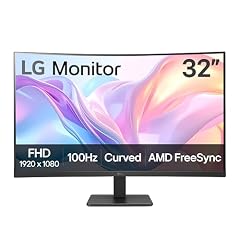
LG 32MR50C-B Curved Monitor 32-Inch FHD 100Hz AMD FreeSync OnScreen
- Size
- 32 in
- Resolution
- FHD 1080p
- Refresh
- 100 Hz
- Panel
- VA
$167.67 (as of 10/24/2026 16:07 PDT - Details)
The LG 32MR50C-B brings a 32-inch curved VA panel with 1080p and 100Hz. Its size is impressive for immersive viewing, and VA provides good contrast for movies and games.
Pros
- 32-inch FHD (1920x1080) resolution
- VA panel for deep blacks
- Curved screen
- AMD FreeSync (per the name)
Cons
- 1080p on 32 inches may show visible pixels
- Large footprint might dominate a desk
Good fit if
- Users who want a cinema-like display for entertainment
- Gamers who prefer a big screen for immersion
Skip if
- You need higher resolution for detailed work
- You have limited desk space
Verdict: A big curved monitor that impresses on size, but pixels are looser at 1080p.
9 Best USB-C hub monitor

Philips 34 Inch Curved Computer Monitor UWQHD 100Hz USB-C PD VA
- Size
- 34 in
- Resolution
- 3440x1440
- Refresh
- 100 Hz
- Panel
- VA
$309.99 (as of 10/24/2026 17:11 PDT - Details)
The Philips 346E2CUAE is a 34-inch VA ultrawide with 3440x1440 resolution and 100Hz. It includes USB-C with power delivery (as the name notes) and an Ethernet port, making it a capable single-cable hub for laptops.
Pros
- 34-inch 3440x1440 resolution for multitasking
- VA panel for good contrast
- USB-C with power delivery (per the name)
- RJ45 Ethernet port (per the name)
Cons
- No webcam or speakers mentioned
- Curved VA may not suit color-accurate work
Good fit if
- Laptop users who want to replace a docking station
- Professionals needing extra screen width for spreadsheets or code
Skip if
- You prefer an IPS panel for wide viewing angles
- You want a flat screen for design work
Verdict: A productivity ultrawide that streamlines your desk setup.
10 Best smart monitor

LG 34SR60QC-W 34-inch QHD
- Size
- 34 in
- Resolution
- QHD 1440p
- Refresh
- 100 Hz
$329.99 (as of 10/24/2026 16:07 PDT - Details) Typical price: $349.99, 6% off
The LG 34SR60QC-W is a 34-inch QHD curved smart monitor with webOS built in, allowing direct streaming apps without a PC. It also supports HDR10 and runs at 100Hz for smooth browsing.
Pros
- 34-inch QHD (3440x1440) resolution
- Curved screen for immersion
- Built-in webOS with streaming apps
- HDR10 support
Cons
- No panel type stated by the seller
- Smart features may become outdated
- No USB-C mentioned
Good fit if
- Users who want a monitor that also acts as a smart TV
- Those who prefer a two-in-one device for living areas
Skip if
- You already have streaming hardware
- You need a simple monitor without extra features
Verdict: A feature-rich smart ultrawide that doubles as a TV.
11 Best 34-inch QHD

SAMSUNG 34" ViewFinity S50GC Series Ultra-WQHD Monitor
- Size
- 34 in
- Resolution
- QHD 1440p
- Refresh
- 100 Hz
$279.99 (as of 10/24/2026 18:07 PDT - Details)
The Samsung ViewFinity S50GC is a 34-inch QHD monitor with a 100Hz refresh, HDR10, and AMD FreeSync. It offers a flat, borderless design that suits multi-monitor setups and professional work.
Pros
- 34-inch QHD (3440x1440) resolution
- 100Hz refresh rate
- HDR10 support
- AMD FreeSync (per the name)
Cons
- Panel type not stated by the seller
- No height adjustment mentioned
- Curve not stated (flat design per name 'Ultra')
Good fit if
- Users who want a large, high-res monitor for productivity
- Gamers who value smooth frame rates
Skip if
- You need USB-C connectivity
- You prefer a curved screen for immersion
Verdict: A straightforward, high-resolution ultrawide with gaming features.
12 Best 34-inch IPS

LG 34U650A-B 34-inch UltraWide IPS WQHD 100Hz HDR10 Curved Monitor
- Size
- 34 in
- Resolution
- QHD 1440p
- Refresh
- 100 Hz
- Panel
- IPS
$399.99 (as of 10/24/2026 16:07 PDT - Details)
The LG 34U650A-B is a 34-inch IPS ultrawide with QHD resolution and 100Hz. IPS offers wide viewing angles and accurate colors, making it a good all-rounder for work and entertainment.
Pros
- 34-inch QHD (3440x1440) resolution
- IPS panel for wide viewing angles
- 100Hz refresh
- HDR10 support
Cons
- No USB-C mentioned
- Larger footprint
- May be heavier than smaller monitors
Good fit if
- Professionals who need color accuracy for design or video
- Users who want a high-resolution ultrawide without a curve
Skip if
- You want a curved screen
- You need a single-cable laptop connection
Verdict: A flat IPS ultrawide that balances quality and functionality.
13 Best for video calls
Philips 34E1C5600HE 34" UltraWide QHD 21
- Size
- 34 in
- Resolution
- QHD 1440p
- Refresh
- 100 Hz
- Panel
- VA
$354.29 (as of 10/24/2026 17:11 PDT - Details)
The Philips 34E1C5600HE includes a built-in Windows Hello webcam and noise-canceling mic (per the name), making it an ideal monitor for remote work. It also has USB-C and runs at 100Hz on a QHD VA panel.
Pros
- 34-inch QHD (3440x1440) resolution
- Built-in webcam with Windows Hello (per the name)
- Noise-canceling microphone (per the name)
- USB-C connection (per the name)
Cons
- VA panel may have narrower viewing angles than IPS
- Webcam is fixed, not detachable
- No speakers mentioned beyond the mic
Good fit if
- Remote workers who video conference daily
- Users who want a large screen with a built-in camera
Skip if
- You already have a good external webcam
- You prefer an IPS panel for color work
Verdict: A productivity ultrawide with an edge for video meetings.
14 Best entry ultrawide

LG 34U530A-W 34-inch UltraWide WFHD
- Size
- 34 in
- Resolution
- 2560x1080
- Refresh
- 100 Hz
- Panel
- IPS
$269.99 (as of 10/24/2026 16:07 PDT - Details)
The LG 34U530A-W is a 34-inch IPS ultrawide with 2560x1080 resolution and 100Hz. It's a more affordable way to get an ultrawide experience with a trusted brand and solid panel tech.
Pros
- 34-inch 2560x1080 resolution (WFHD)
- IPS panel for wide viewing angles
- 100Hz refresh
- VESA DisplayHDR 400 (per the name)
Cons
- Lower vertical resolution than QHD models
- No USB-C mentioned
- Large size may need a deep desk
Good fit if
- First-time ultrawide buyers on a budget
- Gamers who want a wide FOV without high resolution demands
Skip if
- You need sharper text for work
- You want a curved screen
Verdict: An affordable IPS ultrawide that gets you the format without a premium price.
How they compare
Our selection method
The pool comprised 20 monitors with a 100Hz refresh rate. From this pool, 14 picks were chosen using criteria such as resolution, panel type, size, and connectivity, with a preference for established brands and clearly stated specifications. All specifications are taken from the seller's listings; missing information is noted as not stated. Prices on this page are live from the store and update automatically. No unit was physically tested; selections are based on published specifications.
What matters when choosing
Resolution: What works for a 100 Hz panel?
100Hz is a smooth refresh rate, but the resolution determines how sharp the image looks. For a 24-inch or 27-inch monitor, 1080p (1920x1080) is common and fine for office tasks. On larger screens like 32-inch or 34-inch ultrawide, 1080p shows visible pixels; consider QHD (2560x1440 or 3440x1440) for more detail. Higher resolutions are better for reading text, photo editing, and multitasking, but they require more graphics power from your PC to hit 100Hz in games.
Panel Type: IPS vs. VA
IPS panels offer wide viewing angles and accurate colors, making them great for shared screens and creative work. VA panels have higher contrast and deeper blacks, which is good for movies and games, but they often have narrower viewing angles. For a 100Hz monitor, both can work well; choose based on your main use. IPS is usually preferred for office and design, VA for media consumption. Some budget models do not state the panel type, so check the seller's description.
Connectivity: HDMI, DisplayPort, and USB-C
Make sure the monitor has inputs that match your computer. Most 100Hz monitors include HDMI and often DisplayPort. If you have a modern laptop with USB-C, a monitor with USB-C Power Delivery can charge your laptop and carry display signal through one cable, reducing clutter. Look for USB-C with wattage high enough for your laptop (e.g., 60W or 96W). Ethernet ports on monitors can also add wired network to a laptop, useful in docking setups.
Adaptive Sync: FreeSync and G-Sync
Adaptive sync technologies like AMD FreeSync and NVIDIA G-Sync reduce screen tearing and stuttering when your frame rate is below the refresh rate. Many 100Hz monitors support FreeSync, which works with recent NVIDIA GPUs as well. If you are a gamer, having adaptive sync is a plus. Check the monitor's specs for mention of FreeSync or G-Sync. Not all 100Hz models include it, so decide if it's essential.
Ergonomics and Mounting
Check if the monitor supports tilt, height adjustment, swivel, or VESA mounting. A stand that allows height and tilt helps you set a comfortable viewing position. VESA mount compatibility is important if you plan to use an arm or wall mount. Some budget monitors only offer tilt, so consider your desk setup. Also, pay attention to the visual design, though this is subjective.
Extra Features: HDR, Speakers, and Smart TV
Some 100Hz monitors support HDR10, which expands dynamic range for brighter highlights and darker shadows. HDR10 is a basic standard; better HDR requires certification like VESA DisplayHDR. Built-in speakers are convenient but often small. Smart monitors with webOS or similar allow streaming apps without a PC, but they cost more. Decide if these extras are worth the price for your use case.
Questions
Is 100Hz a big upgrade from 60Hz?
Yes, moving from 60Hz to 100Hz makes motion look noticeably smoother. Scrolling through web pages feels fluid, and games appear more responsive. For most users, the jump from 60Hz to 100Hz is a clear improvement, though it is smaller than the leap to 144Hz. If your PC can output frame rates above 100, you will benefit from the higher refresh.
Do I need a powerful GPU for a 100Hz monitor?
It depends on the resolution and the software you run. For productivity, any integrated GPU can drive a 1080p 100Hz desktop. For games, reaching 100 frames per second requires a GPU that can render at that rate. At 1080p, mid-range GPUs can often hit 100fps in esports titles. At 1440p or ultrawide, you may need a more powerful card. Always match your graphics card's capability to the monitor's resolution.
What is the difference between 100Hz and 144Hz?
144Hz is 44% faster than 100Hz, offering even smoother motion. For competitive gaming, 144Hz is often preferred, but 100Hz is still a big step up from 60Hz. The difference between 100Hz and 144Hz is less obvious than the jump from 60Hz to 100Hz, but for professional esports players, the extra refresh can matter.
Should I choose an ultrawide monitor for work?
Ultrawide monitors, like 34-inch models, give you extra horizontal space for side-by-side windows, which is great for spreadsheets, coding, or video editing. They can also be immersive for games. However, ultrawide screens take up more desk space and can be heavier. Consider whether your desk can accommodate the width and whether your computer can drive the resolution smoothly.
Change log
- : First published.