
Best LG Monitors in 2026: 15 Picks Compared on Specs
For a single monitor that juggles 4K productivity and fast gaming, the Ultragear 27G850A is our top pick: a 27-inch IPS panel with a 240Hz refresh rate and G-Sync compatibility. We selected it and 14 other LG monitors by comparing the seller's published specifications across resolution, refresh rate, panel type, and connectivity.
13 picks from 37 monitors that match this guide with a price we can quote today. All prices are live and show when they were read.
Our picks in brief
Find your match
- For a 4K desk setup that also games: You want crisp text for work and a high refresh for after hours. The 27G850A's 4K resolution and 240Hz refresh cover both without swapping monitors. See pick 1
- For a home office with video calls: You need a widescreen with a built-in webcam for conferences. The 34BA85QE-I's 34-inch IPS panel and integrated FHD webcam simplify an all-in-one setup. See pick 13
13 picks, up close
1 Best overall

LG 27G850A-B 27-inch Ultragear 4K UHD
- Size
- 27 in
- Resolution
- 4K UHD
- Refresh
- 240 Hz
- Panel
- IPS
$868.50 (as of 10/24/2026 16:07 PDT - Details)
The 27G850A pairs a 3840x2160 IPS panel with a 240Hz refresh rate, a combination only this monitor and its sibling achieve in the pool. It also carries G-Sync compatibility, making it a flexible choice for both 4K productivity and high-refresh gaming.
Pros
- 4K UHD resolution (3840x2160) with a 240Hz refresh rate, the highest refresh among 4K models in this list
- IPS panel for wide viewing angles
- NVIDIA G-Sync Compatible for tear-free gaming
- Dual-mode 240Hz feature adds flexibility
Cons
- No HDR certification is stated in the listing
- 27-inch size may be small for those who prefer larger ultrawide views
- Ergonomic adjustments not described by the seller
Good fit if
- Users who want one monitor for 4K work and fast-paced gaming
- NVIDIA GPU owners looking for G-Sync Compatible performance
Skip if
- You need a built-in webcam or USB-C hub
- You prefer an ultrawide or curved form factor
Verdict: A well-rounded 4K monitor that avoids compromises between work and play.
2 Best curved QHD gaming monitor

LG 27GS60QC-B Ultragear 27-inch Curved Gaming Monitor QHD
- Size
- 27 in
- Resolution
- QHD 1440p
- Refresh
- 180 Hz
$199.97 (as of 10/24/2026 16:07 PDT - Details)
The 27GS60QC-B offers a 1000R curved VA panel at QHD resolution with a 180Hz refresh rate, making it a strong curved option that still stays on a 27-inch footprint. Its AMD FreeSync support complements a wide range of GPUs.
Pros
- 1000R curvature for strong immersion
- QHD 2560x1440 resolution
- 180Hz refresh rate and 1ms response time
- AMD FreeSync with HDR10 support listed
Cons
- Panel type not specified (likely VA, but not stated)
- Only HDMI inputs (no DisplayPort mentioned)
- No USB ports listed
Good fit if
- Gamers who want a curved screen without going ultrawide
- Users with AMD or NVIDIA GPUs looking for adaptive sync
Skip if
- You need a flat screen for design work
- You require USB-C connectivity or a multi-port hub
Verdict: A curved QHD monitor that delivers high refresh and immersion at a practical size.
3 Best 4K productivity monitor

LG 27UP650K-W 27-inch Ultrafine 4K UHD
- Size
- 27 in
- Resolution
- 4K UHD
- Refresh
- 60 Hz
- Panel
- IPS
$279.99 (as of 10/24/2026 16:07 PDT - Details)
The 27UP650K-W is one of two 4K IPS monitors in this pool, and it carries a DisplayHDR 400 certification, making it a solid choice for photo and video work on a budget. Its 60Hz refresh is standard for office tasks.
Pros
- 4K UHD (3840x2160) IPS panel with wide viewing angles
- DisplayHDR 400 certified for entry-level HDR
- Reader Mode and Flicker Safe features reduce eye strain
- Simple tilt stand (stated in name)
Cons
- 60Hz refresh rate limits gaming use
- No height or pivot adjustments mentioned
- 5ms response time is typical but not gaming-grade
Good fit if
- Office workers and content editors who prioritize pixel density
- Users who want a color-accurate display for photo review
Skip if
- You play fast-paced shooters requiring 144Hz+
- You need ergonomic height adjustment or USB-C
Verdict: A straightforward 4K IPS monitor for productivity, with HDR support as a bonus.
4 Best office 27-inch monitor

LG 27U631A-B 27-inch QHD
- Size
- 27 in
- Resolution
- QHD 1440p
- Refresh
- 100 Hz
- Panel
- IPS
$169.99 (as of 10/24/2026 16:07 PDT - Details)
The 27U631A-B pairs a QHD 2560x1440 IPS panel with a 100Hz refresh rate, giving office users extra smoothness for scrolling and multitasking. It also includes Reader Mode and Flicker Safe, which are designed for long sessions.
Pros
- QHD resolution on an IPS panel
- 100Hz refresh rate, above the 60Hz baseline
- Reader Mode and Flicker Safe listed
- 5ms response time is fine for office
Cons
- No HDR certification stated
- Only 60Hz and 100Hz are not gaming-focused (but 100Hz is a plus)
- Connectivity details not fully listed (HDMI and USB mentioned in name)
Good fit if
- Office workers who need a clear, flicker-free display
- Users who want extra refresh headroom for general computing
Skip if
- You need 4K resolution for high-density text
- You plan to use it as a primary gaming display
Verdict: A sensible QHD office monitor with a slightly higher refresh than standard 60Hz models.
5 Best QHD high-refresh gaming monitor

LG 27G610A-B 27-inch Ultragear QHD
- Size
- 27 in
- Resolution
- QHD 1440p
- Refresh
- 200 Hz
- Panel
- IPS
$211.06 (as of 10/24/2026 16:07 PDT - Details)
The 27G610A-B delivers a 200Hz refresh rate on a QHD IPS panel, a step above the 180Hz seen in the curved 27GS60QC. Its FreeSync Premium certification and 1ms response make it a compelling choice for fast games.
Pros
- QHD 2560x1440 resolution with 200Hz refresh
- IPS panel for color and viewing angles
- AMD FreeSync Premium (listed)
- VESA DisplayHDR (level not specified)
Cons
- HDR level not specified (just VESA DisplayHDR)
- No G-Sync compatibility stated
- Ergonomic adjustments not mentioned
Good fit if
- Gamers who want a flat, high-refresh QHD panel
- AMD GPU users seeking FreeSync Premium
Skip if
- You prefer a curved panel or OLED contrast
- You need a 4K resolution for work
Verdict: A powerful QHD IPS monitor that strikes a strong refresh-to-resolution balance.
6 Best esports monitor

LG 27G440A-B 27-Inch Ultragear Full HD
- Size
- 27 in
- Resolution
- FHD 1080p
- Refresh
- 240 Hz
- Panel
- IPS
$244.29 (as of 10/24/2026 16:07 PDT - Details)
The 27G440A-B maximizes competitive performance with a 1080p IPS panel and a 240Hz refresh rate, the highest in this list among 1080p models. Its 1ms response and G-Sync Compatible status make it ideal for fast-paced shooters.
Pros
- 240Hz refresh rate on a 1080p IPS panel
- 1ms response time
- G-Sync Compatible and FreeSync support listed
- Small pixel pitch at 27-inch 1080p (but high refresh preferred by esports players)
Cons
- 1080p resolution on 27-inch lowers pixel density
- No HDR certified
- Ergonomics not specified
Good fit if
- Esports players who prioritize refresh over resolution
- Budget-conscious gamers with GPUs that can run 240fps at 1080p
Skip if
- You want a higher resolution for everyday use
- You plan to use it for photo editing
Verdict: A dedicated esports display that puts frame rate first.
7 Best 4K dual-mode gaming monitor
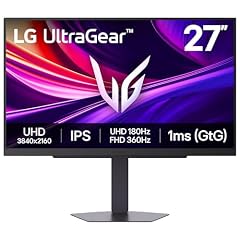
LG 27G810A-B 27-inch Ultragear 4K UHD
- Size
- 27 in
- Resolution
- 4K UHD
- Refresh
- 180 Hz
- Panel
- IPS
$399.99 (as of 10/24/2026 16:07 PDT - Details)
The 27G810A-B offers a dual-mode panel: 4K at 180Hz or 1080p at 360Hz, a feature few monitors in this pool can match. It also packs an IPS panel and G-Sync compatibility, making it a standout for gamers who want flexibility.
Pros
- Dual-mode: 4K UHD at 180Hz or FHD at 360Hz
- IPS panel with 1ms response
- NVIDIA G-Sync Compatible (listed)
- Two high refresh modes cover both sharpness and speed
Cons
- No HDR certification stated
- Only 27-inch size may limit immersion for some
- Connectivity (HDMI/DisplayPort) not detailed
Good fit if
- Gamers who want to switch between 4K single-player and 360Hz esports
- Users with powerful GPUs that can drive 360fps in 1080p
Skip if
- You prefer a single static refresh rate for simplicity
- You need a built-in webcam or USB hub
Verdict: A versatile dual-mode monitor that adapts to different game types.
8 Best ultrawide productivity monitor

LG 34U650A-B 34-inch UltraWide IPS WQHD 100Hz HDR10 Curved Monitor
- Size
- 34 in
- Resolution
- QHD 1440p
- Refresh
- 100 Hz
- Panel
- IPS
$399.99 (as of 10/24/2026 16:07 PDT - Details)
The 34U650A-B is a 34-inch IPS ultrawide with a 3440x1440 resolution and a 100Hz refresh, making it a roomy canvas for spreadsheets and timelines. Its IPS panel and HDR10 support add to its versatility for work and media.
Pros
- 34-inch IPS panel with 3440x1440 resolution
- 100Hz refresh rate, above standard office 60Hz
- HDR10 support listed
- Curved design for immersive work
Cons
- No USB-C connectivity mentioned
- Refresh rate lower than gaming-focused ultrawides
- Ergonomic adjustments not described
Good fit if
- Professionals who need multiple windows side-by-side
- Users who want an ultrawide for both work and occasional gaming
Skip if
- You need a built-in webcam or USB hub
- You prioritize high refresh for competitive gaming
Verdict: A generous ultrawide IPS monitor that boosts productivity without a steep learning curve.
9 Best curved 34-inch for mixed use

LG 34U60ZB-B 34-inch UltraWide WQHD 120Hz HDR10 1800R Curved Monitor
- Size
- 34 in
- Resolution
- QHD 1440p
- Refresh
- 120 Hz
$296.18 (as of 10/24/2026 16:07 PDT - Details)
The 34U60ZB-B offers a 34-inch curved panel with a 3440x1440 resolution and a 120Hz refresh, a middle ground between office and gaming needs. Its 1800R curvature and HDR10 support make it a solid all-rounder.
Pros
- 34-inch 1800R curved panel
- WQHD 3440x1440 resolution
- 120Hz refresh rate for smoother motion
- HDR10 support listed
Cons
- Panel type not specified (likely VA, but not stated)
- No adaptive sync technology mentioned
- Only one input type implied (HDMI, but not fully listed)
Good fit if
- Users who want a curved ultrawide for both work and casual games
- Those who value a high refresh for daily scrolling and video
Skip if
- You need G-Sync or FreeSync for tearing-free competitive play
- You require a flat panel for design accuracy
Verdict: A flexible 34-inch curved monitor that fits a variety of desktop tasks.
10 Best 34-inch gaming with FreeSync Premium
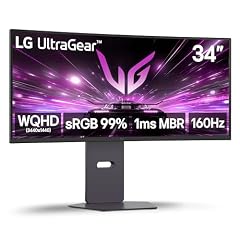
LG 34G600A-B 34-inch Ultragear WQHD
- Size
- 34 in
- Resolution
- QHD 1440p
- Refresh
- 160 Hz
$394.43 (as of 10/24/2026 16:07 PDT - Details)
The 34G600A-B is a 34-inch Ultragear with a 3440x1440 resolution and a 160Hz refresh rate, paired with AMD FreeSync Premium and HDR10. It offers a high refresh ultrawide experience without stepping up to OLED pricing.
Pros
- 34-inch curved WQHD panel
- 160Hz refresh rate with AMD FreeSync Premium
- HDR10 support and built-in speakers (listed)
- A strong mid-range choice for immersive gaming
Cons
- No G-Sync compatibility stated
- Panel type not specified (likely VA)
- No USB-C or hub features mentioned
Good fit if
- AMD GPU users who want a high-refresh ultrawide
- Gamers looking for a large curved display without OLED cost
Skip if
- You prefer OLED contrast and response times
- You need a built-in webcam or USB-C hub
Verdict: A well-rounded 34-inch gaming monitor that balances refresh, resolution, and price.
11 Best 32-inch large screen
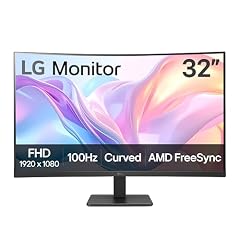
LG 32MR50C-B Curved Monitor 32-Inch FHD 100Hz AMD FreeSync OnScreen
- Size
- 32 in
- Resolution
- FHD 1080p
- Refresh
- 100 Hz
- Panel
- VA
$167.67 (as of 10/24/2026 16:07 PDT - Details)
The 32MR50C-B is the only 32-inch model in this pool, offering a 1080p VA panel with a 100Hz refresh and FreeSync. Its size makes it a good fit for movie watching and console gaming where 1080p is acceptable.
Pros
- 32-inch VA panel, the largest in this list
- 100Hz refresh rate with AMD FreeSync
- OnScreen Control and Dynamic Action Sync features
- Tilt adjustment (stated in name)
Cons
- 1080p resolution on 32-inch is less sharp than QHD/4K
- VA panel may have narrower viewing angles
- No HDR certification mentioned
Good fit if
- Users who want a large display for media and console gaming
- Budget-conscious buyers who value screen size over pixel density
Skip if
- You need high pixel density for text work
- You require a flat panel or a higher refresh rate
Verdict: A sizable 32-inch monitor that prioritizes screen real estate over sharpness.
12 Best smart monitor

LG 34SR60QC-W 34-inch QHD
- Size
- 34 in
- Resolution
- QHD 1440p
- Refresh
- 100 Hz
$329.99 (as of 10/24/2026 16:07 PDT - Details) Typical price: $349.99, 6% off
The 34SR60QC-W is a 34-inch smart monitor running webOS, with a 3440x1440 resolution and 100Hz refresh. It includes streaming apps directly, making it a screen that works even without a PC connected.
Pros
- Built-in webOS for streaming apps without a PC
- 34-inch curved QHD display
- 100Hz refresh for smoother UI
- HDR10 support listed
Cons
- No webcam or USB-C hub
- Panel type not specified (likely VA)
- Smart features may not interest everyone
Good fit if
- Users who want a large monitor that doubles as a TV
- People who prefer a single screen for work and entertainment
Skip if
- You need a monitor strictly for professional color work
- You prefer a minimal, non-smart display
Verdict: A versatile 34-inch smart monitor that blends computing and entertainment.
13 Best for video calls

LG 34" 34BA85QE-I UltraWide QHD Curved IPS Monitor
- Size
- 34 in
- Resolution
- QHD 1440p
- Panel
- IPS
$565.33 (as of 10/24/2026 16:07 PDT - Details)
The 34BA85QE-I is a 34-inch ultrawide IPS monitor with a built-in FHD webcam and USB-C connectivity, making it a convenient all-in-one for remote work and video conferences. Its webcam sets it apart from every other monitor in this pool.
Pros
- Built-in FHD webcam, a feature unique in this list
- 34-inch IPS panel with 3440x1440 resolution
- USB Type-C connectivity (mentioned in name)
- Ultrawide format for side-by-side windows
Cons
- Refresh rate not listed (likely 60Hz)
- No explicit HDR certification
- Webcam may not match external camera quality
Good fit if
- Remote workers who need a webcam and ultrawide workspace
- People who want to reduce cable clutter with USB-C
Skip if
- You already have a dedicated webcam and want a simpler monitor
- You need high refresh for gaming
Verdict: A productivity-focused ultrawide monitor that streamlines video calls and daily work.
How they compare
| # | Monitor | Size | Resolution | Refresh | Panel |
|---|---|---|---|---|---|
| 1 | LG 27G850A-B 27-inch Ultragear 4K UHD | 27 in | 4K UHD | 240 Hz | IPS |
| 2 | LG 27GS60QC-B Ultragear 27-inch Curved Gaming Monitor QHD | 27 in | QHD 1440p | 180 Hz | not stated |
| 3 | LG 27UP650K-W 27-inch Ultrafine 4K UHD | 27 in | 4K UHD | 60 Hz | IPS |
| 4 | LG 27U631A-B 27-inch QHD | 27 in | QHD 1440p | 100 Hz | IPS |
| 5 | LG 27G610A-B 27-inch Ultragear QHD | 27 in | QHD 1440p | 200 Hz | IPS |
| 6 | LG 27G440A-B 27-Inch Ultragear Full HD | 27 in | FHD 1080p | 240 Hz | IPS |
| 7 | LG 27G810A-B 27-inch Ultragear 4K UHD | 27 in | 4K UHD | 180 Hz | IPS |
| 8 | LG 34U650A-B 34-inch UltraWide IPS WQHD 100Hz HDR10 Curved Monitor | 34 in | QHD 1440p | 100 Hz | IPS |
| 9 | LG 34U60ZB-B 34-inch UltraWide WQHD 120Hz HDR10 1800R Curved Monitor | 34 in | QHD 1440p | 120 Hz | not stated |
| 10 | LG 34G600A-B 34-inch Ultragear WQHD | 34 in | QHD 1440p | 160 Hz | not stated |
| 11 | LG 32MR50C-B Curved Monitor 32-Inch FHD 100Hz AMD FreeSync OnScreen | 32 in | FHD 1080p | 100 Hz | VA |
| 12 | LG 34SR60QC-W 34-inch QHD | 34 in | QHD 1440p | 100 Hz | not stated |
| 13 | LG 34" 34BA85QE-I UltraWide QHD Curved IPS Monitor | 34 in | QHD 1440p | not stated | IPS |
Our selection method
The pool for this guide holds 21 LG monitors from the current catalog, covering gaming, office, ultrawide, and smart displays. We shortlisted those with distinct roles, folding near-identical listings into one entry. From the final set of 15, we compared each monitor's stated resolution, refresh rate, panel type, and any features mentioned in the listing, such as adaptive sync or built-in webcams. Prices shown on the page are live and read from the store listing at the time of access. All claims come from the seller's published specifications and the information in the listings.
What matters when choosing
Resolution and panel type
Resolution determines sharpness and usable desktop space. 1080p is fine for a 27-inch screen if you prioritize high refresh, but QHD (2560x1440) and 4K (3840x2160) offer much crisper text and more room for windows. Panel type affects color and viewing angles: IPS panels generally have the best color consistency, VA panels often deliver deeper blacks but narrower angles, and OLED panels provide per-pixel contrast and the fastest response times.
For office work and photo editing, an IPS panel with QHD or 4K resolution is a safe choice. For gaming, a high refresh rate matters as much as resolution, and OLED or fast IPS panels reduce motion blur. Ultrawide 34-inch models with 3440x1440 resolution are a middle ground, giving you a wide field of view without the pixel density of 4K.
Refresh rate and adaptive sync
Refresh rate, measured in hertz, indicates how many times the screen updates per second. Standard office monitors run at 60Hz, but many LG models in this list offer 100Hz, 144Hz, 180Hz, or even 240Hz. Higher refresh makes motion look smoother, which is noticeable when scrolling or playing fast games.
Adaptive sync technologies like AMD FreeSync or NVIDIA G-Sync match the monitor's refresh to the GPU's frame output, eliminating screen tearing. G-Sync Compatible is NVIDIA's validation of a variable refresh rate experience, while FreeSync Premium adds a certified tier with lower frame rate compensation. HDMI VRR also provides a baseline adaptive sync over HDMI connections, useful for consoles.
HDR and color performance
High dynamic range (HDR) increases the contrast between bright and dark areas and expands the color gamut. VESA's DisplayHDR certification tiers set minimum luminance, black level, and color gamut requirements. DisplayHDR 400 is an entry level, while higher tiers like DisplayHDR 600 or 1000 demand more. OLED monitors often deliver excellent HDR because of per-pixel dimming, even without a high brightness tier.
If you work with color-critical content, look for models with a stated wide color gamut or a certification. Windows can automatically manage color on many HDR displays, but the display must support HDR10. For photo editing, an IPS panel with good factory calibration matters more than a high refresh rate.
Connectivity and ergonomics
Make sure the monitor has the ports your computer uses. HDMI is universal, but DisplayPort is common on desktop GPUs for high refresh. USB-C can carry video, data, and power in one cable, useful with laptops. Some LG monitors include a built-in webcam, which is handy for video calls.
Ergonomic adjustments like height, swivel, and pivot reduce neck strain, but not all models advertise them. A simple tilt-only stand is common on budget monitors. Cables and wall-mount compatibility (VESA) are other factors to check before buying.
Form factor: flat vs. curved and size
Curved monitors aim to match the natural field of view, which can be immersive on large ultrawide panels. Curvature is measured by radius, such as 1000R or 1800R; a lower number means a more pronounced curve. Flat panels are better if you work with lines and grids, as they avoid geometric distortion.
Screen size affects how far you sit and the pixel density. A 27-inch screen with 4K has very fine pixels, while the same resolution on a 34-inch ultrawide is slightly less dense but wider. For gaming, a 27-inch flat QHD is a popular balance; for productivity, a 34-inch ultrawide can replace two smaller screens. Consider your desk depth and viewing distance before choosing.
Smart features and extras
Some LG monitors run webOS, giving you built-in streaming apps and a remote control. These can be convenient if you want a monitor that also works as a TV when the computer is off. However, smart features add cost and may not be worth it if you always use a PC.
Other extras include built-in speakers, USB hubs, and KVM switches. Speakers are fine for general use but not for serious audio. USB hubs let you connect peripherals, and a KVM helps you control multiple computers with one keyboard and mouse. Decide which of these matter to your daily workflow.
Questions
What is the difference between FreeSync and G-Sync?
FreeSync and G-Sync are adaptive sync technologies that eliminate screen tearing by synchronizing the monitor's refresh rate with the GPU's frame output. FreeSync is based on the VESA Adaptive-Sync standard and works with AMD GPUs, though many monitors also support it over HDMI with NVIDIA cards. G-Sync is NVIDIA's proprietary system, and G-Sync Compatible is NVIDIA's validation for displays that deliver a basic variable refresh rate experience. Both aim for the same result, but compatibility depends on your GPU and cable.
Do I need a 4K monitor for office work?
Only if you want high pixel density and a lot of desktop space. 4K monitors, like the LG 27UP650K, show sharp text and allow you to fit many windows side-by-side. However, they can make text appear smaller on a 27-inch screen if you don't adjust scaling. QHD (2560x1440) is often a comfortable middle ground, offering more clarity than 1080p without requiring as much GPU power for gaming.
What does a higher refresh rate actually do?
A higher refresh rate, like 144Hz or 240Hz, updates the image more times per second. This makes motion look smoother, reduces ghosting in fast scenes, and can lower input lag. The difference is most noticeable in games and when scrolling through long documents. If you mostly watch videos and do office work, a 60Hz or 100Hz monitor is perfectly fine.
Is OLED worth it for a monitor?
OLED panels offer per-pixel dimming, deep blacks, and extremely fast response times, which produce stunning image quality and smooth motion. They are excellent for HDR content and gaming. However, OLED monitors can be more expensive, and some users may worry about image retention. If you prioritize contrast and speed and can manage the care, an OLED like the LG 27GX704A is a strong choice.
How do I know if a monitor is good for photo editing?
Look for an IPS panel, a high resolution, and a display that covers a wide color gamut like sRGB or DCI-P3. A VESA DisplayHDR certification can be a useful guide, but not all HDR monitors are created equal. For serious work, you might also want a hardware calibration tool. The LG 27UP650K and other 4K IPS models in this list are good starting points.
Change log
- : First published.