
Best Monitors for Home and Office in 2026: 15 Picks Compared on Specs
For home and office work, a monitor needs clear text, wide viewing angles, and smooth motion for video and scrolling. The Dell 27 SE2726H pairs a 27-inch IPS panel with a 144Hz refresh rate, making it a strong all-rounder for spreadsheets, video calls, and light gaming. We compared 30 monitors in our pool using declared specifications such as panel type, resolution, and refresh rate, then selected 15 for this guide. Live prices are shown next to each pick.
15 picks from 34 monitors that match this guide with a price we can quote today. All prices are live and show when they were read.
Our picks in brief
Find your match
- For a compact home office: If your desk is tight, a 24-inch model like the ViewSonic VA2456A-MHD keeps the footprint small while still offering a 120Hz IPS panel for smooth scrolling and a built-in VESA mount. See pick 6
- For gaming after hours: The AOC 27-inch with a 180Hz refresh rate and IPS panel handles fast action in the evening and still works well for spreadsheets and documents during the day. See pick 9
- For a shared family computer: A 27-inch 120Hz IPS from Acer gives everyone a large, comfortable view for homework, video calls, and streaming without taking up too much desk space. See pick 5
- For a multi-monitor setup: The Dell 24 SE2426H with its 23.8-inch IPS panel and 144Hz refresh rate pairs well with a second screen for side-by-side productivity without overwhelming a small desk. See pick 2
15 picks, up close
1 Best overall

Dell 27 Monitor
- Size
- 27 in
- Resolution
- FHD 1080p
- Refresh
- 144 Hz
- Panel
- IPS
$108.99 (as of 10/24/2026 12:19 PDT - Details)
Combines a 27-inch IPS panel with a 144Hz refresh rate, giving you a large workspace for documents and smooth motion for video and light gaming. The IPS technology ensures wide viewing angles, and the 1080p resolution is practical for typical office tasks.
Pros
- 27-inch IPS panel for wide viewing angles
- 144Hz refresh rate smooths scrolling and video
- Reputable brand with a well-known warranty program
Cons
- 1080p resolution at 27 inches may appear less sharp up close
- No stated HDR support
- No USB-C connectivity mentioned
Good fit if
- Home workers who want one monitor for spreadsheets, video calls, and weekend gaming
- Users who value a large screen without moving to a higher resolution
Skip if
- You need 1440p or higher for detailed photo editing
- You prefer a curved display for immersive viewing
Verdict: A balanced 27-inch IPS monitor with a high refresh rate, ideal for mixed home office use.
2 Best compact 24-inch
Dell 24 Monitor
- Size
- 23.8 in
- Resolution
- FHD 1080p
- Refresh
- 144 Hz
- Panel
- IPS
$89.99 (as of 10/24/2026 12:19 PDT - Details)
At 23.8 inches, this Dell fits easily on small desks while offering the same 144Hz IPS panel as larger models. Its size and refresh rate make it a great choice for dual-monitor setups or tight spaces.
Pros
- Compact 23.8-inch size fits small desks
- 144Hz IPS panel for smooth performance
- Good brand reputation and support
Cons
- Smaller screen than 27-inch counterparts
- 1080p resolution is standard but not exceptional
- No built-in speakers mentioned
Good fit if
- Users with limited desk space
- Those building a multi-monitor array
Skip if
- You need a larger display for split-screen work
- You prefer a 27-inch or larger screen
Verdict: A space-saving 24-inch monitor with a high refresh rate, perfect for dual setups.
3 Best for long reading sessions

Philips 24 Inch Computer Monitor FHD 100Hz VA VESA Flicker-Free
- Size
- 24 in
- Resolution
- FHD 1080p
- Refresh
- 100 Hz
- Panel
- VA
$79.99 (as of 10/24/2026 17:11 PDT - Details)
The 24-inch VA panel offers high contrast, which can make text appear crisper for extended document work. It also runs at 100Hz, reducing flicker compared to standard 60Hz monitors, and the VESA mount adds flexibility.
Pros
- VA panel for high contrast and deep blacks
- 100Hz refresh rate reduces motion blur
- Flicker-free technology for eye comfort
Cons
- VA panels have narrower viewing angles than IPS
- Resolution is only 1080p
- No built-in speakers mentioned
Good fit if
- People who spend hours reading or writing
- Users who prioritize contrast over viewing angles
Skip if
- You need wide viewing angles for collaboration
- You want a higher resolution for design work
Verdict: A comfortable, high-contrast 24-inch VA monitor designed for extended document work.
4 Best for document-centric work
Philips 27" Computer Monitor FHD 100Hz VA VESA Eye Care
- Size
- 27 in
- Resolution
- FHD 1080p
- Refresh
- 100 Hz
- Panel
- VA
$89.99 (as of 10/24/2026 10:18 PDT - Details)
This 27-inch VA monitor provides a spacious canvas for spreadsheets and long-form writing. Its 100Hz refresh rate is smoother than basic 60Hz screens, and the VA panel delivers solid contrast for text readability.
Pros
- 27-inch VA panel with high contrast
- 100Hz refresh rate for fluid scrolling
- Eye Care features advertised
Cons
- Narrower viewing angles than IPS
- 1080p resolution may be less sharp on larger screen
- No USB-C or HDR support mentioned
Good fit if
- Office workers who need a large display for documents
- Users who prefer high contrast for reading
Skip if
- You need IPS viewing angles for shared screen use
- You plan to use it for color-critical work
Verdict: A large 27-inch VA monitor that prioritizes contrast and comfort for document-heavy tasks.
5 Best for straightforward office setup

Acer 27in FHD 1920x1080 IPS 120Hz Gaming Monitor
- Size
- 27 in
- Resolution
- FHD 1080p
- Refresh
- 120 Hz
- Panel
- IPS
$99.99 (as of 10/24/2026 11:17 PDT - Details)
The Acer 27-inch IPS monitor offers a simple, no-frills experience with a 120Hz refresh rate and an IPS panel for wide viewing angles. It's a reliable choice for standard office tasks like email, spreadsheets, and video calls.
Pros
- 27-inch IPS panel for clear images and wide angles
- 120Hz refresh rate for smoother motion
- Simple design with likely VESA mount support
Cons
- 1080p resolution may be basic for some
- No HDR or advanced features
- No built-in speakers mentioned
Good fit if
- Businesses upgrading from older 60Hz monitors
- Users who want a dependable 27-inch screen
Skip if
- You need a curved or high-resolution display
- You want gaming-specific features like FreeSync
Verdict: A solid, straightforward 27-inch IPS monitor that gets the job done without extras.
6 Best for family use

ViewSonic VA2456A-MHD 24 Inch 1080p IPS Computer Monitor
- Size
- 24 in
- Resolution
- FHD 1080p
- Refresh
- 120 Hz
- Panel
- IPS
$109.99 (as of 10/24/2026 19:08 PDT - Details)
This 24-inch IPS monitor from ViewSonic is versatile and easy to set up. The 120Hz refresh rate makes it great for online classes, light gaming, and general browsing, while the IPS panel ensures everyone sees the same colors from different angles.
Pros
- 24-inch IPS panel for wide viewing angles
- 120Hz refresh rate for a fluid experience
- VESA mount and HDMI inputs for flexibility
Cons
- 1080p resolution is standard but not future-proof
- No HDR support
- Built-in speakers not specified
Good fit if
- Families sharing a computer for work and school
- Users who want a reliable 24-inch monitor at a modest size
Skip if
- You need a larger screen for split-screen multitasking
- You require a curved panel
Verdict: A dependable 24-inch IPS monitor with a high refresh rate, well suited for shared home environments.
7 Best for business environments

ASUS BE249QG-R 24 Inch 1080P 120Hz Computer Monitor
- Size
- 24 in
- Resolution
- FHD 1080p
- Refresh
- 120 Hz
- Panel
- IPS
$156.99 (as of 10/24/2026 11:51 PDT - Details)
The ASUS BE249QG-R is TAA compliant, making it a safe choice for government and corporate workplaces. It pairs a 24-inch IPS panel with a 120Hz refresh rate, offering a professional look and smooth performance for everyday tasks.
Pros
- TAA compliant for business procurement
- 24-inch IPS panel with wide viewing angles
- 120Hz refresh rate smooths scrolling and presentations
Cons
- 1080p resolution is standard
- No HDR or advanced color features
- Limited to 24 inches for those who want bigger
Good fit if
- Corporate and government offices with compliance needs
- Users who prioritize a reputable brand and warranty
Skip if
- You need a larger display or higher resolution
- You are looking for gaming-focused features
Verdict: A professional-grade 24-inch IPS monitor with compliance certification and smooth performance.
8 Best for mixed gaming and work

LG 27" Ultragear Gaming Monitor
- Size
- 27 in
- Resolution
- FHD 1080p
- Refresh
- 144 Hz
- Panel
- IPS
$209.00 (as of 10/24/2026 16:07 PDT - Details)
The LG 27-inch Ultragear brings a 144Hz refresh rate and IPS panel to the desk, handling both productivity and fast-paced gaming without compromise. Its G-Sync compatibility helps reduce tearing when paired with an NVIDIA GPU.
Pros
- 27-inch IPS panel with 144Hz refresh rate
- G-Sync Compatible for tear-free gaming
- 1ms MBR for reduced motion blur
Cons
- 1080p resolution, not 1440p
- No built-in speakers
- HDR10 support but not certified to a high tier
Good fit if
- Users who game after hours but need a work monitor during the day
- Those with an NVIDIA GPU wanting G-Sync
Skip if
- You need a 4K display for video editing
- You prefer a curved panel
Verdict: A high-refresh IPS monitor that bridges office and gaming seamlessly.
9 Best for high refresh on a budget

AOC 27 Inch Gaming Monitor FHD 180Hz Fast IPS 0.5ms HDR
- Size
- 27 in
- Resolution
- FHD 1080p
- Refresh
- 180 Hz
- Panel
- IPS
$118.99 (as of 10/24/2026 11:40 PDT - Details)
The AOC 27-inch offers a 180Hz refresh rate and Fast IPS panel, making it one of the fastest in this list while still suitable for office work. Its 0.5ms response time and HDR support add to its versatility.
Pros
- 180Hz refresh rate for ultra-smooth motion
- Fast IPS panel with 0.5ms response
- HDR support for better contrast in media
Cons
- 1080p resolution may limit desktop space
- No mention of USB-C or built-in speakers
- Gaming-focused design may not fit all office aesthetics
Good fit if
- Users who want a high refresh rate without breaking the bank
- Gamers who also need a workable screen for spreadsheets
Skip if
- You need 4K resolution for detailed work
- You prefer a more conservative office look
Verdict: A high-refresh 27-inch monitor that delivers speed and works for office tasks.
10 Best with built-in speakers

Dell 27 Plus Monitor
- Size
- 27 in
- Resolution
- FHD 1080p
- Refresh
- 144 Hz
$174.99 (as of 10/24/2026 12:19 PDT - Details)
The Dell 27 Plus includes 2 x 3W speakers, eliminating the need for separate audio for video calls and media. It still offers a 144Hz refresh rate and a 27-inch screen, making it a complete package for home office use.
Pros
- Built-in 2 x 3W speakers for convenience
- 27-inch FHD display with 144Hz refresh rate
- Trusted Dell build quality and support
Cons
- Speakers are often limited in bass and volume
- 1080p resolution, not higher
- No HDR support mentioned
Good fit if
- Users who want a single display with audio for calls
- Those who prefer a well-known brand
Skip if
- You have a separate speaker system or headphones
- You need a higher resolution for design work
Verdict: A 27-inch monitor with built-in speakers and a high refresh rate, great for all-in-one desk setups.
11 Best compact with speakers

Dell 24 Plus Monitor
- Size
- 23.8 in
- Resolution
- FHD 1080p
- Refresh
- 144 Hz
$149.99 (as of 10/24/2026 12:19 PDT - Details)
The Dell 24 Plus offers the same built-in 2 x 3W speakers as its larger sibling but in a space-saving 23.8-inch frame. Its 144Hz refresh rate and IPS-like performance (though panel type not stated) make it versatile for small offices.
Pros
- Built-in 2 x 3W speakers
- Compact 23.8-inch size fits tight desks
- 144Hz refresh rate for smooth scrolling and video
Cons
- Panel type not stated by seller
- 1080p resolution is standard
- No height adjustment mentioned
Good fit if
- Small home offices needing audio without extra speakers
- Users who want a high refresh rate in a small footprint
Skip if
- You need a 27-inch screen
- You require a specific panel type like IPS or VA
Verdict: A compact 24-inch monitor with speakers and a high refresh rate for space-conscious users.
12 Best curved panel

Samsung 27" Essential S3
- Size
- 27 in
- Resolution
- FHD 1080p
- Refresh
- 100 Hz
$129.99 (as of 10/24/2026 18:06 PDT - Details) Typical price: $137.30, 5% off
The Samsung 27-inch Essential S3 features a 1800R curvature that wraps the screen around your field of view, which can reduce eye strain during long sessions. Its 100Hz refresh rate and VA panel provide good contrast and smooth motion for office tasks.
Pros
- 1800R curvature for a more immersive view
- 100Hz refresh rate for smoother movements
- VA panel for high contrast
Cons
- VA panel has narrower viewing angles
- 1080p resolution, not 1440p
- No built-in speakers
Good fit if
- Users who prefer a curved display for a modern look
- Those who want a high-contrast screen for movies and documents
Skip if
- You need IPS for wide viewing angles
- You also want a high refresh rate above 100Hz
Verdict: A curved 27-inch VA monitor that adds immersion to your home office.
13 Best for competitive gamers

LG 27G440A-B 27-Inch Ultragear Full HD
- Size
- 27 in
- Resolution
- FHD 1080p
- Refresh
- 240 Hz
- Panel
- IPS
$244.29 (as of 10/24/2026 16:07 PDT - Details)
The LG 27G440A steps up to a 240Hz refresh rate with a 1ms response time, making it ideal for fast-paced esports. Its IPS panel ensures colors stay consistent, and G-Sync compatibility keeps gameplay smooth on NVIDIA systems.
Pros
- 240Hz refresh rate for extreme smoothness
- 1ms response time reduces motion blur
- G-Sync Compatible for tear-free gaming
Cons
- 1080p resolution is lower than some competitors
- No HDR certification
- Built-in speakers not mentioned
Good fit if
- Esports players who also need an office monitor
- Users who prioritize refresh rate over resolution
Skip if
- You need 1440p or 4K for content creation
- You prefer a larger screen than 27 inches
Verdict: A 240Hz IPS monitor that dominates in fast games but still handles office work.
14 Best 27-inch 144Hz value
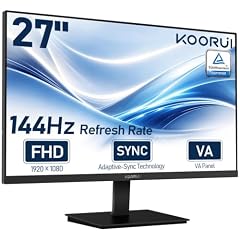
KOORUI 27-inch Computer Monitor
- Size
- 27 in
- Resolution
- FHD 1080p
- Refresh
- 144 Hz
- Panel
- VA
$129.99 (as of 10/24/2026 15:14 PDT - Details)
The KOORUI 27-inch delivers a 144Hz refresh rate and a VA panel at an entry-level price point, making high refresh rates accessible for everyday use. Its 1080p resolution is paired with a 27-inch screen, offering a large workspace without a high price.
Pros
- 27-inch VA panel with 144Hz refresh rate
- Entry-level pricing for a high-refresh monitor
- Good contrast from VA technology
Cons
- VA panel has narrower viewing angles
- 1080p resolution may appear less sharp on 27 inches
- Brand reputation less established
Good fit if
- Budget-conscious users who want a large, smooth display
- Those who work in spreadsheets and light gaming
Skip if
- You need IPS for color accuracy
- You prefer a smaller screen at higher pixel density
Verdict: A budget-friendly 27-inch 144Hz VA monitor that balances cost and performance.
15 Best 24-inch high refresh

Philips 24" Gaming Monitor FHD 180Hz Overlocked IPS HDR10
- Size
- 24 in
- Resolution
- FHD 1080p
- Refresh
- 180 Hz
- Panel
- IPS
$84.99 (as of 10/24/2026 17:11 PDT - Details)
The Philips 24E2G2200 packs a 180Hz refresh rate and an IPS panel into a compact 24-inch frame. It's a strong option for small desks that still want fast motion handling for gaming and fluid scrolling in documents.
Pros
- 180Hz refresh rate in a 24-inch size
- IPS panel for wide viewing angles
- HDR10 support for better contrast
Cons
- 1080p resolution is standard
- No USB-C or built-in speakers
- Gaming styling may not suit all offices
Good fit if
- Users with limited desk space who want high refresh
- Gamers who need a compact secondary monitor
Skip if
- You need a larger screen for multitasking
- You prefer a more professional design
Verdict: A compact 24-inch IPS monitor with an impressive 180Hz refresh rate for its size.
How they compare
Our selection method
We started with a pool of 30 monitors that matched our home and office filter. We prioritized models from established brands with a stated refresh rate of at least 100Hz and, where available, an IPS panel for wide viewing angles. We also considered screen size, resolution, and connectivity options. Prices shown are live and read from the listing at the time of writing. All comparisons are based on the specifications published by the sellers and the makers.
What matters when choosing
Panel Type: IPS vs. VA
IPS (In-Plane Switching) panels offer wide viewing angles and consistent colors, making them ideal for collaborative work and tasks where colors matter, such as photo editing. VA (Vertical Alignment) panels typically deliver higher contrast ratios and deeper blacks, which can enhance text readability and movie viewing, but they have narrower viewing angles. For general home and office use, IPS is often the safer choice unless you prioritize contrast over angle stability.
Refresh Rate: Beyond 60Hz
A standard monitor refreshes at 60Hz, but many modern office monitors now offer 100Hz, 120Hz, or even 144Hz. Higher refresh rates make scrolling through long documents, moving windows, and video playback feel noticeably smoother. They also reduce eye strain during prolonged use. For home office users who also game, a 144Hz or higher refresh rate provides a better experience without sacrificing work functionality.
Resolution and Screen Size
Most monitors in this guide are 1080p (1920x1080), which is sufficient for typical office tasks like email, spreadsheets, and web browsing. For screens 24 inches and below, 1080p offers a good pixel density. On 27-inch displays, some users may notice slightly larger pixels, but it's still practical for everyday use. If you work with high-resolution media or need more screen real estate, consider a 1440p or 4K monitor, though they are less common in this price range.
Connectivity and Built-in Speakers
Check for the ports you need: HDMI is standard, and DisplayPort is common on higher-refresh models. Some monitors include USB-C with Power Delivery, allowing you to charge a laptop and display video through a single cable, which is convenient for a tidy desk. Built-in speakers are handy for video calls and casual media, but their quality is often limited. If you have external speakers or a headset, you can prioritize other features.
Ergonomics and Mounting
A monitor with height adjustment, tilt, and swivel lets you position the screen to reduce neck and eye strain. VESA mount compatibility (usually 100x100mm) allows you to attach the monitor to an arm or wall mount, freeing up desk space and improving your setup. If you plan to use a multi-monitor arrangement, consider a model with slim bezels and VESA support.
Gaming Features for Work
Many monitors labeled as 'gaming' include features that benefit office use too. Variable Refresh Rate (VRR) technologies like FreeSync or G-Sync Compatible help eliminate screen tearing when the frame rate varies, which can also smooth scrolling and video playback. Low input lag and high refresh rates are bonuses for tasks that involve rapid movement, such as video editing timelines or interactive applications.
Questions
What is the best resolution for a home office monitor?
For most home office tasks, 1080p (Full HD) is sufficient and common in this price range. It provides a clear image for documents, web browsing, and video calls. If you have a 27-inch or larger screen, you might prefer 1440p for a sharper image, but 1080p still works well. If you work with large spreadsheets or need to see many windows side by side, consider a higher resolution monitor with more screen real estate.
Do I need a high refresh rate monitor for office work?
A refresh rate of 100Hz or higher can make everyday tasks feel more responsive and reduce eye strain when scrolling through long documents. While 60Hz is the standard, many modern office monitors offer 120Hz or 144Hz, which also improves the experience for casual gaming. If you frequently watch videos or use applications with animations, a higher refresh rate is a worthwhile upgrade.
What is the difference between IPS and VA panels?
IPS panels have wider viewing angles and more consistent colors, making them ideal for collaborative work or tasks where color accuracy is important. VA panels offer higher contrast ratios and darker blacks, which can improve text readability and make movies look better, but they have narrower viewing angles and can exhibit color shifting when viewed from the side. For most home office use, IPS is the safer choice.
Are built-in speakers good enough for video calls?
Built-in monitor speakers are generally adequate for basic audio in video calls, but their quality is often limited in volume and bass. They are convenient and save desk space, but for better sound, consider using a headset or external speakers. Some monitors with built-in speakers are fine for occasional calls, but they may not deliver the clarity needed for frequent meetings.
How important is VESA mount compatibility?
VESA mount compatibility (usually 100x100mm) allows you to attach the monitor to an arm or wall mount, giving you more flexibility in positioning and freeing up desk space. It's especially useful in a multi-monitor setup or if you want to adjust the height and distance of your screen easily. If you plan to use a monitor arm, check for VESA holes on the back of the monitor.
Change log
- : First published.