
Best OLED Monitors in 2026: 14 Picks Compared on Specs
The ASUS ROG PG27UCDM takes the top spot: it pairs a 27-inch 4K QD-OLED panel with a 240Hz refresh rate, making it a versatile choice for competitive gaming and sharp desktop work. This guide compares 14 OLED monitors listed in the catalogue, using the specifications published by each maker and the product data, with live prices shown next to every pick.
11 picks from 18 monitors that match this guide with a price we can quote today. All prices are live and show when they were read.
Our picks in brief
Find your match
- For competitive esports: Prioritize the highest refresh rate and the lowest response time. The LG 27" 280Hz model delivers the fastest 1440p refresh in a flat 27-inch panel. See pick 2
- For 4K gaming and content creation: A 4K panel with a high refresh rate covers both needs. The MSI MAG 272UP offers 4K at 240Hz with QD-OLED color. See pick 3
- For professional color work: Look for wide gamut coverage and factory calibration. The ASUS ProArt is specified with 99% DCI-P3 and a color accuracy of ΔE < 1.5. See pick 4
- For travel or multi-device setups: A portable OLED with a touchscreen and USB-C input suits mobile work. The 14-inch 4K model fits a backpack and connects over USB-C. See pick 5
11 picks, up close
1 Best ultrawide for speed

ASUS ROG PG34WCDN 34 Inch 1440p 360Hz Ultrawide RGB OLED Gaming Monitor
- Size
- 34 in
- Resolution
- QHD 1440p
- Refresh
- 360 Hz
- Panel
- OLED
$1,299.00 (as of 10/24/2026 11:53 PDT - Details)
This 34-inch curved ultrawide offers a 360Hz refresh rate, the highest in this pool, making it ideal for fast-paced esports titles. Its 1440p resolution keeps GPU demand lower than 4K while still providing a wide field of view.
Pros
- 360Hz refresh rate, the highest of any pick here
- 34-inch ultrawide aspect ratio
- RGB OLED panel with 0.03ms response time
Cons
- 1440p resolution, not 4K
- Large size requires a deep desk
- No stated HDR certification
Good fit if
- Competitive gamers who want maximum smoothness
- Users who prefer an immersive ultrawide view
Skip if
- You need 4K resolution for text or photo work
- You have limited desk space
Verdict: A high-refresh ultrawide OLED tuned for speed, though the 1440p resolution limits productivity sharpness.
2 Best for esports

LG 27 Inch Ultragear Gaming Monitor
- Size
- 27 in
- Resolution
- QHD 1440p
- Refresh
- 280 Hz
- Panel
- OLED
$699.00 (as of 10/24/2026 16:07 PDT - Details)
With a 280Hz refresh rate in a 27-inch flat panel, this LG Ultragear is the fastest non-ultrawide OLED in the list. The 1440p resolution keeps frame rates high on mid-range GPUs, and the 0.03ms response time is suited to competitive play.
Pros
- 280Hz refresh rate, highest among non-ultrawide picks
- 1440p resolution balances sharpness and performance
- 0.03ms response time stated by the seller
Cons
- Not 4K, so text is less sharp than on UHD models
- No curved panel for wider viewing
- No explicit HDR certification mentioned
Good fit if
- Esports players who need maximum fluidity
- Gamers with mid-range graphics cards
Skip if
- You want 4K resolution for productivity
- You prefer an ultrawide aspect ratio
Verdict: A flat 27-inch 1440p OLED with a very high refresh rate that prioritizes smooth motion over resolution.
3 Best 4K gaming

msi MAG 272UP QD-OLED X24 27-Inch 4K UHD Gaming Monitor
- Size
- 27 in
- Resolution
- 4K UHD
- Refresh
- 240 Hz
- Panel
- OLED
$629.00 (as of 10/24/2026 16:13 PDT - Details)
This MSI MAG combines a 27-inch 4K UHD resolution with a 240Hz QD-OLED panel, a rare combination in the pool. It offers the same high refresh as the top pick but with a different branding and no built-in calibration claims, making it a strong alternative for 4K gaming.
Pros
- 4K UHD with 240Hz refresh rate
- QD-OLED panel technology
- 0.03ms response time specified
Cons
- No color accuracy spec like ΔE < 1.5
- May require a high-end GPU for 4K at 240Hz
- No USB-C port listed
Good fit if
- Gamers who want 4K and high refresh in one monitor
- Users with RTX 50-series or similar GPUs
Skip if
- You need professional color calibration
- You are on a tighter power budget
Verdict: A 4K 240Hz QD-OLED that delivers top-tier gaming performance without the premium of a professional calibration.
4 Best for creators

ASUS ProArt Display 27" 4K OLED USB-C Professional Monitor
- Size
- 27 in
- Resolution
- 4K UHD
- Refresh
- 120 Hz
- Panel
- OLED
$699.00 (as of 10/24/2026 11:52 PDT - Details)
The ASUS ProArt is built for color-critical work, with a stated 99% DCI-P3 coverage and a ΔE < 1.5 factory calibration. It also includes USB-C connectivity, which can carry video and power to a laptop, per the USB Power Delivery standard.
Pros
- 99% DCI-P3 and ΔE < 1.5 stated by the maker
- 4K UHD resolution for detailed editing
- USB-C port supports power delivery and video
Cons
- Only 120Hz refresh, not for high-speed gaming
- No G-SYNC or FreeSync mentioned
- No VESA DisplayHDR certification listed
Good fit if
- Photographers and video editors who need accurate color
- Laptop users who want a single-cable connection
Skip if
- You primarily play fast competitive games
- You need VRR support for console gaming
Verdict: A 4K QD-OLED focused on color fidelity and connectivity, not on extreme refresh rates.
5 Best portable

14" 4K OLED Portable Monitor Touchscreen MPP Stylus Pen USB-C HDMI
- Size
- 14 in
- Resolution
- 4K UHD
- Panel
- OLED
$269.99 (as of 10/24/2026 10:51 PDT - Details)
This 14-inch OLED monitor is the only portable pick in the list, with a 4K UHD resolution and touchscreen support, including a stylus pen. It connects over USB-C and HDMI, making it suitable for travel or extending a laptop screen.
Pros
- 14-inch size, ideal for baggage
- 4K UHD resolution on a small panel
- Touchscreen with stylus pen support
Cons
- Refresh rate not stated by the seller
- No built-in stand or adjustable ergonomics
- May require external power for full functionality
Good fit if
- Travelers who need a compact second display
- Artists or note-takers who want a touchscreen
Skip if
- You need a large desktop monitor
- You require a high refresh rate for gaming
Verdict: A niche but versatile portable OLED with touch and stylus features, though refresh rate remains unspecified.
6 Best 34-inch curved QD-OLED
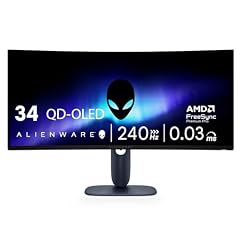
Alienware 34 240Hz QD-OLED Curved Gaming Monitor
- Size
- 34.2 in
- Resolution
- QHD 1440p
- Refresh
- 240 Hz
- Panel
- OLED
$699.99 (as of 10/24/2026 11:30 PDT - Details)
The Alienware AW3425DW offers a 34.2-inch WQHD (3440x1440) QD-OLED with a 240Hz refresh rate and a pronounced 1800R curve. It stands out among the two other 34-inch picks for its QD-OLED panel and higher refresh than the ASUS XG34WCDG's 175Hz.
Pros
- 240Hz refresh rate on a 34-inch QD-OLED
- 1800R curvature for an immersive viewing angle
- 0.03ms response time specified
Cons
- 1440p vertical resolution, not 4K
- No stated HDR certification
- Larger footprint than 27-inch models
Good fit if
- Users who want an ultrawide with high refresh
- Fans of QD-OLED color performance
Skip if
- You need 4K sharpness for text work
- You prefer a flat panel for precise aiming
Verdict: A curved 34-inch QD-OLED with high refresh and strong color, suited for immersive gaming and media.
7 Best ultrawide G-SYNC

ASUS ROG XG34WCDG 34 Inch 1440p 175Hz Ultrawide OLED G-SYNC Gaming
- Size
- 34 in
- Resolution
- QHD 1440p
- Refresh
- 175 Hz
- Panel
- OLED
$749.00 (as of 10/24/2026 11:54 PDT - Details)
This ASUS ROG 34-inch ultrawide carries an explicit G-SYNC designation, which means it has passed NVIDIA's validation for variable refresh rate without screen tearing. With a 175Hz refresh and 1440p resolution, it offers tear-free gaming at a slightly lower refresh than the Alienware.
Pros
- NVIDIA G-SYNC certified for tear-free gaming
- 34-inch ultrawide QHD OLED
- 175Hz refresh rate with 0.03ms response
Cons
- Lower refresh than Alienware 240Hz or ASUS 360Hz
- No stated HDR certification
- No built-in USB-C port listed
Good fit if
- NVIDIA GPU owners who want VRR assurance
- Users who prefer a 21:9 aspect ratio
Skip if
- You want the fastest refresh possible
- You need USB-C connectivity for laptops
Verdict: A G-SYNC-certified ultrawide OLED that balances refresh and validation, though not the fastest here.
8 Best 32-inch 4K

Samsung 32" Odyssey OLED G7
- Size
- 32 in
- Resolution
- 4K UHD
- Refresh
- 165 Hz
- Panel
- OLED
$997.65 (as of 10/24/2026 18:07 PDT - Details)
This Samsung Odyssey G7 is the only 32-inch pick with 4K UHD resolution, offering a larger canvas than 27-inch models while keeping a 165Hz refresh rate. Its panel is not explicitly labeled as QD-OLED, but it falls in the OLED family.
Pros
- 32-inch 4K UHD resolution, the largest 4K here
- 165Hz refresh rate, above standard 60Hz
- OLED panel for deep blacks
Cons
- 165Hz is lower than 240Hz or 280Hz options
- No stated HDR certification
- Requires a powerful GPU for 4K gaming
Good fit if
- Users who want a big 4K desktop for work and play
- Console gamers who appreciate 4K at 120Hz (via HDMI 2.1 not stated)
Skip if
- You prioritize the highest possible refresh rate
- You have limited desk space for a 32-inch panel
Verdict: A spacious 4K OLED with a solid 165Hz refresh, ideal for those who value screen size over extreme speed.
9 Best for HDR content
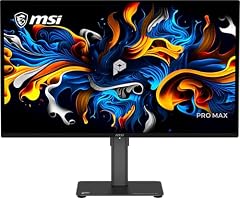
MSI PRO MAX 271UPX12G 27-inch 3840x2160(UHD) QD OLED Monitor
- Size
- 27 in
- Resolution
- 4K UHD
- Refresh
- 120 Hz
- Panel
- OLED
$579.99 (as of 10/24/2026 17:06 PDT - Details)
The MSI PRO MAX 271UPX is the only monitor in the pool with a clear DisplayHDR True Black 400 certification, which ensures a high contrast ratio and deep blacks per the VESA standard. It pairs a 4K UHD resolution with a 120Hz refresh rate, making it a capable option for HDR movies and casual gaming.
Pros
- VESA DisplayHDR True Black 400 certified
- 4K UHD resolution on a 27-inch OLED
- 120Hz refresh rate, better than 60Hz for general use
Cons
- 120Hz refresh is lower than 240Hz competitors
- No G-SYNC or FreeSync specified
- No color accuracy number like ΔE
Good fit if
- Movie watchers who want true HDR with OLED contrast
- Office users who want 4K text sharpness
Skip if
- You play fast esports titles where 240Hz matters
- You need adaptive sync for variable frame rates
Verdict: A certified HDR-focused 4K OLED that prioritizes image quality over raw refresh speed.
10 Best QD-OLED 1440p

Samsung 27" Odyssey OLED G6
- Size
- 27 in
- Resolution
- QHD 1440p
- Refresh
- 240 Hz
- Panel
- OLED
$424.99 (as of 10/24/2026 18:06 PDT - Details)
The Samsung Odyssey G6 is one of two 27-inch 1440p QD-OLED monitors in the list, alongside the LG 27GX704A, but it explicitly carries the QD-OLED label. With a 240Hz refresh and QD-OLED color, it offers a vibrant picture at a resolution that is more accessible than 4K.
Pros
- Explicit QD-OLED panel type
- 240Hz refresh rate on 27-inch 1440p
- 0.03ms response time specified
Cons
- 1440p resolution, not 4K
- No G-SYNC or FreeSync certification mentioned
- No HDR certification listed
Good fit if
- Gamers who want the color depth of QD-OLED without the 4K GPU load
- Users who prefer a flat 27-inch panel
Skip if
- You need 4K for heavy productivity
- You already own a 240Hz OLED and want higher refresh
Verdict: A solid 240Hz QD-OLED 1440p monitor that balances color and performance for mainstream gamers.
11 Best 27-inch 4K alternative

Samsung 27" Odyssey OLED G7
- Size
- 27 in
- Resolution
- 4K UHD
- Refresh
- 165 Hz
- Panel
- OLED
$749.99 (as of 10/24/2026 18:06 PDT - Details)
The Samsung Odyssey G7 (G70SH) offers a 27-inch 4K UHD resolution with a 165Hz refresh rate, a combination that fewer picks provide, and it carries the OLED label. It is a slightly more affordable 4K OLED option than the ASUS ROG PG27UCDM, though with a lower refresh.
Pros
- 27-inch 4K UHD with 165Hz refresh rate
- OLED panel for contrast
- Smaller footprint than 32-inch models
Cons
- 165Hz refresh is lower than 240Hz on other 4K picks
- No stated HDR certification
- No explicit QD-OLED tag in the name, so panel type may be standard OLED
Good fit if
- Users who want 4K on a compact screen for work and play
- Gamers who prefer higher resolution over extreme refresh
Skip if
- You want the highest refresh (240Hz or more)
- You need USB-C for laptop connectivity
Verdict: A solid 27-inch 4K OLED that provides sharp text and smooth motion, at a moderate refresh.
How they compare
| # | Monitor | Size | Resolution | Refresh | Panel |
|---|---|---|---|---|---|
| 1 | ASUS ROG PG34WCDN 34 Inch 1440p 360Hz Ultrawide RGB OLED Gaming Monitor | 34 in | QHD 1440p | 360 Hz | OLED |
| 2 | LG 27 Inch Ultragear Gaming Monitor | 27 in | QHD 1440p | 280 Hz | OLED |
| 3 | msi MAG 272UP QD-OLED X24 27-Inch 4K UHD Gaming Monitor | 27 in | 4K UHD | 240 Hz | OLED |
| 4 | ASUS ProArt Display 27" 4K OLED USB-C Professional Monitor | 27 in | 4K UHD | 120 Hz | OLED |
| 5 | 14" 4K OLED Portable Monitor Touchscreen MPP Stylus Pen USB-C HDMI | 14 in | 4K UHD | not stated | OLED |
| 6 | Alienware 34 240Hz QD-OLED Curved Gaming Monitor | 34.2 in | QHD 1440p | 240 Hz | OLED |
| 7 | ASUS ROG XG34WCDG 34 Inch 1440p 175Hz Ultrawide OLED G-SYNC Gaming | 34 in | QHD 1440p | 175 Hz | OLED |
| 8 | Samsung 32" Odyssey OLED G7 | 32 in | 4K UHD | 165 Hz | OLED |
| 9 | MSI PRO MAX 271UPX12G 27-inch 3840x2160(UHD) QD OLED Monitor | 27 in | 4K UHD | 120 Hz | OLED |
| 10 | Samsung 27" Odyssey OLED G6 | 27 in | QHD 1440p | 240 Hz | OLED |
| 11 | Samsung 27" Odyssey OLED G7 | 27 in | 4K UHD | 165 Hz | OLED |
Our selection method
We pulled every OLED monitor from the catalogue that matched the filter, which gave us 14 products across sizes from 14 to 34 inches. We shortlisted using the stated resolution, refresh rate, panel technology (QD-OLED vs OLED), and any HDR certification or port features, then grouped them by use case to assign awards. We did not test any of these units; every specification comes from the seller's listing or the maker's published information. Prices on the page are read live from the store listing at the time shown, so they may change.
What matters when choosing
Resolution: 1080p, 1440p, or 4K?
For a 27-inch or smaller OLED, 1440p (QHD) is a strong middle ground, giving a sharp image without demanding too much from your graphics card. If you do photo or video work, 4K UHD makes text and details noticeably crisper, but 4K gaming at high refresh rates requires a high-end GPU. Many of the picks here are 27-inch 1440p at 240Hz, which is a sweet spot for fast games. Larger panels, like 32 or 34 inches, often come at 4K or ultrawide resolutions, so think about what your GPU can push before buying.
Refresh rate and response time
Refresh rate, measured in hertz (Hz), is how often the image updates per second. A 60Hz monitor is basic for office work; for gaming, 120Hz feels smoother, and 240Hz or more is preferred by competitive players for minimal motion blur. The response time, often listed as 0.03ms on OLEDs, is the time a pixel takes to change, which is effectively instant and eliminates ghosting in fast scenes. In this list, the highest refresh is 360Hz on the ASUS PG34WCDN, while productivity-focused models like the MSI PRO MAX top out at 120Hz.
Panel technology: OLED vs QD-OLED
OLED panels produce per-pixel lighting, so they can switch off individual pixels to achieve true blacks and high contrast. QD-OLED is a newer variant that adds a quantum dot film to improve color volume, often reaching higher peak brightness and wider color gamut than standard OLED. Both types are available in this pool, with the Alienware, ASUS PG27UCDM, and MSI MAG 272UP using QD-OLED. For HDR content, look for a DisplayHDR True Black certification, which guarantees a minimum level of luminance and black level performance.
Adaptive sync: G-SYNC and FreeSync
Adaptive sync technologies match the monitor's refresh rate to the frame rate your GPU outputs, preventing screen tearing and stuttering. NVIDIA G-SYNC uses a proprietary module or is validated as G-SYNC Compatible, while AMD FreeSync is an open standard. Many monitors support both, so you can use them with any graphics card. The ASUS XG34WCDG is explicitly G-SYNC certified, while the LG 27GX704A and LG 34GS95QE list FreeSync Premium Pro. Check your GPU brand and the monitor's compatibility list before buying.
Connectivity and extra features
Most gaming monitors include DisplayPort and HDMI inputs, but for laptops, a USB-C port that supports power delivery is very useful: it can carry video, data, and charging through a single cable. The ASUS ProArt and the 14-inch portable monitor have USB-C. Also consider ergonomics like height adjustment and tilt, and portability if you travel. Built-in speakers are rarely impressive, so plan to use headphones or external speakers.
Questions
What does OLED mean for a monitor?
OLED stands for organic light-emitting diode. Each pixel produces its own light, so black areas can be turned off completely, giving infinite contrast in theory. This results in deep blacks and vivid colors. OLED monitors also have extremely fast response times, often 0.03ms, which reduces motion blur in fast games. The trade-off is that OLED panels might have a shorter lifespan than traditional LCDs, and some users notice color shift at wide angles, though modern OLEDs handle this well.
Is a QD-OLED worth the extra cost?
QD-OLED adds a quantum dot layer that boosts color brightness and coverage compared to standard OLED. This can make HDR content more striking and colors more saturated. In this pool, models like the Alienware AW3425DW and ASUS PG27UCDM use QD-OLED. If you value color accuracy and HDR performance for gaming or creative work, the premium is justified. For basic office use, a standard OLED may be enough, but many gamers appreciate the enhanced vibrancy.
What refresh rate is best for OLED gaming?
The best refresh rate depends on what you play. For fast esports titles like Counter-Strike or Valorant, 240Hz or higher reduces motion blur and provides a competitive edge. For slower games or media, 120Hz is already smooth. Most 1440p OLEDs in this list offer 240Hz, while 4K models top out at 165Hz or 240Hz. Keep in mind that to see the benefit of a high refresh rate, your graphics card must be powerful enough to produce matching frame rates.
Do OLED monitors have burn-in issues?
Burn-in is a risk with OLED because organic materials degrade over time with static images. Modern OLED monitors include features like pixel shifting and brightness limiting to reduce this. For mixed use with varied content, burn-in is rarely a problem. If you keep the same UI on screen for hours every day, like a trading platform, be cautious. Using a screensaver and lowering OLED brightness can help. The makers' warranties may or may not cover burn-in, so check the fine print.
Which connections should I look for?
Look for at least one HDMI 2.1 port for 4K at 120Hz on consoles, and DisplayPort 1.4 or 2.1 for PC. USB-C with power delivery is great for laptops, as it can charge and connect with one cable. The HDMI 2.2 specification adds support for higher bandwidths like 4K240, but not all monitors have it yet. Check the monitor's spec sheet for the exact ports and versions.
Change log
- : First published.