
Best 180 Hz Monitors in 2026: 13 Picks Compared on Specs
The Acer Nitro KG271U is our top pick for a 180Hz monitor. It pairs a 27-inch QHD IPS panel with a 180Hz refresh rate, giving you high refresh and sharpness without moving up to 4K. We chose it after comparing the specs of 23 monitors in our catalog, shortlisting 13 that cover the most useful sizes, resolutions, and panel types.
13 picks from 27 monitors that match this guide with a price we can quote today. All prices are live and show when they were read.
Our picks in brief
Find your match
- For esports on a budget: The Philips 24-inch FHD gives you a high refresh at a smaller screen size, perfect for competitive titles where frame rates matter more than resolution. See pick 2
- For QHD gaming on a 27-inch: The Acer Nitro 27-inch QHD offers the sweet spot of resolution and size with a flat IPS panel, ideal for immersive games and productivity. See pick 1
- For an ultrawide experience: If you want a wider field of view, the ASUS TUF Gaming VG34VQ3B adds a 34-inch curved panel with HDR support. See pick 7
- For 4K gaming with flexibility: The LG Ultragear 27G810A lets you switch between 4K 180Hz and 1080p 360Hz, useful for players who want both resolution and competitive refresh. See pick 13
13 picks, up close
1 Best Overall

Acer Nitro 27in QHD 2560x1440 IPS 180Hz Gaming Monitor KG271U N3bmiipx
- Size
- 27 in
- Resolution
- QHD 1440p
- Refresh
- 180 Hz
- Panel
- IPS
$159.99 (as of 10/24/2026 11:18 PDT - Details)
The Acer Nitro KG271U combines a 27-inch QHD IPS panel with 180Hz refresh, offering a balanced sweet spot for most gamers. Its flat design works well in multi-monitor setups, and QHD sharpness suits both games and daily use.
Pros
- QHD resolution on 27 inches
- IPS panel with good color
- 180Hz refresh rate
Cons
- Not curved
- No HDR mentioned in listing
Good fit if
- Most gamers looking for a QHD 27-inch monitor
- Users who want a flat panel for productivity
Skip if
- Want a curved screen
- Need 4K resolution
Verdict: A versatile 27-inch QHD monitor that covers the essential features.
2 Best 24-inch FHD

Philips 24" Gaming Monitor FHD 180Hz Overlocked IPS HDR10
- Size
- 24 in
- Resolution
- FHD 1080p
- Refresh
- 180 Hz
- Panel
- IPS
$84.99 (as of 10/24/2026 17:11 PDT - Details)
The Philips 24E2G2200 delivers 180Hz on a 24-inch FHD IPS panel, making it a strong choice for high-refresh gaming without the cost of a larger display. Its 1080p resolution keeps pixel density high on a 24-inch size, and HDR10 support is included.
Pros
- 24-inch FHD with 180Hz refresh
- IPS panel for wide viewing angles
- HDR10 support in listing
Cons
- 1080p resolution limits screen space
- Only 24 inches, small for some users
Good fit if
- Budget-minded competitive gamers
- Players who prioritize refresh rate over resolution
Skip if
- Need more screen real estate
- Want QHD or 4K resolution
Verdict: A solid 24-inch choice for high refresh at an accessible price.
3 Best 27-inch FHD

AOC 27 Inch Gaming Monitor FHD 180Hz Fast IPS 0.5ms HDR
- Size
- 27 in
- Resolution
- FHD 1080p
- Refresh
- 180 Hz
- Panel
- IPS
$118.99 (as of 10/24/2026 11:40 PDT - Details)
The AOC 27G51F2 brings 180Hz to a 27-inch FHD panel with a 0.5ms response time, appealing to gamers who want a large screen with low motion blur. Its IPS panel and HDR support round out the package.
Pros
- 27-inch FHD with 180Hz
- 0.5ms response time listed
- IPS panel and HDR
Cons
- 1080p on 27 inches is less sharp than QHD
- No adaptive sync mentioned in listing
Good fit if
- Gamers who want a bigger screen for fast-paced games
- Users who don't need ultra-sharp text
Skip if
- Want higher pixel density
- Need adaptive sync support
Verdict: A large 1080p option that focuses on speed over resolution.
4 Best Curved 27-inch

LG 27GS60QC-B Ultragear 27-inch Curved Gaming Monitor QHD
- Size
- 27 in
- Resolution
- QHD 1440p
- Refresh
- 180 Hz
$199.97 (as of 10/24/2026 16:07 PDT - Details)
The LG 27GS60QC-B adds a 1000R curve to a 27-inch QHD screen, making it immersive for single-player games. It lists 180Hz, 1ms response, and FreeSync support.
Pros
- 1000R curve for immersion
- QHD resolution
- FreeSync and HDR10 listed
Cons
- Panel type not stated by seller
- No G-Sync compatibility mentioned
Good fit if
- Gamers who want a curved 27-inch monitor
- Players with AMD graphics
Skip if
- Need a flat panel for productivity
- Want a specific panel type (IPS/VA)
Verdict: A curved QHD option with a strong feature set.
5 Best 32-inch QHD

KTC 32 Inch Curved Gaming Monitor
- Size
- 32 in
- Resolution
- QHD 1440p
- Refresh
- 180 Hz
$229.99 (as of 10/24/2026 15:14 PDT - Details)
The KTC H32S5 offers a 32-inch QHD panel with 180Hz refresh, giving you a large canvas for gaming and multitasking. Its curve adds immersion, and the 180Hz rate supports smooth motion.
Pros
- 32-inch QHD with 180Hz
- Curved design
- Overclockable to 185Hz in listing
Cons
- Panel type not listed
- No mention of HDR or adaptive sync in pool data
Good fit if
- Gamers who want a big screen
- Users who like curved panels
Skip if
- Need a specific panel tech
- Want HDR support
Verdict: A big QHD option that brings high refresh to a larger screen.
6 Best 24-inch QHD

KTC 24 Inch Gaming Monitor 180Hz
- Size
- 24 in
- Resolution
- QHD 1440p
- Refresh
- 180 Hz
- Panel
- IPS
$189.99 (as of 10/24/2026 15:14 PDT - Details)
The KTC H24T7 packs 180Hz and QHD resolution into a 24-inch IPS panel, an unusual combination that offers sharp text and gaming speed in a compact size.
Pros
- 24-inch QHD with IPS
- 180Hz refresh
- High pixel density
Cons
- Smaller screen size may not suit everyone
- No HDR mentioned
Good fit if
- Users who want high resolution in a small footprint
- Gamers who prefer a 24-inch screen
Skip if
- Need a larger display
- Want FHD for max performance on older GPUs
Verdict: A niche 24-inch QHD that balances density and refresh.
7 Best 34-inch HDR Ultrawide

ASUS TUF Gaming VG34VQ3B 34 Inch 1440p 180Hz Ultrawide HDR Gaming
- Size
- 34 in
- Resolution
- QHD 1440p
- Refresh
- 180 Hz
$328.69 (as of 10/24/2026 11:54 PDT - Details)
The ASUS TUF VG34VQ3B brings 180Hz to a 34-inch ultrawide 1440p panel with HDR support. Its 1500R curve adds to immersion, and the 21:9 ratio suits racing and strategy games.
Pros
- 34-inch ultrawide QHD
- 180Hz refresh
- HDR support listed
- 1500R curve
Cons
- Panel type not stated
- Large footprint may need desk space
Good fit if
- Gamers who want an immersive ultrawide
- Users who want HDR benefits
Skip if
- Limited desk space
- Require a specific panel type
Verdict: A feature-heavy ultrawide for high-refresh gaming.
8 Best 34-inch IPS

INNOCN 34" Ultrawide Monitor WQHD 3440 x 1440P 180Hz IPS PC
- Size
- 34 in
- Resolution
- QHD 1440p
- Refresh
- 180 Hz
- Panel
- IPS
$229.74 (as of 10/24/2026 15:08 PDT - Details)
The INNOCN 34-inch ultrawide uses an IPS panel with 180Hz, offering wide color and viewing angles. It lists G-Sync compatibility, HDMI, DP, and PIP/PBP for multitasking.
Pros
- IPS panel on 34-inch
- 180Hz refresh
- G-Sync compatible
- PIP/PBP features
Cons
- No HDR mentioned
- Only 3440x1440 resolution
Good fit if
- Users who want an IPS ultrawide
- NVIDIA GPU owners looking for G-Sync compatibility
Skip if
- Need HDR
- Prefer a smaller screen
Verdict: An IPS ultrawide that balances color and speed.
9 Best Premium 34-inch

Alienware 34 Curved Gaming Monitor
- Size
- 34 in
- Resolution
- QHD 1440p
- Refresh
- 180 Hz
$349.99 (as of 10/24/2026 11:30 PDT - Details)
The Alienware AW3425DWM is a 34-inch curved QHD monitor with 180Hz, 1ms response, FreeSync Premium, and VESA mount support. It's designed to focus on gaming immersion.
Pros
- 34-inch curved 1500R
- 180Hz and 1ms
- FreeSync Premium
- VESA mount support
Cons
- Panel type not listed
- Price premium over other 34-inch options
Good fit if
- Gamers who want a premium curved display
- Users who want FreeSync Premium
Skip if
- On a tight budget
- Prefer a flat panel
Verdict: A high-end curved option with strong gaming credentials.
10 Best 34-inch for Color Accuracy

ViewSonic VX3418C-2K 34 Inch 1440p Ultrawide Curved Gaming Monitor
- Size
- 34 in
- Resolution
- QHD 1440p
- Refresh
- 180 Hz
- Panel
- VA
$289.99 (as of 10/24/2026 19:08 PDT - Details)
The ViewSonic VX3418C-2K is a 34-inch ultrawide with 180Hz, and it lists 100% sRGB coverage, making it suitable for color-sensitive work alongside gaming.
Pros
- 34-inch ultrawide QHD
- 180Hz refresh
- 100% sRGB coverage in listing
Cons
- Panel type not stated
- No HDR mentioned
Good fit if
- Users who need decent color for creative tasks
- Gamers who want an ultrawide
Skip if
- Need HDR
- Want a smaller screen
Verdict: An ultrawide that balances gaming and color needs.
11 Best 34-inch VA

Pixio PXC348C Neo White 34" 180Hz Refresh Rate UWQHD 1440p Ultrawide
- Size
- 34 in
- Resolution
- 3440x1440
- Refresh
- 180 Hz
- Panel
- VA
$299.99 (as of 10/24/2026 17:11 PDT - Details)
The Pixio PXC348C Neo offers a 34-inch VA panel with 180Hz refresh and 1000R curve, providing deep contrast and an immersed feel. Its 1440p ultrawide resolution suits many games.
Pros
- VA panel for high contrast
- 34-inch ultrawide 1000R
- 180Hz refresh
Cons
- VA panel may have ghosting
- No HDR mentioned
Good fit if
- Gamers who want deep blacks
- Users who like curved VA panels
Skip if
- Prefer IPS color
- Need HDR
Verdict: A VA ultrawide for high contrast and immersive play.
12 Best Budget QHD

Samsung 27" Odyssey G5
- Size
- 27 in
- Resolution
- QHD 1440p
- Refresh
- 180 Hz
$217.00 (as of 10/24/2026 20:13 PDT - Details)
The Samsung Odyssey G5 (G51F) is a 27-inch QHD monitor with 180Hz, offering a high refresh rate at an entry-level price for QHD. It's a simple choice for gamers moving up from 1080p.
Pros
- 27-inch QHD
- 180Hz refresh
- Samsung brand
Cons
- Panel type not stated
- No extras like HDR or adjustment features in listing
Good fit if
- Budget-conscious gamers wanting QHD
- Users upgrading from 1080p
Skip if
- Need HDR or adjustable stand
- Want a curved panel
Verdict: A straightforward QHD 180Hz monitor for budget-minded gamers.
13 Best 4K Dual-Mode
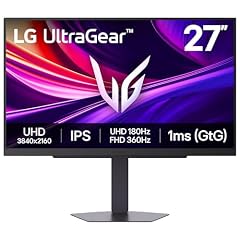
LG 27G810A-B 27-inch Ultragear 4K UHD
- Size
- 27 in
- Resolution
- 4K UHD
- Refresh
- 180 Hz
- Panel
- IPS
$399.99 (as of 10/24/2026 16:07 PDT - Details)
The LG 27G810A-B is a 27-inch 4K IPS monitor that runs at 180Hz in 4K or 360Hz at 1080p, giving you a rare combination of high resolution and extreme refresh. It's built for gamers who want both detail and esports speed.
Pros
- Dual-mode: 4K 180Hz or FHD 360Hz
- IPS panel
- 4K resolution on 27 inches
Cons
- No HDR or FreeSync mentioned in listing
- Only 27 inches, may be small for 4K
Good fit if
- Gamers who want 4K and high refresh in one monitor
- Users with powerful GPUs that can drive 4K
Skip if
- Need a larger screen
- Prefer a lower resolution with better value
Verdict: A versatile 4K option that switches to 360Hz for competitive play.
How they compare
Our selection method
We pulled 180Hz monitors from our catalog and filtered for those with a native 180Hz refresh rate. We read each listing's specifications, including panel type, resolution, size, and additional features like adaptive sync and HDR. We excluded models with conflicting specs and aimed for a mix of screen sizes from 24 to 34 inches, including flat and curved options. Prices shown on the page are live and read from the store listing at the time of writing; we did not test these monitors.
What matters when choosing
Refresh rate and frame rate: what 180Hz means
A monitor's refresh rate, measured in hertz (Hz), indicates how many times per second the display updates the image. A 180Hz monitor can render up to 180 frames per second, which reduces motion blur and makes fast-paced scenes appear smoother. This is especially beneficial in competitive games where quick reactions matter. To take full advantage of a 180Hz display, your graphics card must be able to output high frame rates at the monitor's resolution. If you play less demanding titles or cap your frame rate, the benefit is smaller, but you still get fluid motion in everyday use.
Standard monitors refresh at 60Hz, so moving to 180Hz is a significant step up. The effect is most noticeable when scrolling, dragging windows, and watching high-frame-rate videos.
Resolution: FHD, QHD, or 4K
Resolution determines the detail level on the screen. 1080p (FHD) is common on 24-inch and some 27-inch monitors; it keeps GPU load down and allows higher frame rates. QHD (2560x1440) offers more screen real estate and sharper images than FHD, making it a sweet spot for 27-inch panels. On 34-inch ultrawides, you'll often see 3440x1440 (often labeled QHD or UWQHD), which gives a wide aspect ratio with the same pixel density as QHD.
4K (3840x2160) provides the highest detail but is harder to drive. Only a few 180Hz monitors in our pool offer 4K, and they tend to be larger or more expensive. If you have a powerful GPU, 4K 180Hz can be an excellent choice for both gaming and productivity, but for most gamers QHD is a balanced compromise.
Panel type: IPS, VA, and TN
The panel type affects color accuracy, contrast, and response times. IPS panels are known for wide viewing angles and accurate colors, making them popular for gaming and creative work. VA panels typically offer higher contrast ratios and deeper blacks, but they may have slower response times and more visible ghosting in fast scenes. TN panels are rare nowadays but offer the fastest response; however, their color and viewing angles are inferior.
In our picks, we include IPS and VA models. IPS is a safe choice for most users because it balances color and motion clarity. VA is best if you watch a lot of movies or want deep blacks, but be prepared for potential ghosting in competitive games.
Size and curvature
Screen size affects immersion and desk space. 24-inch monitors are compact and work well for esports, while 27-inch is the mainstream choice for QHD gaming. 34-inch ultrawide monitors (21:9) offer a wider field of view and are popular for racing, simulation, and multitasking. Curved panels, with radii like 1000R or 1500R, wrap the screen around your vision and can reduce eye strain during long sessions, though the effect is subjective.
Consider your desk depth and viewing distance. A larger screen needs proper mounting or a sturdy stand. Curved ultrawides are especially wide, so measure your space before buying.
Adaptive sync and HDR
Adaptive sync technologies like AMD FreeSync and NVIDIA G-Sync reduce screen tearing and stuttering by synchronizing the monitor's refresh rate with your GPU's output. Many 180Hz monitors support one or both. FreeSync is often more affordable, while G-Sync may come at a premium. Both work with compatible GPUs (FreeSync with many NVIDIA cards via DisplayPort, and G-Sync Compatible with some FreeSync monitors).
High dynamic range (HDR) improves brightness and color contrast, but its benefits depend on the display's peak brightness and local dimming. Entry-level HDR on many monitors is minimal. For serious HDR gaming, look for displays with VESA DisplayHDR certification. The certification levels (400, 500, 600, etc.) indicate minimum performance criteria for brightness and color. Refer to the VESA page for details.
Questions
What is the difference between 144Hz and 180Hz?
144Hz and 180Hz both offer smooth motion, but 180Hz refreshes the screen 36 more times per second. That can reduce motion blur further and make fast camera pans in games appear cleaner. If you have a GPU that can output 180 FPS in your target games, the jump is noticeable; if not, the difference is less pronounced. Most people moving from 60Hz to either will see a big improvement.
Do I need a high-end graphics card for a 180Hz monitor?
It depends on resolution and game settings. At 1080p, mid-range GPUs like the NVIDIA RTX 3060 or AMD RX 6600 can hit 180 FPS in many esports titles. At QHD, you'll likely need a stronger card like an RTX 4070 or RX 7800 XT for high settings. At 4K, even top-tier cards struggle to reach 180 FPS in demanding games, so you may use the monitor's lower refresh or resolution.
Is 180Hz worth it for office work?
Yes, a 180Hz monitor makes everyday tasks like scrolling, dragging windows, and cursor movement feel much smoother. It reduces eye strain for some users, especially if you're used to 60Hz. The improved fluidity can make multitasking feel more responsive. However, the benefit is less critical than for gaming, and you might prioritize resolution and color accuracy for productivity.
Can a 180Hz monitor run on a laptop with HDMI?
Many laptops have HDMI 2.0 or later, which can support 1080p at 180Hz, but QHD at 180Hz often requires HDMI 2.1 or DisplayPort over USB-C. Check your laptop's port specifications. If it lacks the bandwidth, you may be limited to a lower refresh rate or resolution. Using a Dock with DisplayPort may help.
What is the difference between FreeSync and G-Sync?
FreeSync is AMD's adaptive sync technology, while G-Sync is NVIDIA's. Both eliminate screen tearing and stutter. FreeSync is usually cheaper because it doesn't require dedicated hardware. Many FreeSync monitors work with NVIDIA GPUs if they are 'G-Sync Compatible'. For NVIDIA users, look for G-Sync Compatible certification or try enabling it manually on a FreeSync model.
Change log
- : First published.